Service Manual CHAPTER 6 - THE SX-48 CONFIGURATOR July 24, 2008
SX-48 Page 26
Note: the information in this window scrolls “downwards”, so you must read from the bottom line up
to the top line.
Once the download is complete … The application will automatically send a reboot command to the
unit. This might take some time. After a moment … you can hit the search menu option in the
application and you will see that the unit has been successfully upgraded with the new firmware.
.
Searching for boards on port 2000.
Search/Ping response from: 192.168.3.223 port 2000: SX48:223 1.2.068 Room:1 Unit:3
Search/Ping response from: 192.168.3.234 port 2000: SX48:234 1.2.068 Room:1 Unit:2
Search/Ping response from: 192.168.3.222 port 2000: SX48:222 1.2.068
Program Sync
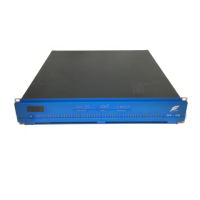
The “Program Sync” Button should be used to reprogram the Sync Card in the SX-48. This must be
done for compatibility with software version 1.50. This will update the SX-48’s Sync Card FPGA
to Version: 7.
Simply click on the <Program Sync> Button.
Once the flash programming is completed … you should see the following:


 To Next Page