Service Manual CHAPTER 6 - THE SX-48 CONFIGURATOR July 24, 2008
SX-48 Page 25
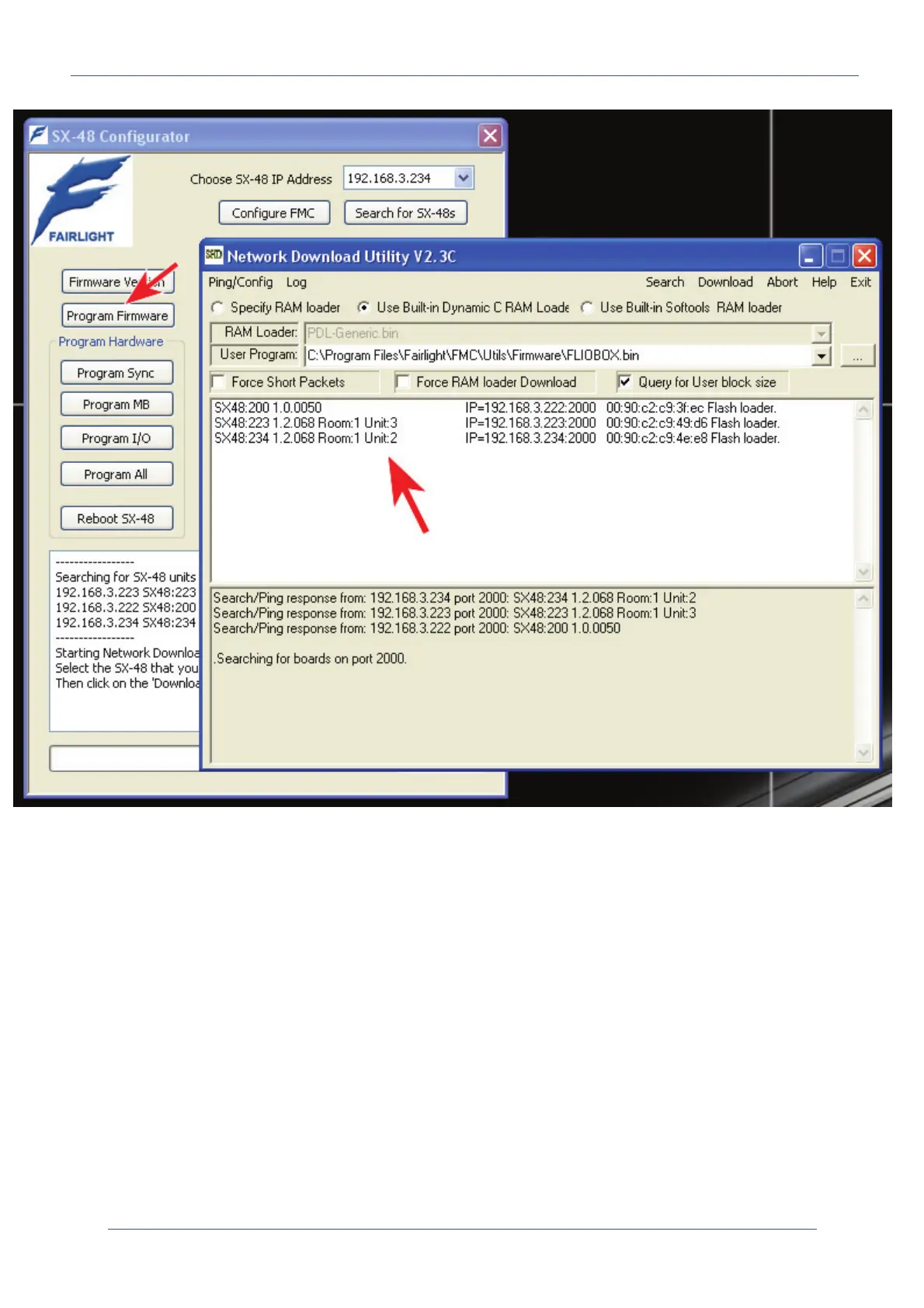
This application will automatically select the correct firmware update for SX-48 (included in the Dream
II or Xynergi installer). The firmware is stored here:
C:\Program Files\Fairlight\FMC\Utils\Firmware\FLIOBOX.bin
The application will automatically list all SX-48s found on the network. Simply highlight the desired
unit that you wish to upgrade then click on the menu item Download in the upper right.
You will see a progress bar indicating that the download is taking place. You will also see information
“scrolling” in the info box of the Network Download Utility on the progress of the upgrade. Like this:
Searching for boards on port 2000.
Board at 192.168.3.222 is rebooting.
Sent Reboot command to target!
Download Complete :)
RAM Loader found.
Search/Ping response from: 192.168.3.222 port 2000: Generic RAM Downloader Mon Nov 28 2005
....Looking for RAM loader
Sent RAM Loader Run command to target!
Route to board ok
Search/Ping response from: 192.168.3.222 port 2000: SX48:222 1.0.0050
.Checking route to 192.168.3.222 Downloading board 1 of 1 at IP=192.168.3.222.


 To Next Page