Fancom 743 4. Operation
7
Example 2: Set the number 5562 at
Flock data 2 Setup flock Number set up.
1. Press
Flock data
.
2. Press
1×, then
.
3. Press
2×,
5×,
5×,
2×,
6× and
2×.
4. Press
.
Example 3:
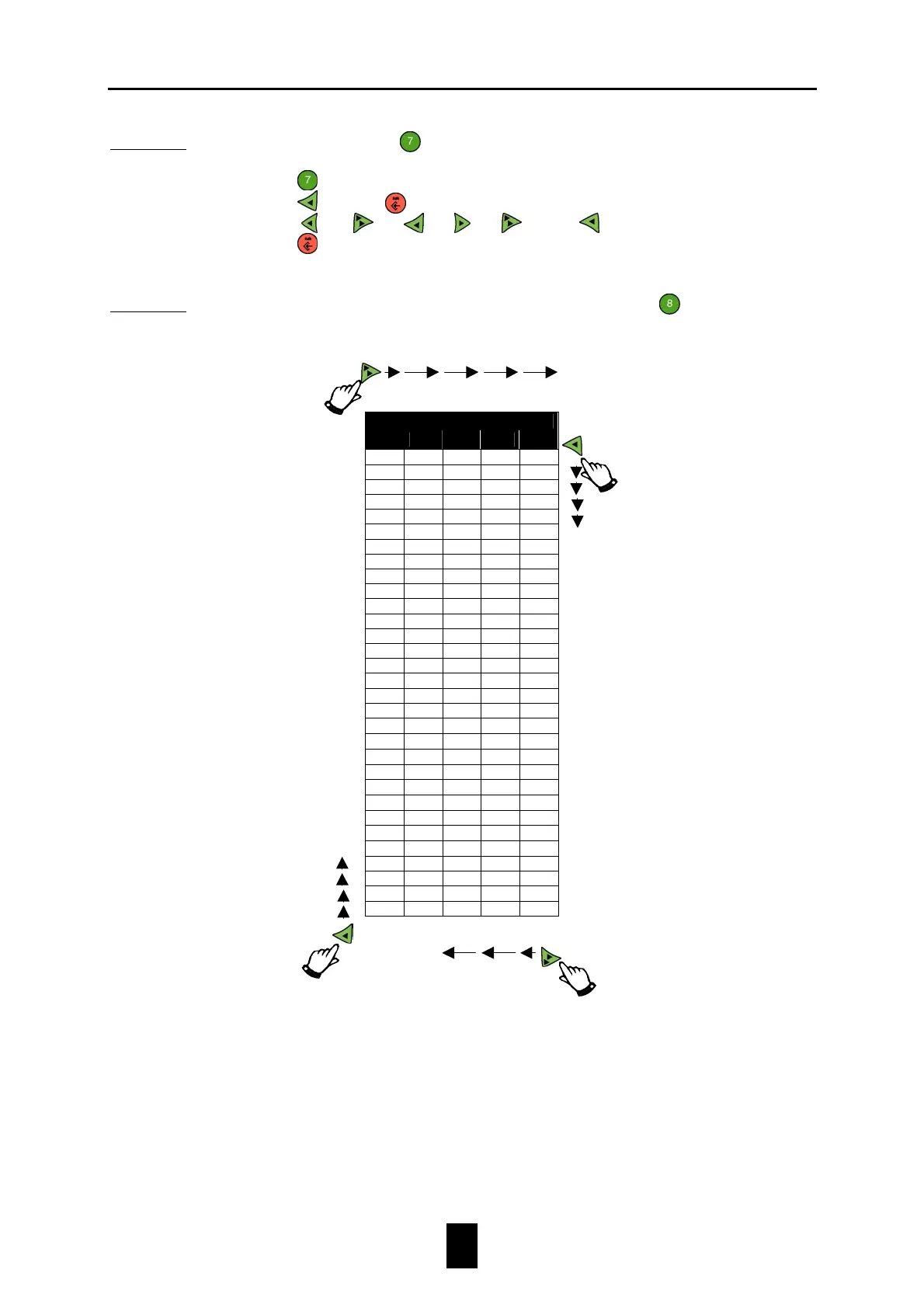
The example below shows how to change text. E.g. at key
Ingredients 1.
Ingredient list Name
change the name from INGR.1 to MEAL.
Groups
GroupsGroups
Groups
1
11
1
2
22
2
3
33
3
4
44
4
5*
5*5*
5*
0 A a
←
! 1 B b ü
" 2 C c é
# 3 D d ä
$ 4 E e À
5 F f c
& 6 G g |
' 7 H h è
( 8 I i ö
) 9 J j û
* : K k y
+ ; L l o
, < M m ñ
- = N n a
. > O o e
/ ? P p z
Q q -
R r
α
S s
β
T t
π
U u
Σ
V v
µ
W w
Ω
X x
∞
Y y
•
Z z
ε
[ {
°
\ |
] }
^
→
The characters from group 5 are language dependent.
If the F-Central program is used, some characters on the PC screen may differ.
Select
previous group
Select
next group
Select next
Select previous
character from group


 To Next Page