6.
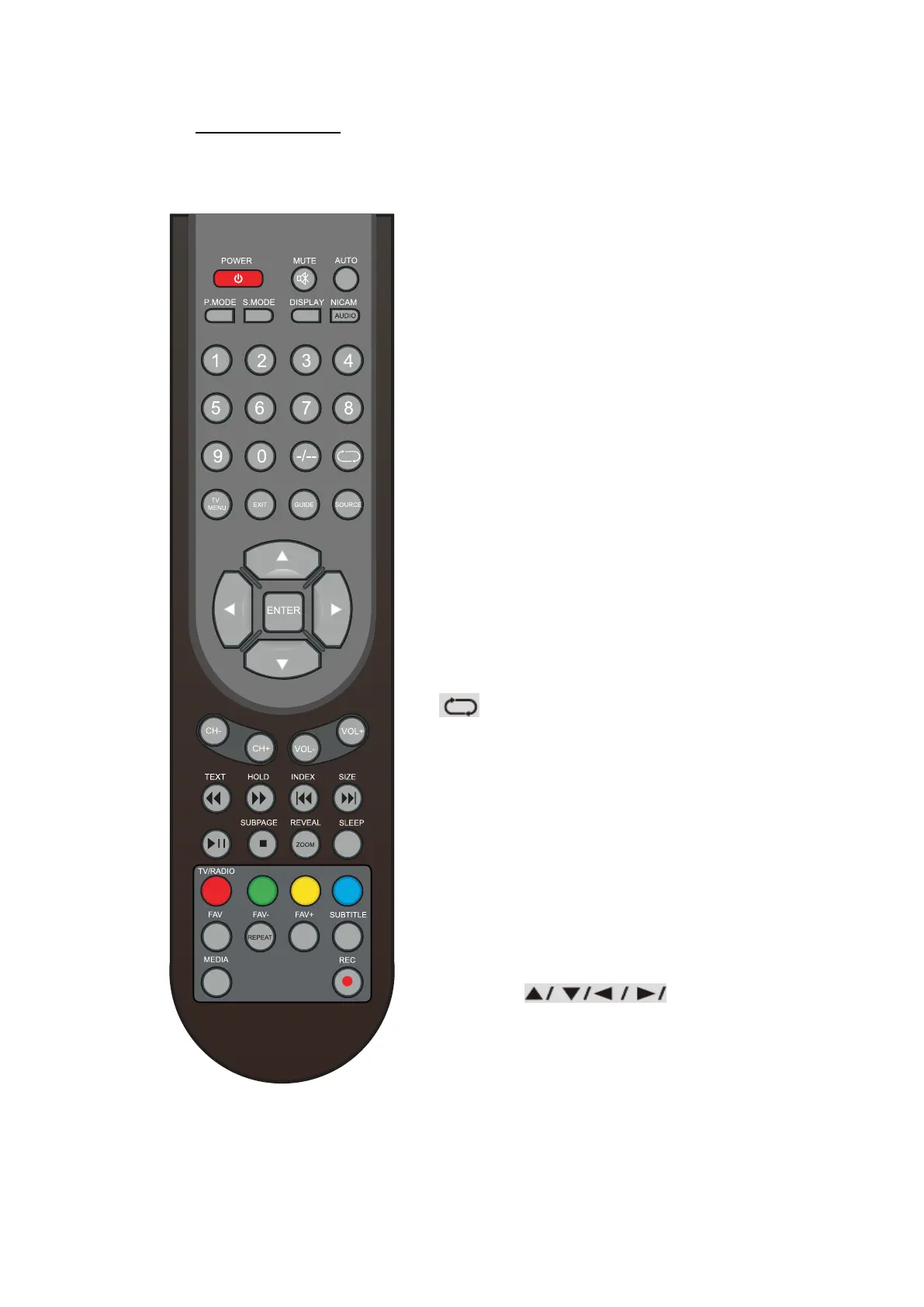
Remote Control Instructions in DTV mode
REMOTE CONTROL
POWER
Turn the TV ON or OFF.
MUTE
Press to mute the sound. Press again or press VOL+
to un-mute the TV.
SLEEP
Lets you select amount of time before your TV turn
itself off automatically.
P.MODE
Press to select the picture mode.
S.MODE
Press this button to change the audio mode.
DISPLAY
Press to display the source and channel’s
information.
NICAM
Press to select the NICAM mode.
AUDIO
Audio select button.
NUMBER BUTTONS
The numerical keys are used for editing the name of
the channel.
Return to the previous channel viewed.
TV MENU
Press to enter or exit the setup menu.
EXIT
Press to exit all the OSD on the screen.
GUIDE
Press to display the channel guide menu.
SOURCE
Press SOURCE to display the OSD input source. Press
▲ ▼ to select an input source, and then press
ENTER to confirm.
THUMBSTICK(
ENTER)
Allows you to navigate the on-screen menus and
adjust the system settings to your preference.
CH+/CH-
Press to scan through channels.
VOL+/VOL-
Press to increase/decrease the sound level.
- 11 -



 To Next Page