Start
Press ▲/▼ button to select Start, and then press ENTER or ► button to start scan, the channel
tuning menu will appear.
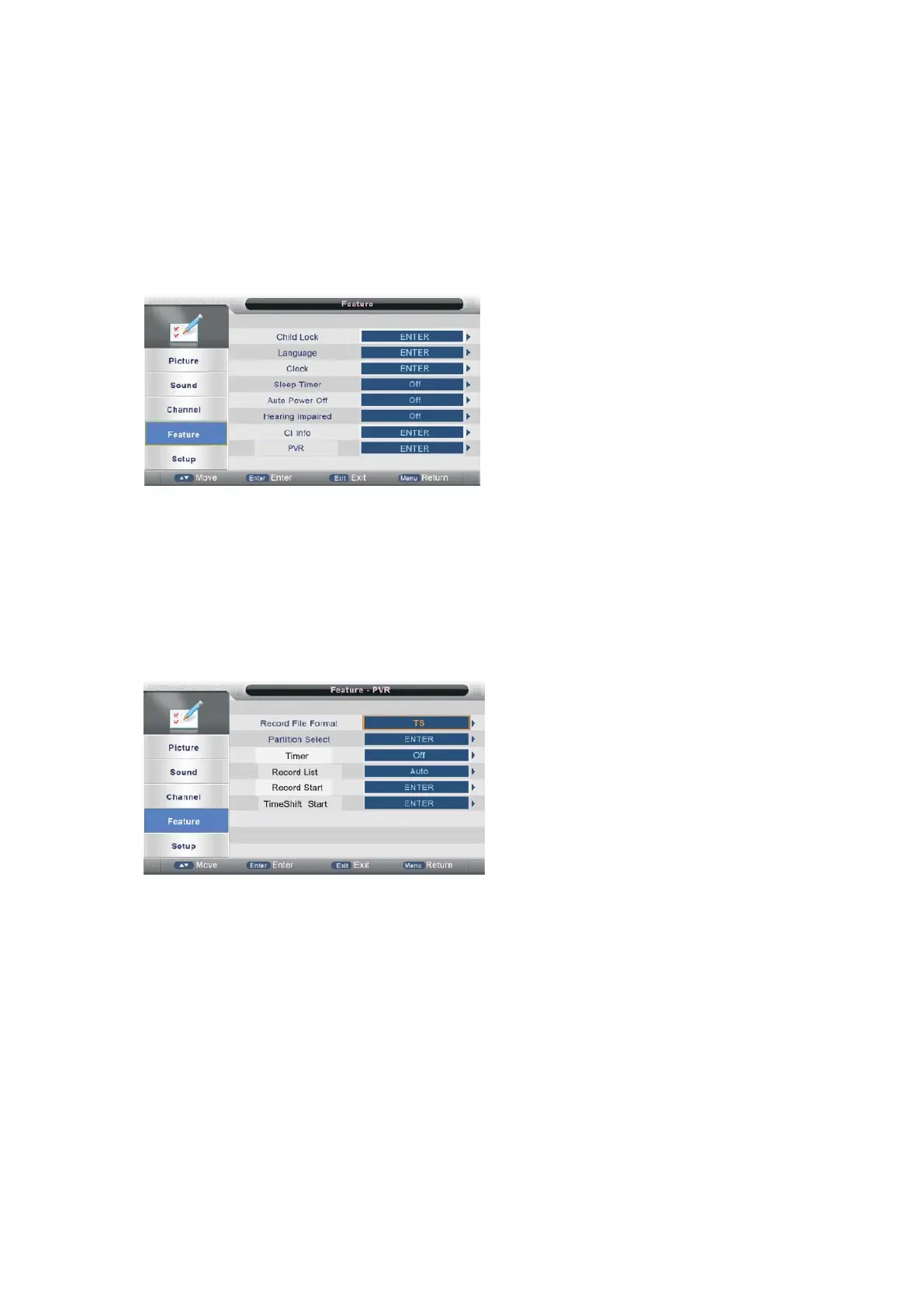
Feature Menu
Press MENU button to display the main menu.
Press ▲/▼ button to select Feature in the main menu, then press ENTER or ► to enter.
1. Press ▲/▼ button to select the option that you want to adjust in the Channel menu, then
press ENTER or ► button to enter.
2. Press ◄/►button to adjust or press ▲/▼button to select.
3. After finishing your adjustment, press MENU button to save and return back to the previous
menu and press EXIT button to exit the entire menu.
PVR/Timeshift
Press ▲/▼ button to select PVR, and then press ENTER or ► button to ente r.
Record File Format
Press ▲/▼ button to select Record File Format, press ENTER or ► button to enter the sub
menu. Then press ▲/▼ to select the ‘TS’ or ‘PS’, then press ENTER or ► to confirm.
Auto Timeshift
Press ▲/▼ button to select Record File Format, press ENTER or ► button to enter the sub
menu. Then press ▲/▼ to select the ‘Off’ or ‘Auto’, then press ENTER or ► to confirm.
- 31 -



 To Next Page