FANTEC TV-LHD
[6]. Configure PLAYER’s network environment. After pressing “SETUP” button, select “IP SETUP”
among the “NETWORK” setup items and IP address and subnet mask.
For example) IP Address : 192.168.1.10 / Subnet Mask : 255.255.255.0
After finishing the setup, save the setup value by pressing the “Setup” button once again
WARNING
If IP address of your PC is automatically assigned by an internet router or
DHCP server, you may not need this setup. In this case, set “IP SETUP” to
Auto. Then the IP will be automatically assigned.
If you want a manual setup, please obtain an available IP address and subnet
mask from the router or network.
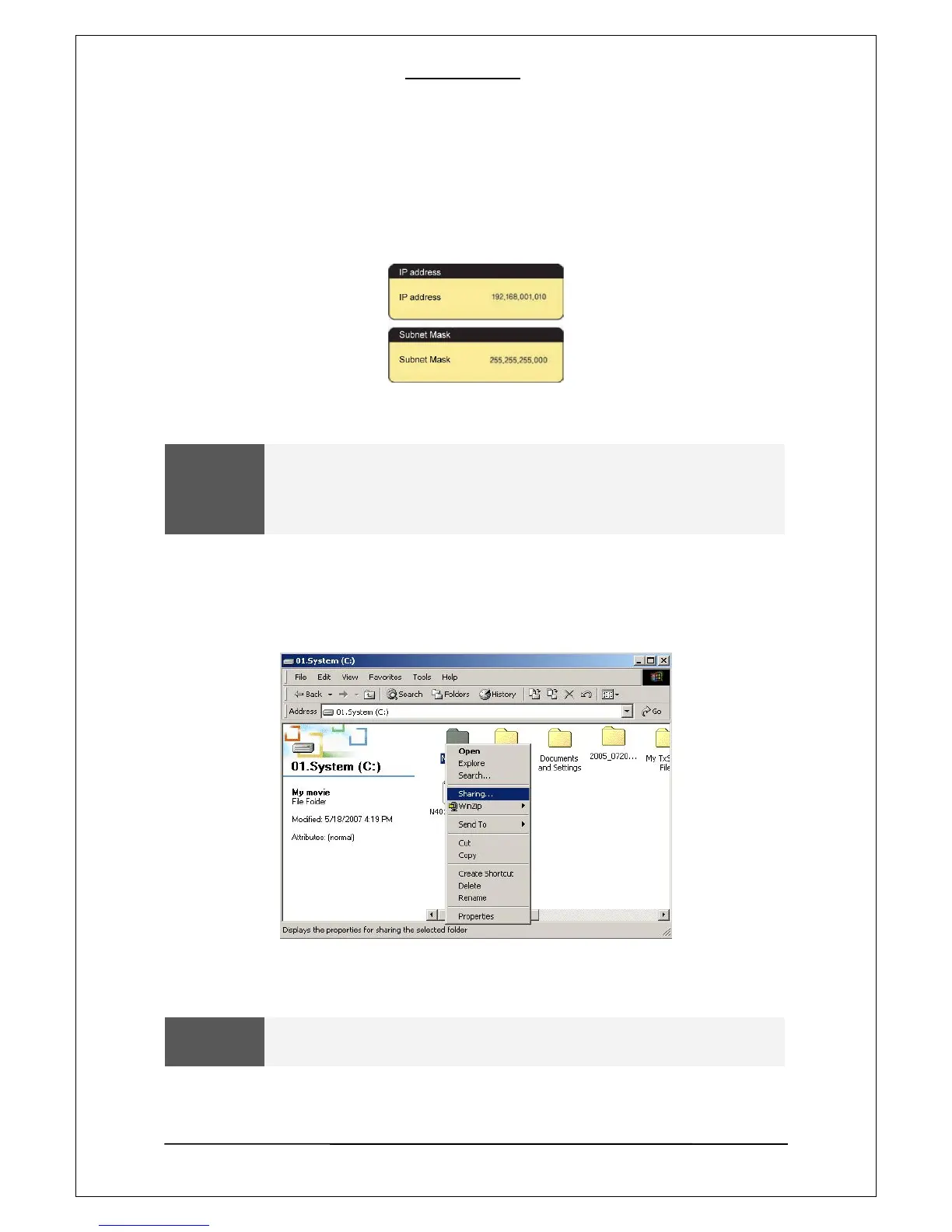
2. Data sharing setup for windows2000
[1]. Select a folder your want to share and select “Sharing” menu using the mouse right button
[2]. Check “Sharing” and type “Share Name” Ex) My Movie
WARNING
Share Name” should be less than 12 letters.
12


 To Next Page
 Loading...











