222
(MT11 - Gb2012)
4+1
INTERCOMS *
7+1
VIDEOINTERCOMS
VC1
CT1
1
2
3
5
9
C
P
1
8
V
M
F
H
1
2
3
4
5
9M
C
P1
9R
X
D
EH9160+9083
EX320
EX310
KM810
+ST701
VC1 VC2
230V
127V
0
1471
1281
2
56
8
V
M
F
H
1
2
3
4
5
9M
C
P1
9R
X
3
8
V
M
F
H
1
2
3
4
5
9M
C
P1
X
9R
EH9160+9083 EH9160+9083
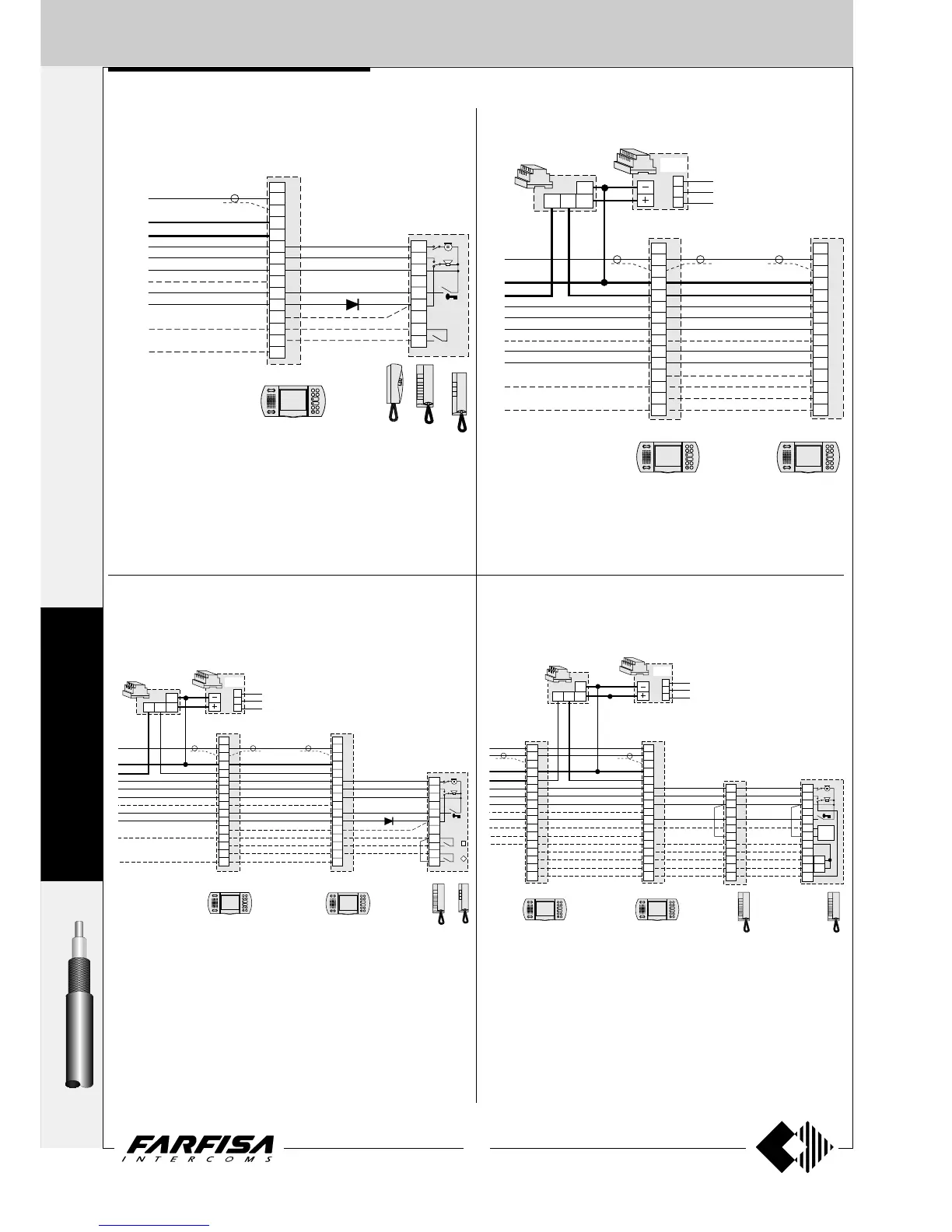
ONE-WAY additional diagrams
1 VIDEO INTERCOM AND 1 INTERCOM WITH INTERCOMMUNI-
CATING SERVICE FOR ONE-WAY SYSTEMS
2 VIDEO INTERCOMS WITH INTERCOMMUNICATING SERVICE
FOR ONE-WAY SYSTEMS
Notes
- On the videointercoms EH9160 verify that jumper J5 is in position 2-3 (see
page 94).
- If push-button P1 of the videointercom is used for other functions, use
pushbuttons from P3 to P6 and check that jumper J6 is in position 2-3.
- Read note 1 of page 219.
D = 100V-1A diode (type 1N4007).
Notes
- On the videointercoms EH9160 verify that jumper J5 is in position 2-3 (see
page 94).
- If pushbutton P1 of the videointercom is used for other functions, use
pushbuttons from P3 to P6 and check that jumper J6 is in position 2-3.
- Read notes 1 and 3 of page 219.
D = 100V-1A diode (type 1N4007).
7
X
7
X
E
C
H
O
S
VC1
230V
127V
0
1471
1281
2
56
3
8
V
M
F
H
1
2
3
4
5
9M
C
P2
9R
X
P1
EH9160+9083
VC2
CT1
1
2
3
5
9
C
P1
P2
C
1
D
EH9160+9083
EX320
EX310
2
8
V
M
F
H
1
2
3
4
5
9M
C
P1
9R
P2
X
7 and X are termi-
nals of the 1282E
or PRS240
7
X
VC1 VC2
CT1
1
2
3
5
9A
3A
P2
9
P3
C
P1
230V
127V
0
1471
1281
3
8
V
M
F
H
1
2
3
4
5
9M
X
P1
P2
P3
C
9R
8
V
M
F
H
1
2
3
4
5
9M
X
C
P1
9R
P2
P3
2
56
CT2
1
2
3
5
9A
3A
C
P1
P2
P3
9
C
C
EX
304
EH9160+9083 EH9160+9083
EX320+
EX304+
EX301
EX32 +
EX304+
EX301
0
7
X
7 and X are terminals of
the 1282E or PRS240
7 and X are terminals of
the 1282E or PRS240
7 and X are terminals of
the 1282E or PRS240
2 VIDEO INTERCOMS AND 1 INTERCOM WITH INTERCOMMUNI-
CATING SERVICE FOR ONE-WAY SYSTEMS
2 VIDEO INTERCOMS AND 2 INTERCOMS WITH INTERCOMMU-
NICATING SERVICE FOR ONE-WAY SYSTEMS
Notes
- On the videointercoms EH9160 verify that jumper J5 is in position 2-3 (see
page 94).
- If pushbutton P1 and P2 of the videointercom is used for other functions,
use pushbuttons from P3 to P6 and check that jumper J6 is in position 2-
3.
- Read notes 1 and 3 of page 219.
Notes
- On the videointercoms EH9160 verify that jumper J5 is in position 2-3 (see
page 94).
- If pushbutton P1 and P2 of the videointercom is used for other functions,
use pushbuttons from P3 to P6 and check that jumper J6 is in position 2-
3.
- Read notes 1 and 3 of page 219.










 To Next Page