Fasep 2000 srl Rev. 1.3
Balatron B110, B210: User’s Manual 15 July 2013
3-1
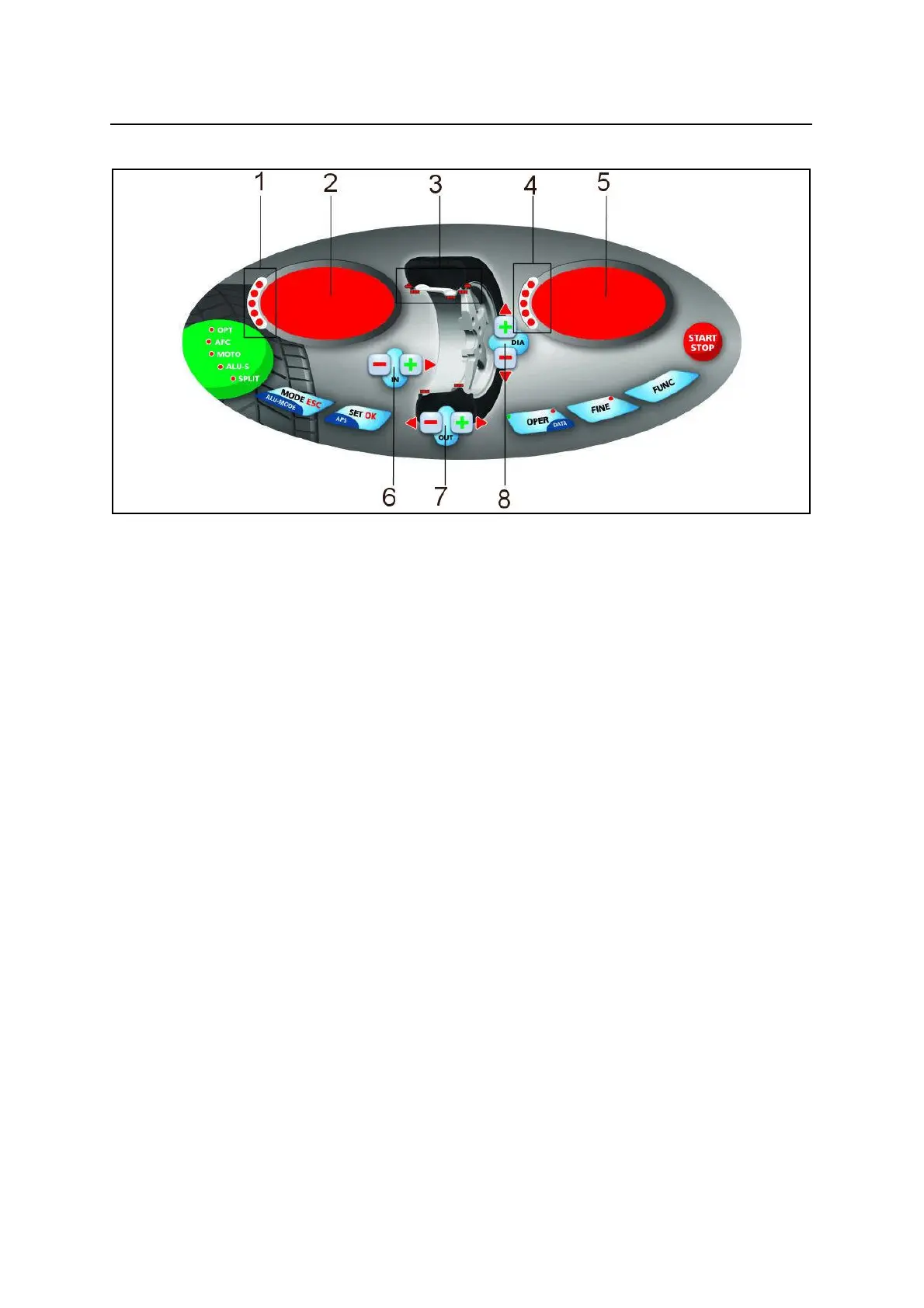
FIG. 7: Panel Balatron 2000
3 USE THE CONTROL PANEL
3.1 Meaning of keys at the keyboard
These instructions apply to Normal Operating Mode. Other function maybe activated by these keys in other operating modes (see
Special Functions).
<MODE>: . . . . . . . . . . . . . . . . . . . . . . . . . . . . . . . . . . . . . . . . . . . . . . . . . . To select balancing type: Dynamic-Static-Alu.
<SET>: . . . . . . . . . . . . . . . . . . . . . . . . . . . . . . . . . . . . . . . . . . . . . . . . . . . . . . . . . . . . . . . . . . . . . . . . . . Confirm selection
<OPER>: . . . . . . . . . . . . . . . . . . . . . . . . . . . . . . . . . . . . . . . . . . . . . . . . . . . . . . . . . . . To select Operator 1 or Operator 2.
<FINE>: . . . . . . . . . . . . . . . . . . . . . . . . . . . . . . . . . . . . . . . . . . . . . . . . . . . . . . . . . . . . . . . . . . . . . To select reading scale.
<FUNC>: . . . . . . . . . . . . . . . . . . . . . . . . . . . . . . . . . . . . . . . . . . . . . . . . . . . . . . . . . . . . . . . . . . To select specific functions
<START-STOP>: . . . . . . . . . . . . . . . . . . . . . . . . . . . . . . . . . . . . . . . . . . . . . . . . . . . . . . . . . . Starts-stops wheel spinning.
6 <DISTANCE -/+>: . . . . . . . . . . . . . . . . . . . . . . . . . . . . . . . . . . . . . . . . . . . . . . . . . . . . . . . . . . . Set internal side measure.
7 <WIDTH -/+>: . . . . . . . . . . . . . . . . . . . . . . . . . . . . . . . . . . . . . . . . . . . . . . . . . . . . . . . . . . . . . . . . . . . Set width measure.
8 <DIAMETER -/+> . . . . . . . . . . . . . . . . . . . . . . . . . . . . . . . . . . . . . . . . . . . . . . . . . . . . . . . . . . . . . Set diameter measure.
3.2 Meaning of Led Indicators
1-4: . . . . . . . . . . . . . . . . . . . . . . . . . . . . . . . . . . . . . . . . . . . . . . . . . . . . . . . . . . . . . . . indicate location of weight required.
2-5: . . . . . . . . . . . . . . . . . . . . . . . . . . . . . . . . . . . . . . . . . . . . . . . . . . . . . . . . . . . . . . . . indicate amount of weight required.
3: . . . . . . . . . . . . . . . . . . . . . . . . . . . . . . . . . . . . . . . . . . . . . . . . . . . . . . . . . . . . . . indicate the application point of weights.


 To Next Page