Fasep 2000 srl Rev. 1.3
Balatron B110, B210: User’s Manual 15 July 2013
4-1
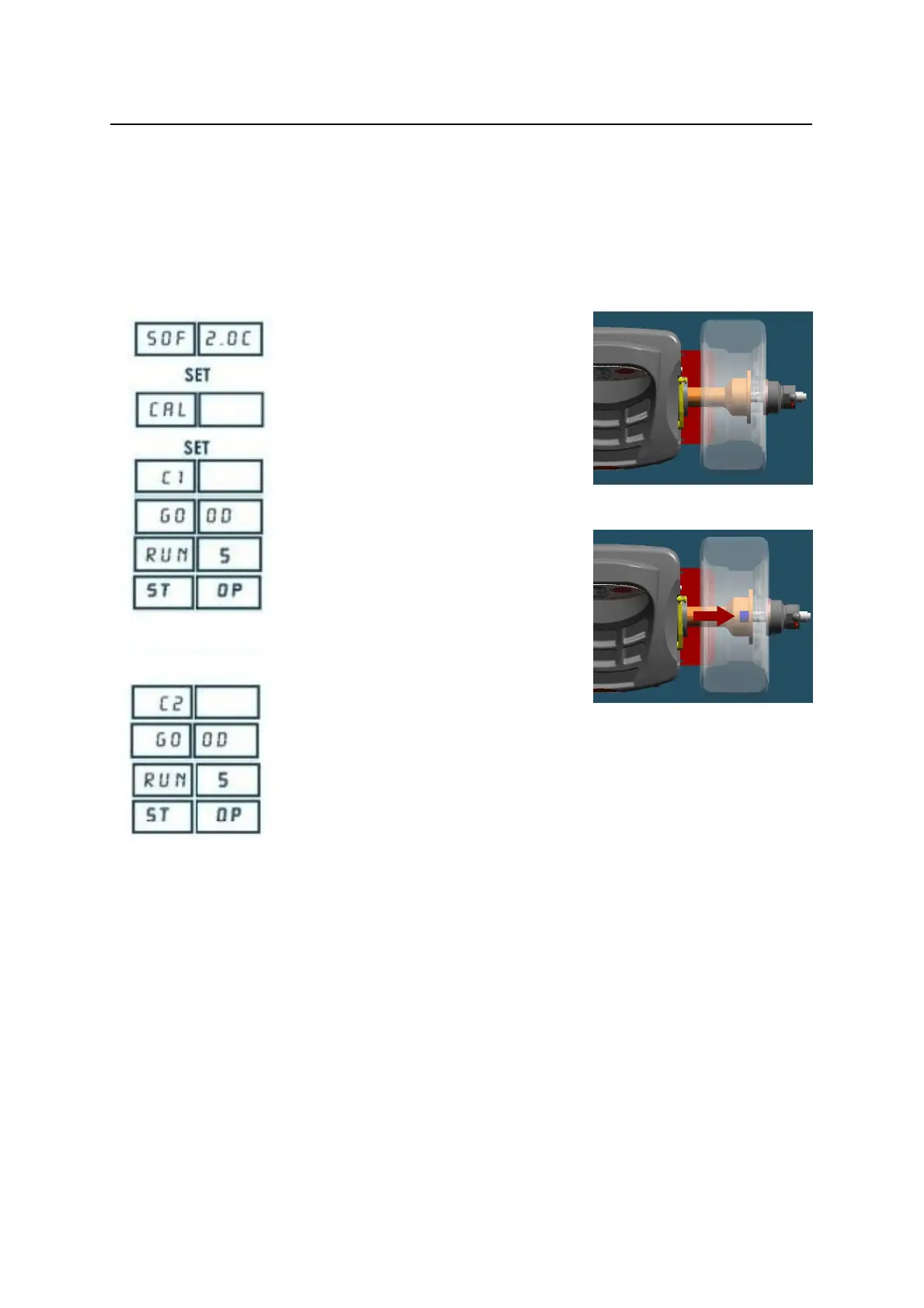
FIG. 9
FIG. 10
4 CALIBRATION
4.1 How to calibrate the Wheel Balancer
G NOTE the following symptoms indicate need for calibration:
a) check calibration program fails.
b) constant low or high weight readings.
c) indicated point of unbalance constantly wrong
d) more than 2 spins required to balance wheels repeatedly
Switch on the wheel balancer.
Press <SET> when SOF X.XX (software
version) is displayed.
Place a wheel on the flange ( Fig. 9).
Press <SET>
Hand spin the wheel
GNOTE: ACC EL: impress greater speed.
RED UCE: reduce the speed.
GO OD: the speed is corrected.
Put the calibration weight (Fig. 10).
Hand spin the wheel
End of calibration.
Press <MODE/ESC> to return to normal
balancing mode.


 To Next Page