37X INSTALLATION & OPERATION MANUAL
372/373 MODEL
31
10.18 Modem Settings Menu
In order to use BevTrak
TM
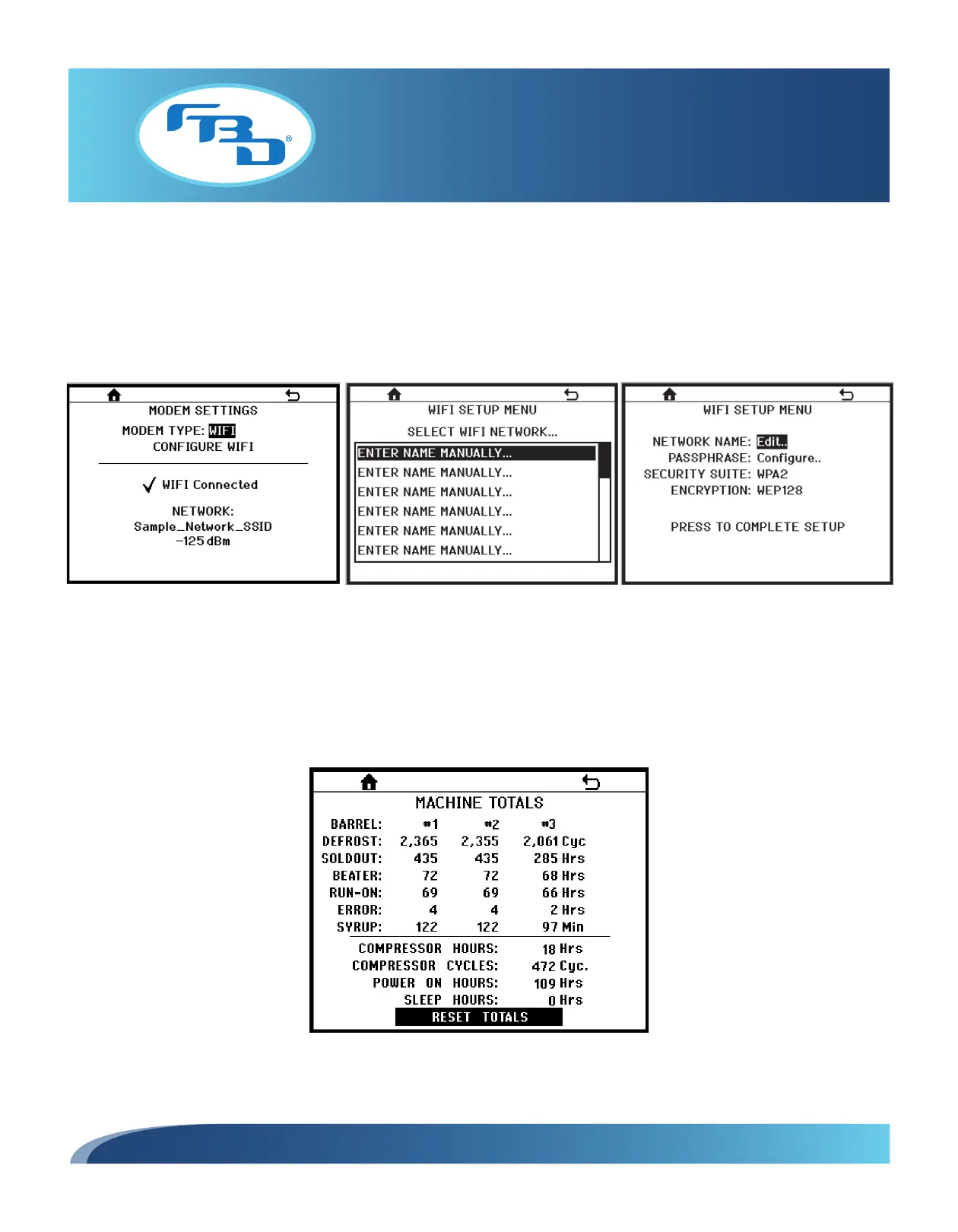
, the modem needs to be configured. To configure the modem, from the MODEM SETTINGS menu
(Figure 10.23), select CONFIGURE WIFI. This will open a WIFI SETUP MENU (Figure 10.24) that will allow you to select
from existing networks in the area or allow you to manually enter the needed network. Once the network is selected, a
second WIFI SETUP MENU window will open (Figure 10.25) that will allow you to enter the password to the selected
network. To finalize setup, select PRESS TO COMPLETE SETUP.
10.19 Machine Totals Menu
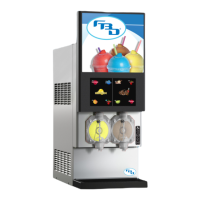
The MACHINE TOTALS menu (Figure 10.26) provides various totals that the dispenser records such as the number
of compressor cycles or operating time for various components. This information can be useful when evaluating the
throughput or diagnosing problems with the dispenser.
Figure 10.23
Figure 10.26
Figure 10.25
Figure 10.24



 To Next Page