6 DUOX PLUS IP CAMERA INTERFACE
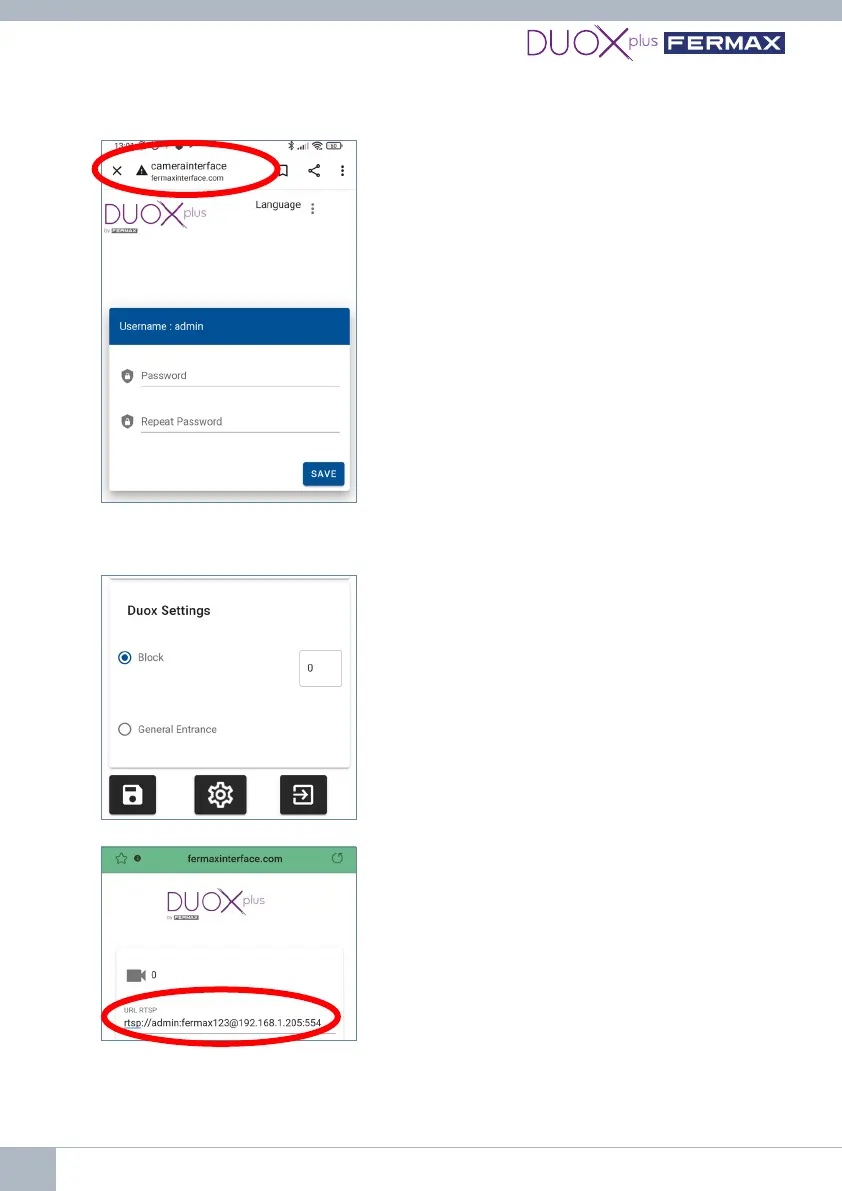
5thThersttimewillcreatethepassword,soenterthepasswordthenrepeatit.Ifyou
already have one and do not remember it, see the FAQs at the end of this document.
Note: The password must have at least 8 digits
and include uppercase letters, lowercase letters,
numbers and symbols.
6thCongureacameraonthe9454Interface.
6.1. Go to the 'Duox Conguration' section by
scrolling down in the main menu and indicate which
auto switch-on will be used to access the camera(s)
connectedtotheInterface:
• Asablockitwillallowcongurationofuptotwo
IP cameras, Camera 0 and Camera 1 (the block
number must be indicated).
• As a General Entrance, it will only allow one IP
Cameratobecongured(Camera0).
*Remember that two identically-congured devices
cannot coexist in the same installation.
6.2.Gotothecamerasection:
• ConguretheURLintheRTSPprotocoloftheIP
camera, following this format example.
rtsp://user:password@IP address:rtsp Port
Example: Example IP camera 192.168.1.205 with
user:admin,password:fermax123,port554.
rtsp://admin:fermax123@192.168.1.205:554
Note: check that you have typed the URL correctly and check the VLC Media Player
application (go to Media→ Open network location) and type the RTSP URL and check
that the camera works. Depending on the camera, all the information required for the
interface to connect as an RTSP client (user, password, IP, port, stream, etc.) must be















 To Next Page