11
OPERATION GUIDE
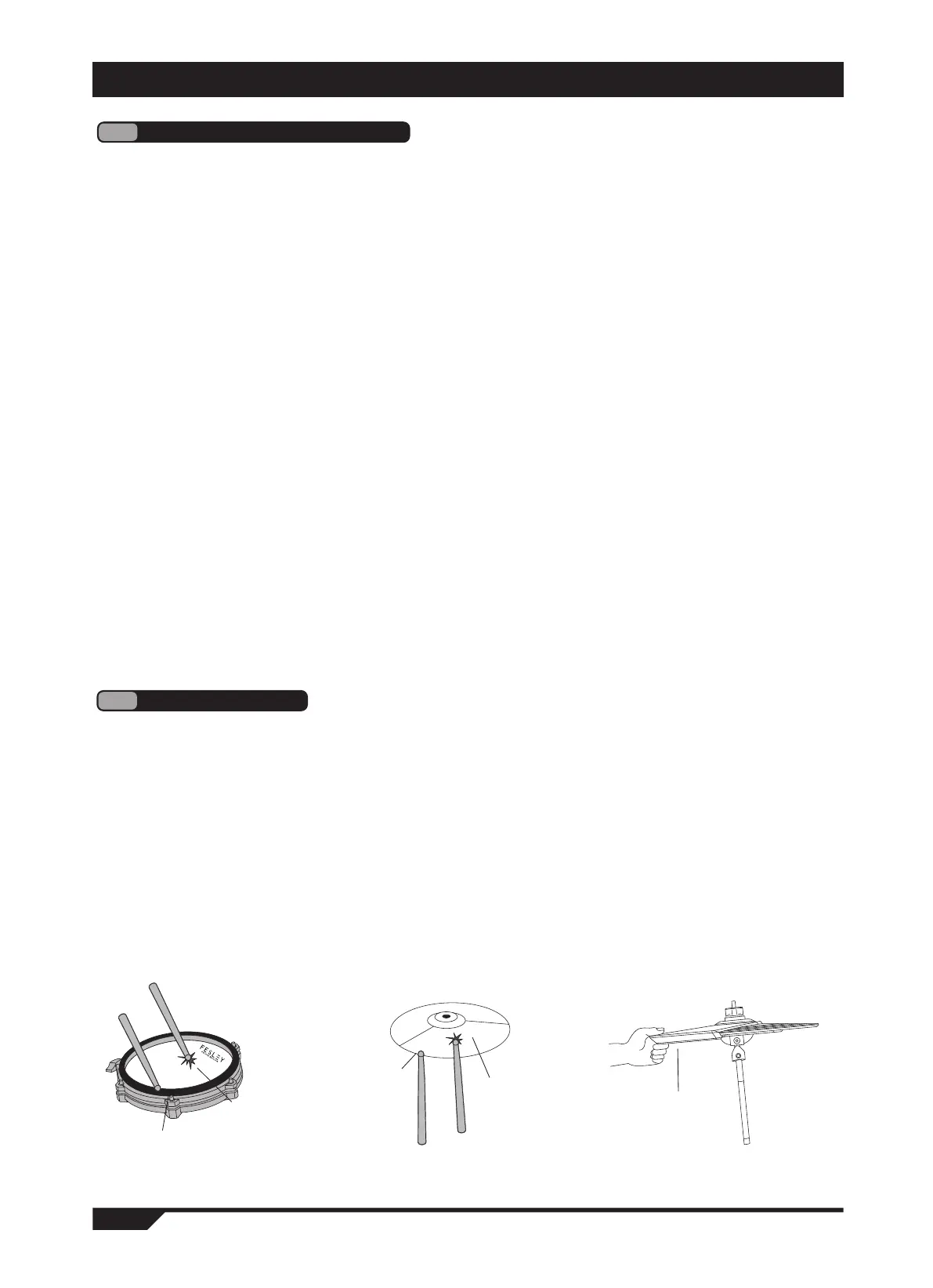
This product has double trigger induction, which makes the striking sound effect closer to the original sound drum effect.
1. "snaredrum" can strike the drum surface and edge.
2. "crash cymbals" and "ride cymbals" can knock the cymbal surface and cymbal edge, and hold the
cymbal edge with your fingers to make sound.
3. Different combinations of "cymbal stepping cymbal piece" and "cymbal stepping pedal" will change the tone
of cymbal stepping.
● open cymbal timbre "openhat": single tap the cymbal surface.
● closed cymbal tone "closehat": step on the cymbal pedal and keep it closed, while knocking on the cymbal
surface.
● step on the cymbal tone "peak": step on the cymbal pedal without knocking on the cymbal surface.
4
Drum Percussion
surface
edge
surface
edge
1. Press the "voice" button, the display will display (voice), and enter the drum kit adjustment mode. (Figure 3)
2. Use the "v" key to select the following options as adjustments. (Figure 4)
The display shows:
● (kit num 001-030): drum kit selection, a total of 30 preset drum kits.
● (kit vol 000-127): drum kit volume, 128 levels in total, adjustable.
● (kick 001-030): the timbre of the kick drum is selected, and a total of 30 timbres are adjustable.
● (snare 001-030): the timbre of the snare drum is selected, and a total of 30 timbres are adjustable.
● (snare rim 001-030): the timbre of the snare drum is selected, and a total of 30 timbres are adjustable.
● (tom1 001-030): drum 1 timbre selection, a total of 30 timbres can be adjusted.
● (tom2 001-030): drum 2 timbre selection, a total of 30 timbres can be adjusted.
● (tom3 001-030): drum 3 timbre selection, a total of 30 timbres can be adjusted
● (crash 001-030): selection of crash cymbal timbre, a total of 30 timbres can be adjusted.
● (crash rim 001-030): select the tone of the crash cymbal while hitting, and a total of 30 tones can be adjusted.
● (crash2 001-030): boom 2 timbre selection, a total of 30 timbres can be adjusted.
● rim 2-030, and 30 tones can be adjusted.
● (ride 001-030): select the timbre of the ride cymbal, with 30 timbres in total, which can be adjusted.
● (ride rim 001-030): select the timbre of the ride cymbal and a total of 30 timbres can be adjusted.
● (open at 001-030): open cymbal timbre selection, a total of 30 timbres can be adjusted.
● (close hat 001-030): closed cymbal timbre selection, a total of 30 timbres can be adjusted
● (pedal 001-030): select the tone of the cymbal and a total of 30 tones can be adjusted.
3. Turn the "quick selection wheel" to adjust the parameters of the above options. (Figure 5)
4. Short press the "save and reset" button to save the adjusted drum set, so that it can be called later(Figure 6).
5. Press and hold the "voice" button for more than 3 seconds to call the previously customized adjusted and
saved drum kit. (Figure 3)
3
Drum kit timbre selection
stop the sound wave
by grabbing the cymbal


 To Next Page