12
Recording system
DOWN
UP
VOLUME
REC
R.PLAY
MENU
SAVE.
RESET
TONE
PLAY
POWER
Metronome and music
Electronic drum
control box
CRASH2
DC9V AUDIO IN AUDIO OUTUSB
METRO
SONG
4 4
5
6
11 12
8
10
9
7
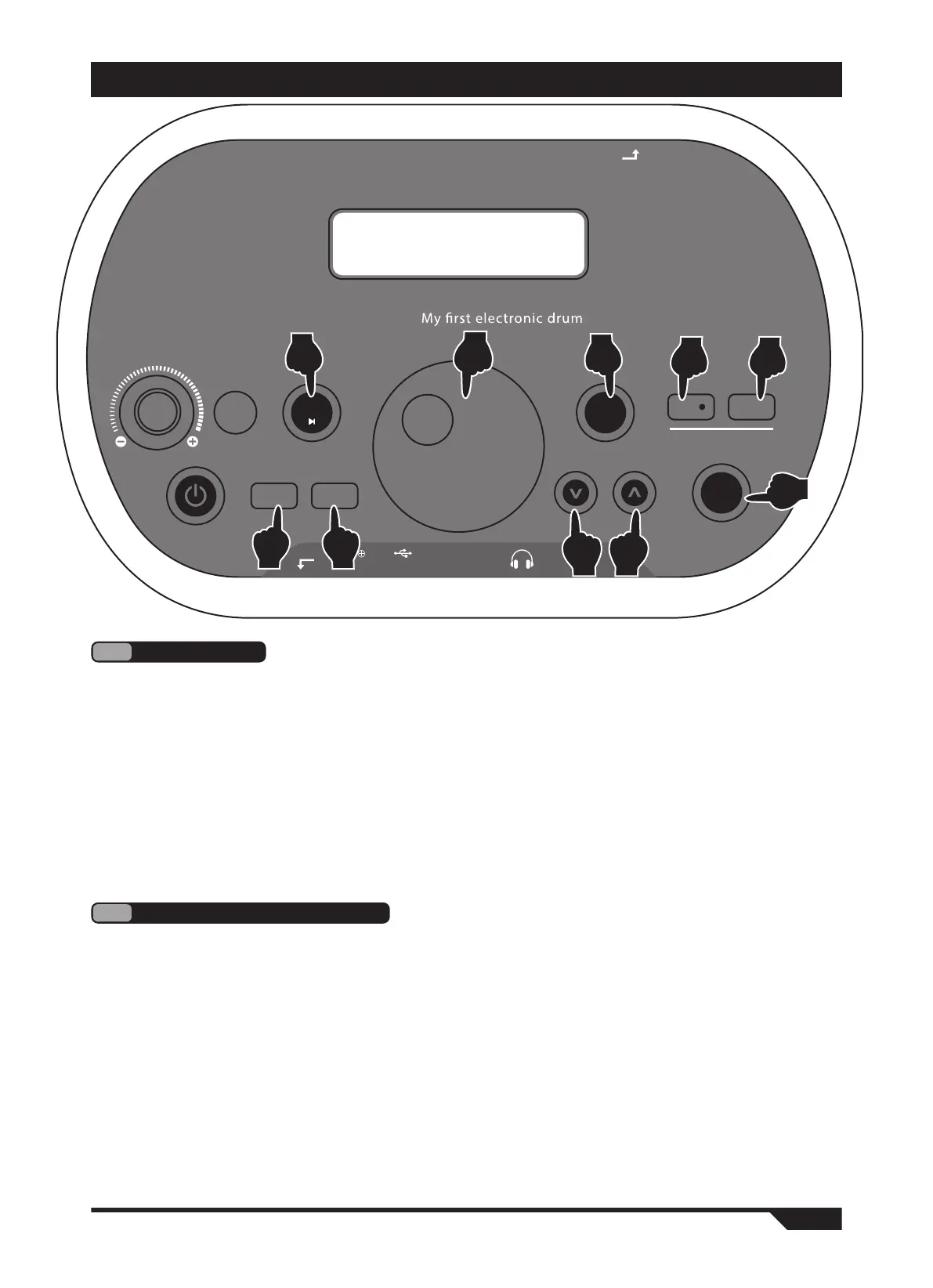
1. Press the "metronome" button, the display will display (Metro), and enter the metro-
nome mode. (Figure 7)
2. Use the "v" key to select the following options as adjustments. (Figure 4)
THE DISPLAY SHOWS:
● (time 002-016): metronome speed, 4 levels in total, standard speed adjustable.
● (beat 001-009): there are 9 types of metronome, which can be adjusted.
● (metro vol 000-127): metronome volume, 128 levels in total, adjustable.
3. Turn the "quick selection wheel" to adjust the parameters of the above options. (Figure 5)
4. Press the "play" button to start playing the metronome, and press it again to stop. (Figure 8)
5
Metronome
1.Press the "demonstration song" button, and the display screen will display (song), and enter
the demonstration song mode. (Figure 9)
2. Use the "v" key to select the following options as adjustments. (Figure 4)
THE DISPLAY SHOWS:
● (num 001-030): selection of 30 built-in demonstration songs.
● (gm vol 000-127): chord accompaniment volume, 128 levels in total, adjustable.
● (drm vol 000-127): drum group volume, 128 levels in total, adjustable.
3. Turn the "quick selection wheel" to adjust the parameters of the above options. (Figure 5)
4. Press the "play" button to start playing the demonstration song, and press it again to
stop.(Figure 8)
6
Built in song playback
OPERATION GUIDE


 To Next Page