11
Wiring the ProtoNode RER to RS-485 Field
Protocol (BACnet MS/TP or Metasys N2)
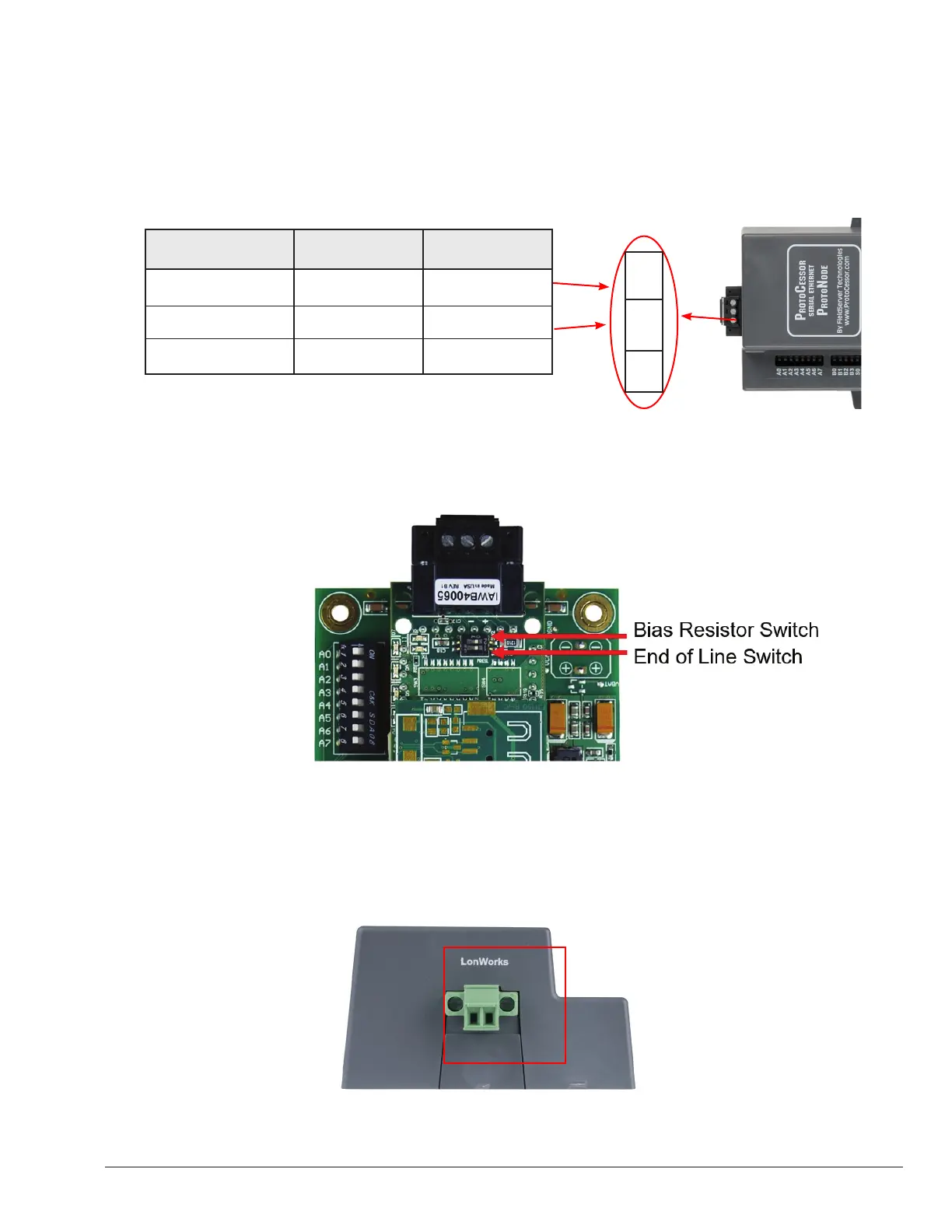
• Connect BMS BACnet MS/TP or Metasys N2 RS485 port to the 3-pin RS485 connector on ProtoNode RER as
shown below.
Figure 8. Connection from ProtoNode to RS-485 Field Protocol –BACnet MS/TP
• If the ProtoNode is the last device on the trunk, then the end of line (EOL) termination switch needs to be
enabled, as shown below:
* The default setting from the factory is OFF (switch position = right side).
* To enable the EOL termination, turn the EOL switch ON (switch position = left side)
Figure 9. End-of-line termination on from ProtoNode to RS-485 Field Protocol – BACnet MS/TP
Figure 10. LonWorks Terminal
Wiring the ProtoNode LER (FPC-N35) Field Port to a LonWorks network
• Connect the ProtoNode to the field network with the LonWorks terminal using a twisted pair non-shielded cable.
LonWorks has no polarity.
BMS RS-485 Wiring ProtoNode Pin # Pin assignment
RS-485 + Pin 1 RS-485 +
RS-485 - Pin 2 RS-485 -
- Pin 3 RS-485 GND
+ – G
APPROVED
UNCONTROLLED DOCUMENT IF PRINTED



 To Next Page