20
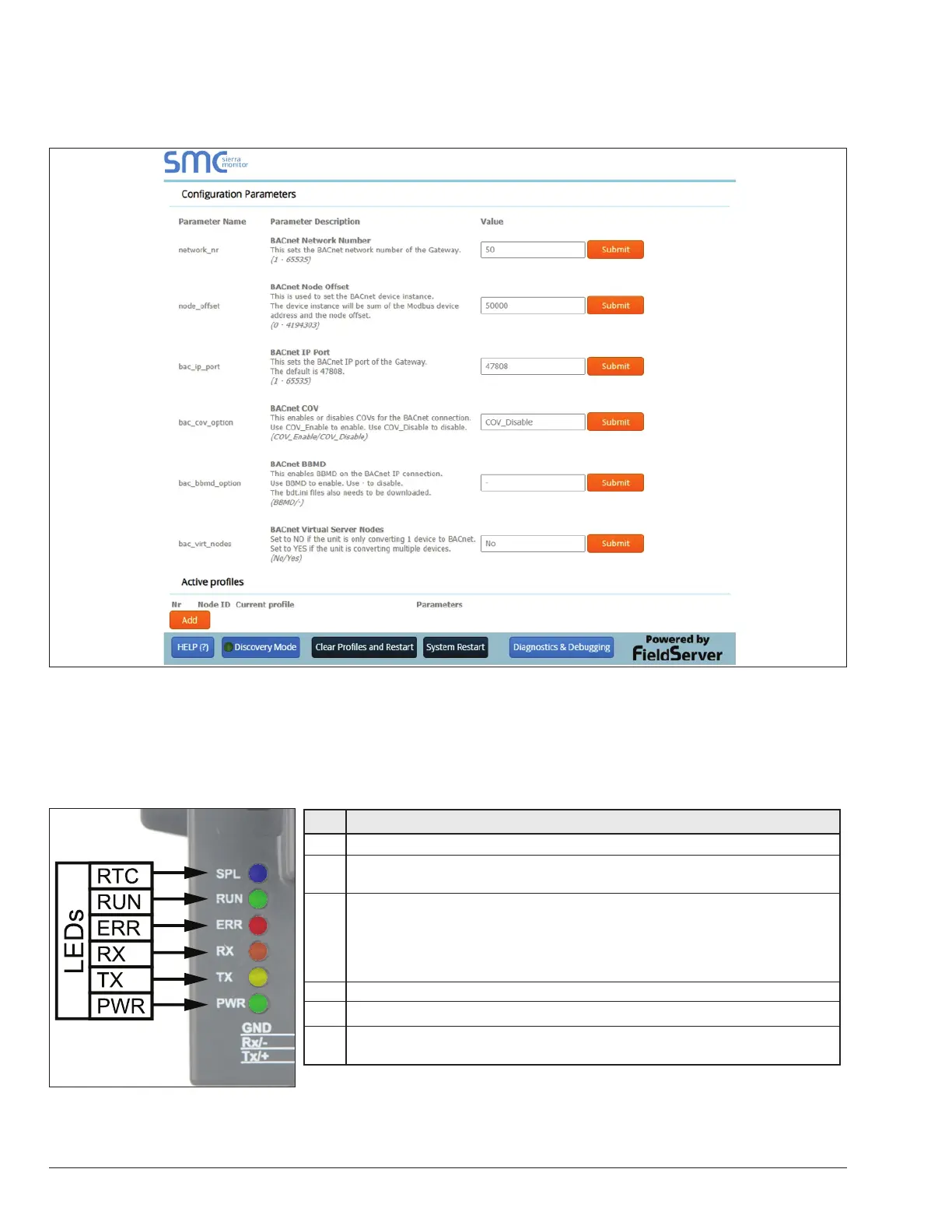
Setting the Network Number for BACnet IP
On the main Web-Congurator screen, update the Network Number in the BN_Network_Nr and hit Submit. Please note
that the default value is 5.
Figure 26. Setting the Network Number for BACnet IP
LED Diagnostics for Modbus RTU Communications
between the ProtoNode and Raypak VERSA IC
ProtoNode RER (B-85) and LER (B-86) LED Locations:
Light Description For ProtoNode RER and LER
RTC Unused
RUN
The RUN LED will start ashing 20 seconds after power indicating normal
operation.
ERR
The SYS ERR LED will go on solid 15 seconds after power up. It will turn
o after 5 seconds. A steady red light will indicate there is a system error on
the ProtoNode. If this occurs, immediately report the related “system error”
shown in the error screen of the GUI interface to FieldServer Technologies for
evaluation.
RX The RX LED will ash when a message is received on the Modbus RTU.
TX The TX LED will ash when a message is sent on the Modbus RTU.
PWR
This is the power light and should show steady green at all times when the
ProtoNode is powered.
Figure 27. Diagnostic LEDs Location and Description
APPROVED
UNCONTROLLED DOCUMENT IF PRINTED



 To Next Page