15
Changing BN_Node_Oset via the ProtoNode’s Web Congurator
• The BACnet Device Instance is equal to the Modbus Node ID plus the BN_Node_Offset.
• To change the BN_Node_offset, enter the new values for the offset in web configurator.
• And click to update new values.
Set IP Address for BACnet/IP via GUI
• Open a PC web browser, enter the default IP address of the ProtoNode 192.168.1.24 and connect to the Protonote.
• The Default GUI landing page is the Web Configuration.
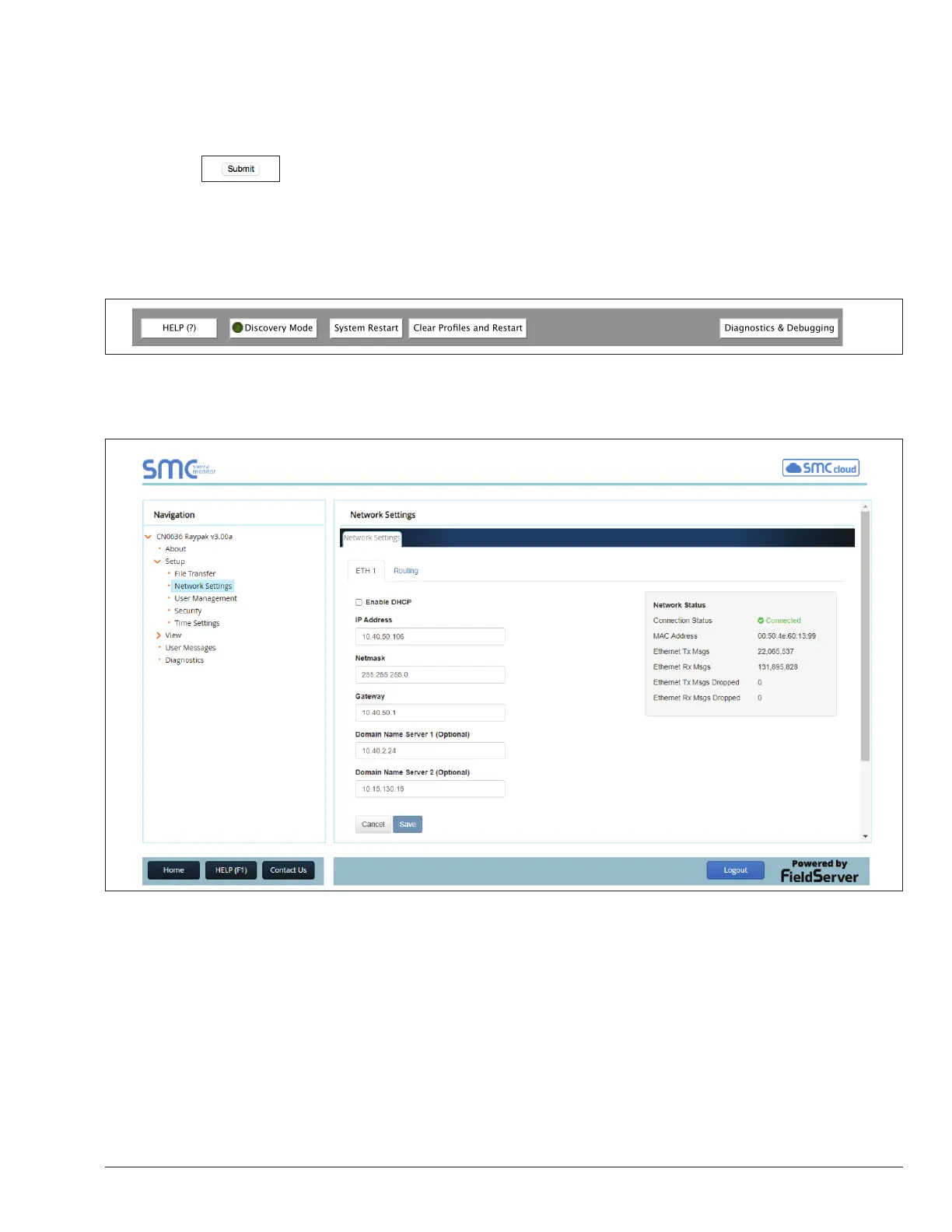
• Press the Diagnostics and Debugging button at the bottom right corner of the page to go to FSGUI utility.
Figure 17. Web Congurator showing multiple completed proles added
• Click on setup and then Network Settings to enter the Edit IP Address Settings menu.
Figure 18. ProtoNode Network Settings Tab
• Type in a new Subnet Mask
• If necessary, change the IP Gateway (Default Gateway field)
• Type in a new IP Gateway
• Note: If the ProtoNode is connected to a router, the IP Gateway of the ProtoNode should be set to the IP address
of the router that it is connected to
• Reset ProtoNode
• Unplug Ethernet cable from PC and connect it to the network hub or router
APPROVED
UNCONTROLLED DOCUMENT IF PRINTED



 To Next Page