---------------------------------------------------------------------------------
FINE MECHATRONICS FS8000
6
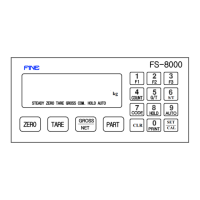
1-4-2. HOW TO USE KEY
* The Key operating can be permitted or prohibited by SETUP-F10
* When pushing the key,it sounds "OK".
* Several Key works either a single function or compound functions.
A compound function key is the command key when it push first and
In case of setting value according to the command key,then the numeral Key works.
Finally The key to finish a input data is SET Key.
* The time to input a data by compound key is limited to 5sec and automatically
Will be removed without the next key inputting.
☞ ZERO Key : This key is to return to ZERO when the weighing device is empty(the end-user
Selected within 2%, 10%, 50%, 90% by SET-UP F07)
☞ TARE Key : The way to set-up the tare weight is two way as follows.
◆ Manual Way
1.Set-up of TARE Key
① Put a TARE on the weighing plate
② TARE Key →SET Key OR TARE Key → Numeral Key → SET Key
2.Remove of TARE Key
① Remove TARE on the weighing plate
② Push TARE Key and push SET Key.
◆Automatic Way
1.Auto-TARE setting if TARE was on the weighing plate
2.Auto-TARE setting after putting TARE and Auto-TARE Remove
After Taking away TARE on the weighing plate.
※ Please refer to
SETUP F12
☞ Gross/Net Key : After setting TARE,This key is to convert Net Weight to Gross Weight
And Gross Weight to Net Weight.
* Available to convert TARE setting only
* Gross Lamp turn on when Gorss Mode works.
☞ PART Key : Usable to confirm or change the product part
* Can set up the data of each product from 1 No to 20 No.
- Checking PART : PART Key → CLR Key
- Changing PART : PART Key → Numeral Key →SET key


 To Next Page