---------------------------------------------------------------------------------
FINE MECHATRONICS FS8000
7
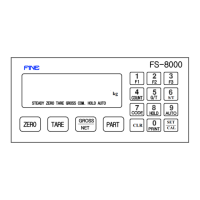
☞ F1,F2,F3 Key : This keys appear a various data as the end-user demands.
Available to use the end-user demanding by SETUP F21,F22,F23
( SET UP F21 REFERENCE )
☞ COUNT Key : This Key appears the worked frequence of each PART.
* Unavailable to change the PART deliberately.
☞ G/T KEY : The function to print The weight of Gross Total
* Avavailable to remove Gross Total in printing.
☞ S
/T KEY : The function to print The weight of Sub Total.
* Available to remove Sub Total in printing
☞ CODE
KEY: The function to check and set Max.6figure CODE of Each PART.
* Checking CODE.
: CODE key → Checking→CLR(Remove)
* Change or setting CODE.
: CODE key → Inputting changed Key →SET(Change or setting)
☞ HOLD Key
: This key is to set/delete HOLD Functions.
* Possible to choose various functions by SET UP F25.
- Manual HOLD : Holding the moment weight value by HOLD
Key
- Manaul HOLD(Average) : Holding Average weight value after pushing HOLD Key
- A stable hold : Holding the weight value when being stable
- Maxium HOLD(1Time only) : Holding the maxium weight value when being maxium
- Maxium HOLD (Continue) : Holding a continuous maxium weight
When being new maxium
☞ AUTO Key : This key is to set/delete AUTO Function.
* Possible to choose various functions by SET UP F24.
- Auto-totallization in holding the weight.
- Available to work the HOLD function by AUTO setting Only.
- Available to work the HOLD function by AUTO setting Only
And to remove the HOLD function when it empty.
- Auto-totallization when the weight is safty
* Possible to choose AUTO/MANUAL by SET UP F19 when the power is ON.


 To Next Page