EasyManua.ls Logo

Firman WH03342 - WH03342_Manual_English _Page_11

Firman WH03342
49 pages
Print Icon
To Next Page IconTo Next Page
To Previous Page IconTo Previous Page
Loading...
FEATURES
AND
CONTROLS
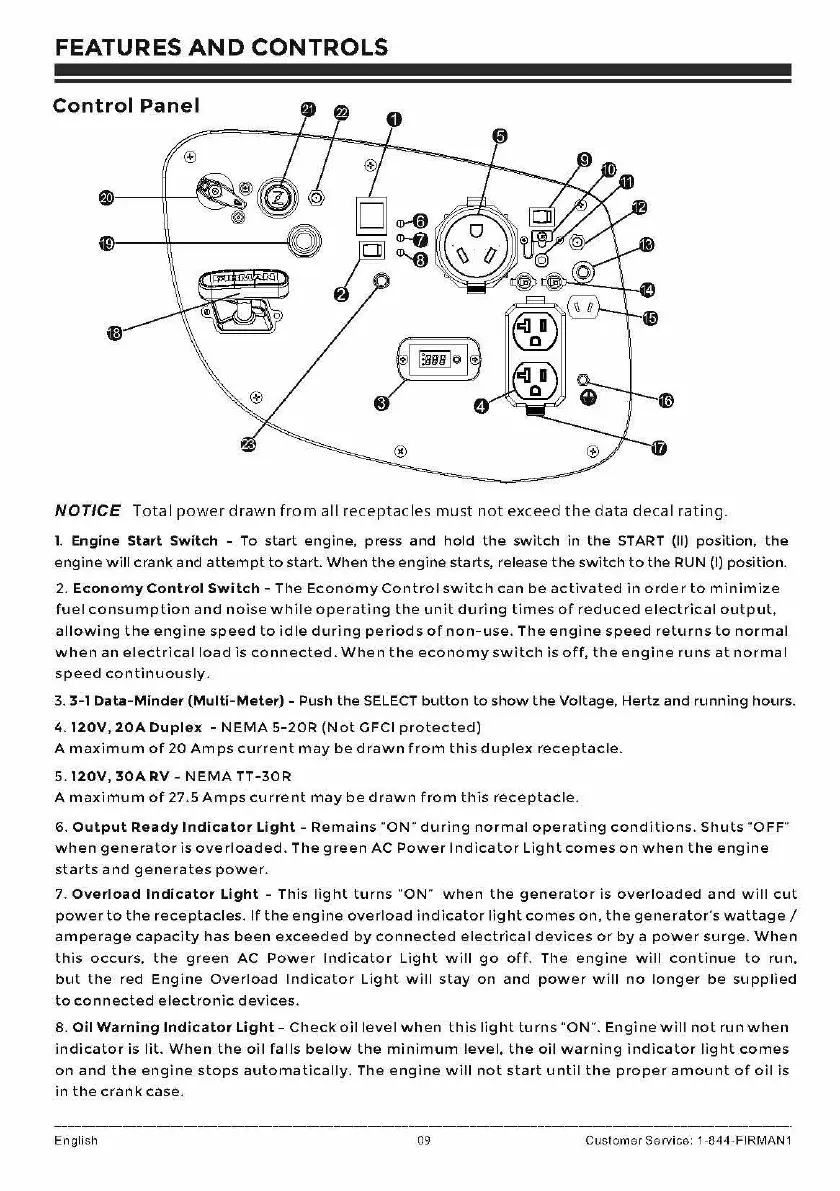
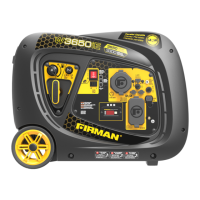
Control
Panel
e--11---------'l
NOTICE
Total
power
drawn
from
all
receptacles
must
not
exceed
the
data
decal
rating.
1.
Engine Start Switch - To
start
engine,
press
and
hold
the
switch
in
the
START
(11)
position,
the
engine
will
crank
and
attempt
to
start.
When
the
engine
starts, release
the
switch
to
the
RUN (I)
position.
2.
Economy
Control
Switch
-
The
Economy
Control
switch
can
be
activated
in
order
to
minimize
fuel
consumption
and
noise
while
operating
the
unit
during
times
of
reduced
electrical
output,
allowing
the
engine
speed
to
idle
during
periods
of
non-use.
The
engine
speed
returns
to
normal
when
an
electrical
load
is
connected.
When
the
economy
switch
is
off,
the
engine
runs
at
normal
speed
continuously.
3.
3-1
Data-Minder
(Multi-Meter)
- Push
the
SELECT
button
to
show
the
Voltage,
Hertz
and
running
hours.
4.
120V,
20A
Duplex
-
NEMA
5-20R
(Not
GFCI
protected)
A
maximum
of
20
Amps
current
may
be
drawn
from
this
duplex
receptacle.
5.
120V,
30A
RV -
NEMA
TT-30R
A
maximum
of
27.5
Amps
current
may
bed
rawn
from
this
receptacle.
6.
Output
Ready
Indicator
Light
-
Remains
"ON"
during
normal
operating
conditions.
Shuts
"OFF"
when
generator
is
overloaded.
The
green
AC
Power
Indicator
Light
comes
on
when
the
engine
starts
and
generates
power.
7.
Overload
Indicator
Light
-
This
light
turns
"ON"
when
the
generator
is
overloaded
and
will
cut
power
to
the
receptacles.
If
the
engine
overload
indicator
light
comes
on,
the
generator's
wattage/
amperage
capacity
has
been
exceeded
by
connected
electrical
devices
or
by
a
power
surge.
When
this
occurs,
the
green
AC
Power
Indicator
Light
will
go
off.
The
engine
will
continue
to
run,
but
the
red
Engine
Overload
Indicator
Light
will
stay
on
and
power
will
no
longer
be
supplied
to
connected
electronic
devices.
8.
Oil
Warning
Indicator
Light-
Check
oil
level
when
this
light
turns
"ON".
Engine
will
not
run
when
indicator
is
lit.
When
the
oil
falls
below
the
minimum
level,
the
oil
warning
indicator
light
comes
on
and
the
engine
stops
automatically.
The
engine
will
not
start
until
the
proper
amount
of
oil
is
in
the
crank
case.
English
09
Customer
Service 1-844-FIRMAN1

Table of Contents

Related product manuals