Panda xControl
29.9.16 Chapter 2: Panda xControl - Page 11
2.3.3 Symbols used in overview pages
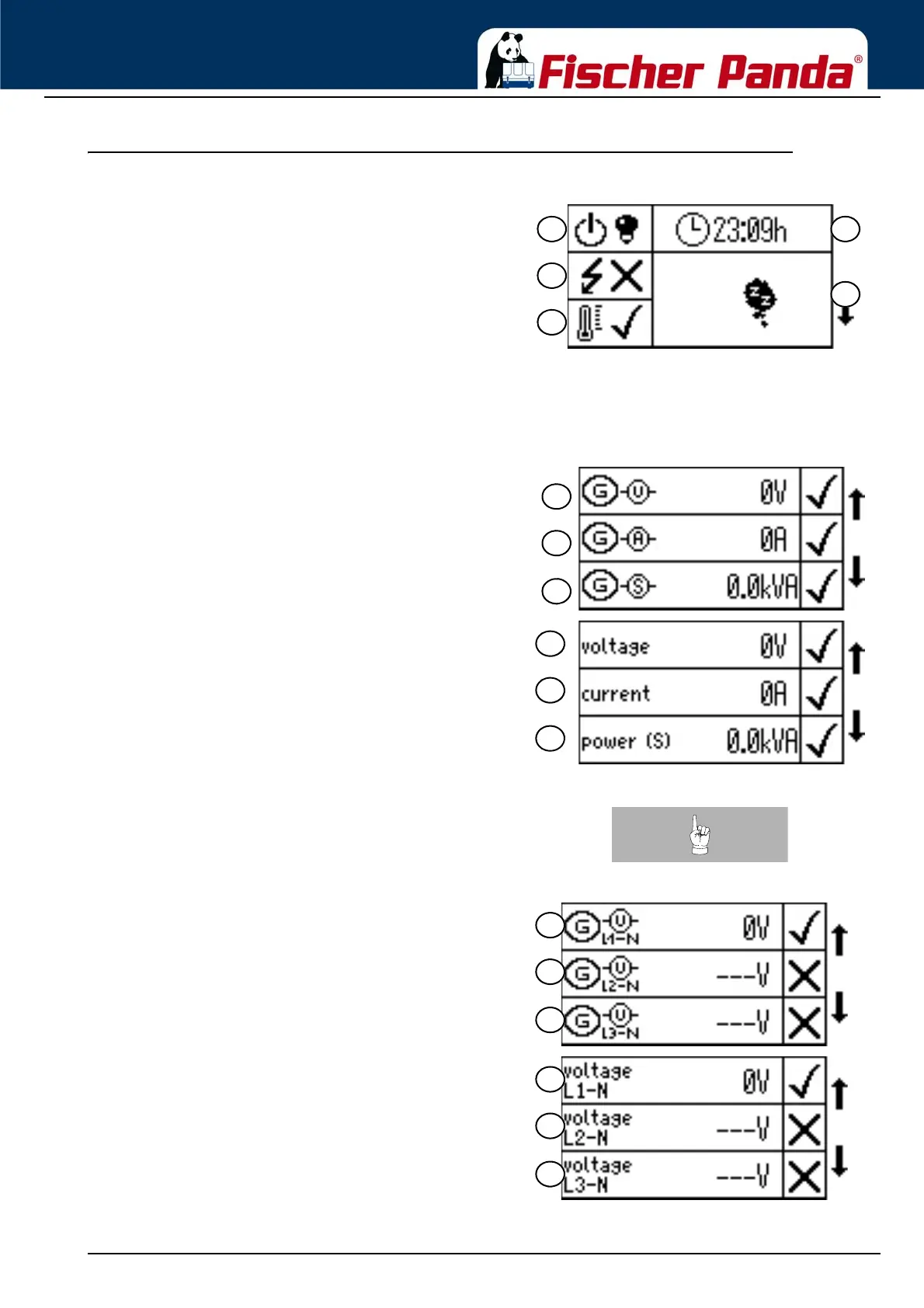
Fig. 2.3.3-1: Symbols used in Overview Page 1Overview Page 1:
01. Generator Status (on/off)
02. AC OK
03. Temperature of the generator (OK/Error)
04. Operating hours of the generator
05. Info screen
Overview Page 1 is the same in all languages.
Fig. 2.3.3-2: Overview Page 2 Symbols/EnglishOverview Page 2 (Generator):
06. Output voltage [V]
07. Generator current [A]
08. Generator apparent power [kVA]
Note:In the case of three-phase generators, the voltage, the
current and the electrical power are shown on separate
pages. Each page shows the value of the three phases
one below the other.
Fig. 2.3.3-3: Voltage display 3-P Symbols/EnglishExample of the voltage display of a 3-phase generator.



 To Next Page