42 FISCHERSCOPE
®
X-RAY
User Interface of the WinFTM Software
To change the display resolution
1. In the WinFTM main menu, click .
The window Modify product appears.
2. Select the tab Product.
3. In the field Display Resolution, select a resolution.
To enter tolerance limits
1. In the WinFTM main menu, click .
The window Modify product appears.
2. Select the tab Presentation.
3. In the area Tolerance limits, check activated.
4. Within the area Tolerance limits, choose the result channels, for which tolerance limits shall be
displayed.
5. In the columns LSL (Lower Specification Limit) and USL (Upper Specification Limit), enter the
tolerance values.
To enter the name of the operator
► In the WinFTM main menu, select Evaluation > Order No. / Operator….
6.5 Status Bar
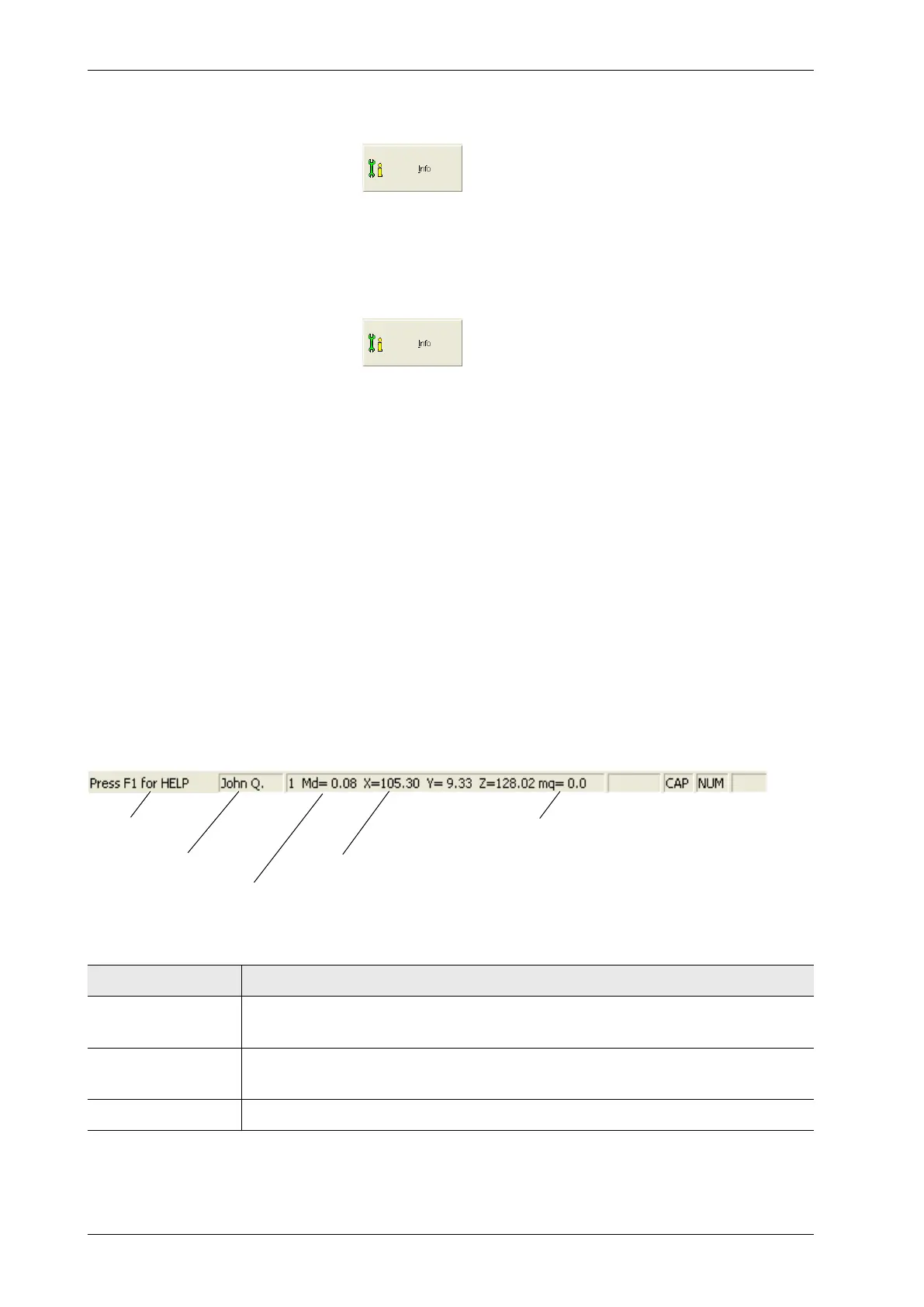
The status bar is located at the bottom of the WinFTM window and displays the following:
Display Explanation
Help text If you hover with the mouse pointer over a command button, additional help
text will be displayed here.
Measurement dis-
tance
Measurement distance between the specimen measurement spot and colli-
mator minus 15 mm, when the video image is focused.
XYZ coordinates
1
Coordinates of the current position of the measurement stage.
Operator‘s name
Help text
Measurement distance
XYZ coordinates
mq value



 To Next Page