S T E E R I N G W H E E L
C O N T R O L S E T T I N G
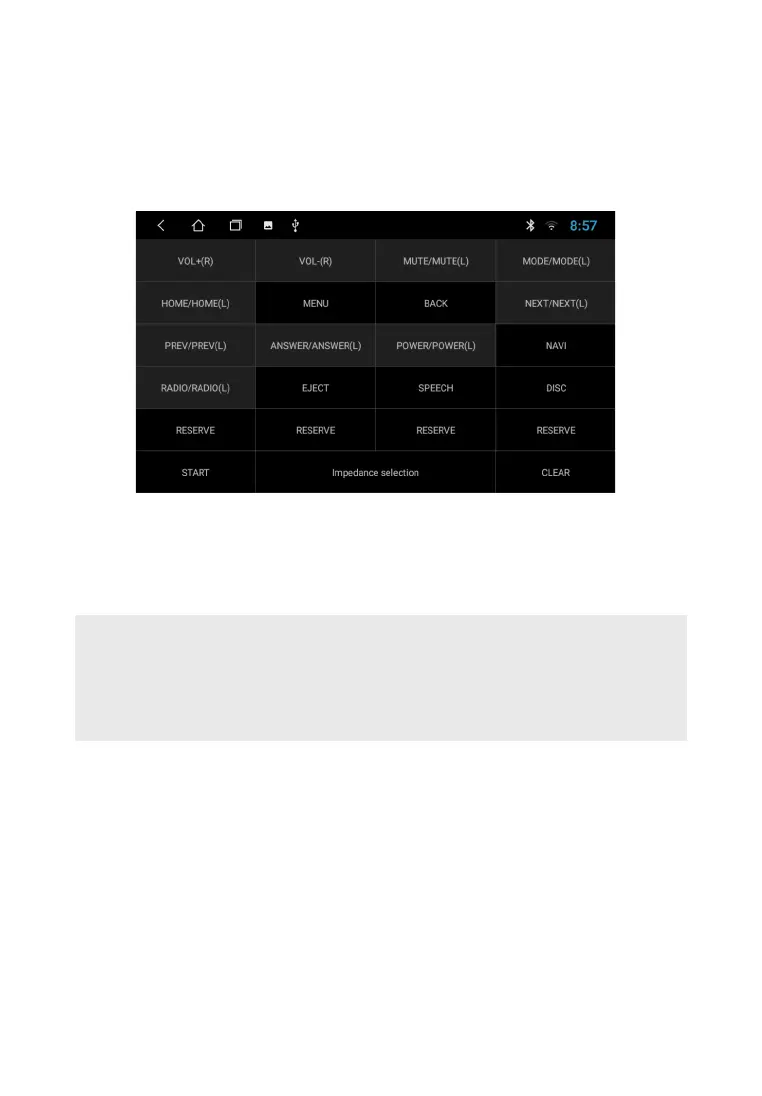
Customizing the steering wheel buttons interface
To adjust, touch the "Steering Wheel" icon on the APP screen. Select the icon of interest function, then
press the corresponding button on the steering wheel. After finishing the setting tap the Save & Exit
icon.
Note. Operating voltage range with the remote control buttons connected — from 0.3 up to 5V. the
minimum difference in operating voltages that are set at the output of the remote control after
pressing the buttons must be at least 0.3 V (otherwise, in some cases different buttons can be
programmed for the same parameter). Adjustment is only possible with steering buttons with analog
(resistive signals).
15
ATTENTION!
The manufacturer does not guarantee correct operation of the device with all types and models
of vehicles. The manufacturer is not responsible for any possible problems with the vehicle or
device that may occur if this device is incorrectly connected to the vehicle's standard wiring. To
properly connect the standard resistive remote control, consult Your car's authorized dealer or
contact a certified installation center.



 To Next Page