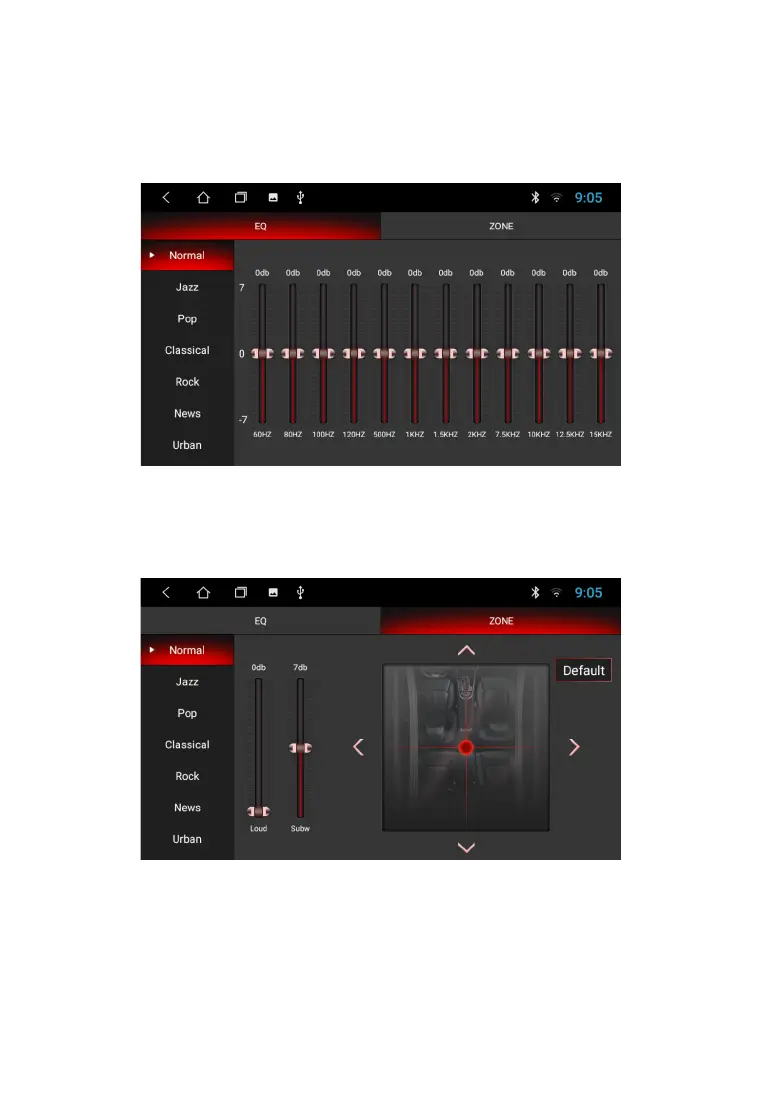
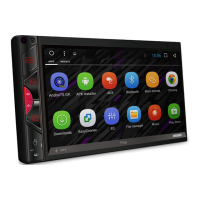
To enter the sound settings, use the EQ icon from the app menu. The settings interface offers two
screens with settings.
S O U N D S E T T I N G S
In the first submenu, the device user is offered a 12-band equalizer.
You can adjust the equalizer to your sound preferences by moving the volume sliders of the
corresponding frequencies, or choose one of the suggested schemes: Normal, Jazz, Pop,
Classic, Rock, News, Urban, Techno.
In the balance settings submenu, you can adjust the relative volume of the speakers to achieve the
desired sound. Setting is done by dragging the point according to the car interior scheme. The user
is also given the opportunity to adjust the overall sound picture to the selected place in the car.
In addition, this menu allows you to set the tone compensation mode, you can enable (or disable)
the sound gain.
20



 To Next Page