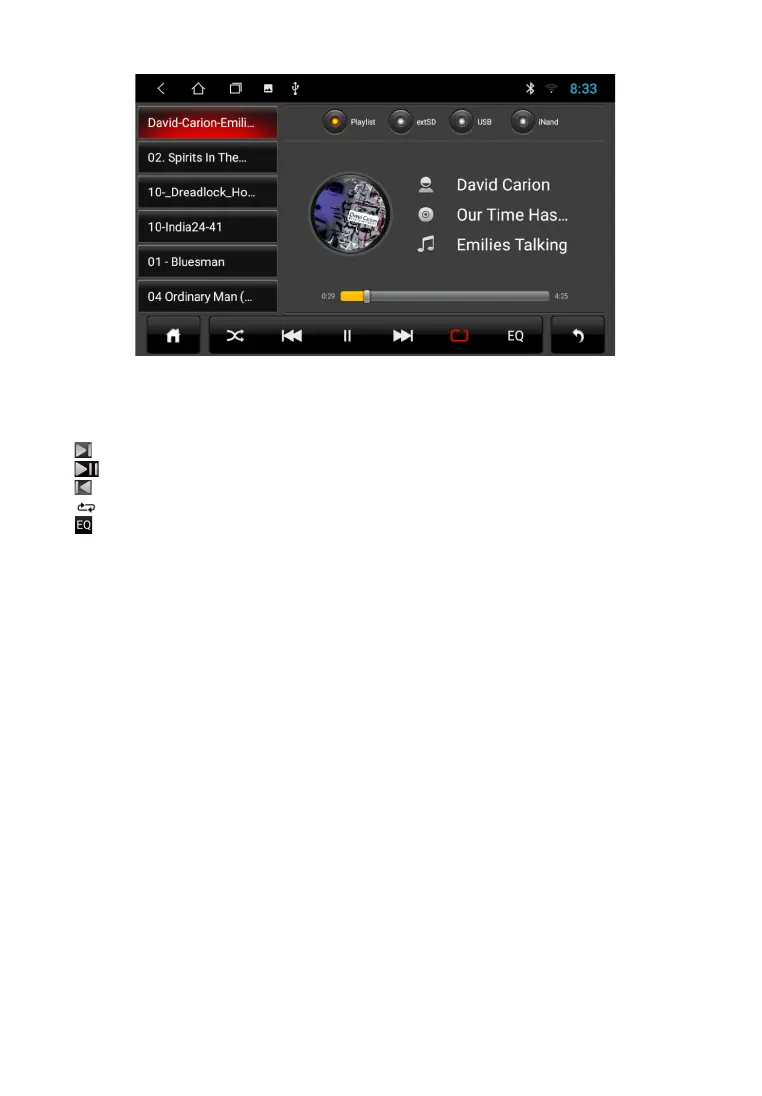
After launching the application, playback of audio files from the connected disc. The bottom
pop-up menu allows you to select a file to listen to
next track
play and pause
previous track
repeat / shuffle mode
equalizer
A U X
To play video from external media connected to the AV input, press the "AUX" icon from
the application menu.
F I L E M A N A G E R
In addition to the applications located on the main screen, a large number of convenient and
necessary tools for the user can be found by clicking on the "Applications" icon
on the home screen. One of the most requested tools needed by an experienced user
Android devices is a “File manager”.
To start the program, click the File manager icon in the application menu. Interface manager is made
in a classic design and is intuitive. All operations are performed by touching the corresponding icons.
Short touch to navigate to folder / file. To highlight the corresponding object. need to put square on
the right side of the screen. Appearing after that the pop-up menu provides a choice of three
actions: copy / cut / delete.
To cancel, remove the mark from the subject.
17



 To Next Page