5.2 Air Filtration
Instructions:
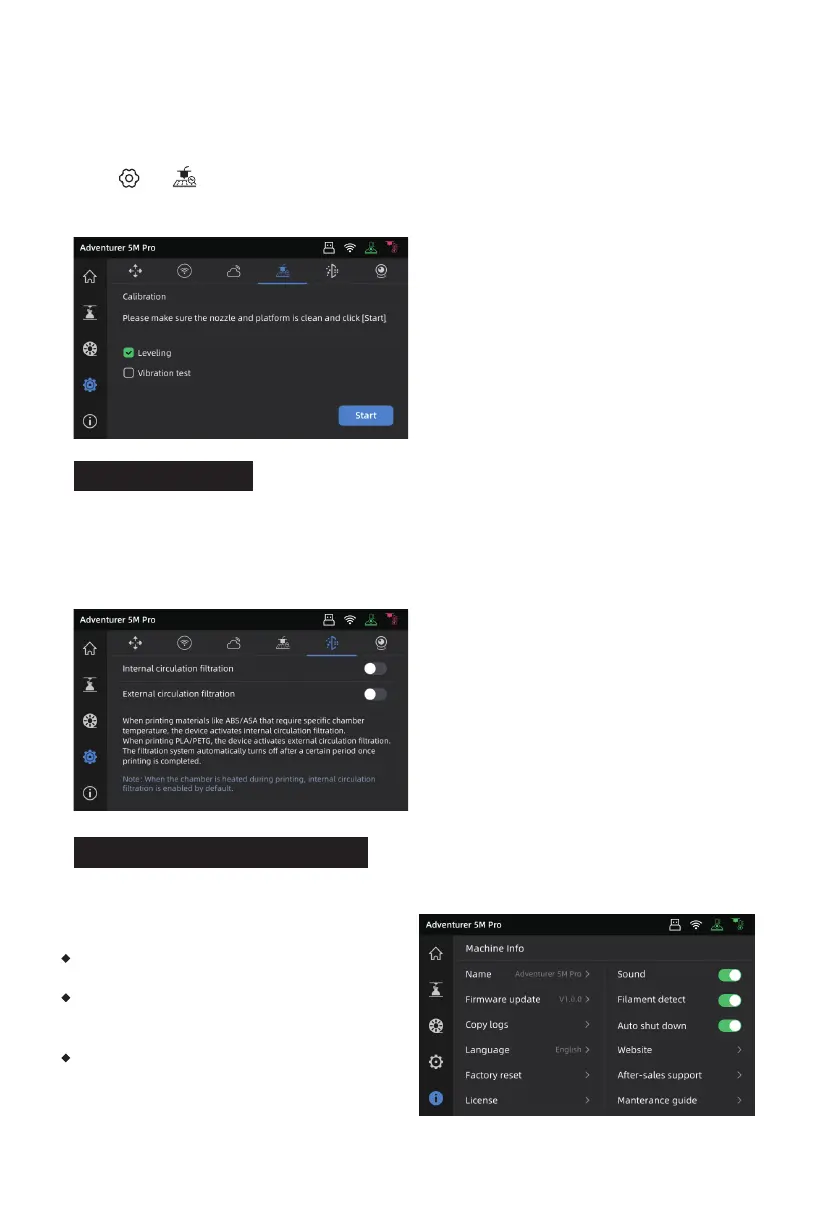
Click [ ] - [ ] to enter the leveling and calibration interface. Choose [Leveling] or [Vibration
test], click [Start], and the printer will automatically perform the corresponding operation.
(Note: Before calibration, ensure there are no foreign objects on the platform or at the nozzle tip.)
The printer has internal&external circulation air filtration mechanisms for different materials.
5.3 Other Function Settings
In the information interface, you can enable or disable sound, filament detection and auto
shutdown, and perform firmware updates.
When [Filament detect] is enabled, the printer
will stop printing if filament runs out mid-print.
When [Auto shut down] is enabled, the printer
will power off automatically 30 minutes after
completing a print job.
When connected to a wireless network, click
[Firmware update] to view the current version,
check for updates, and perform online firmware
updates.
During printing, the printer can automatically choose between internal circulation filtration or
external circulation filtration based on the detected printing material. (Note: Files exported from
third-party slicing software cannot be automatically recognized and require manual selection.)
28















 To Next Page