Guider User Guide | www.ff3dp.com
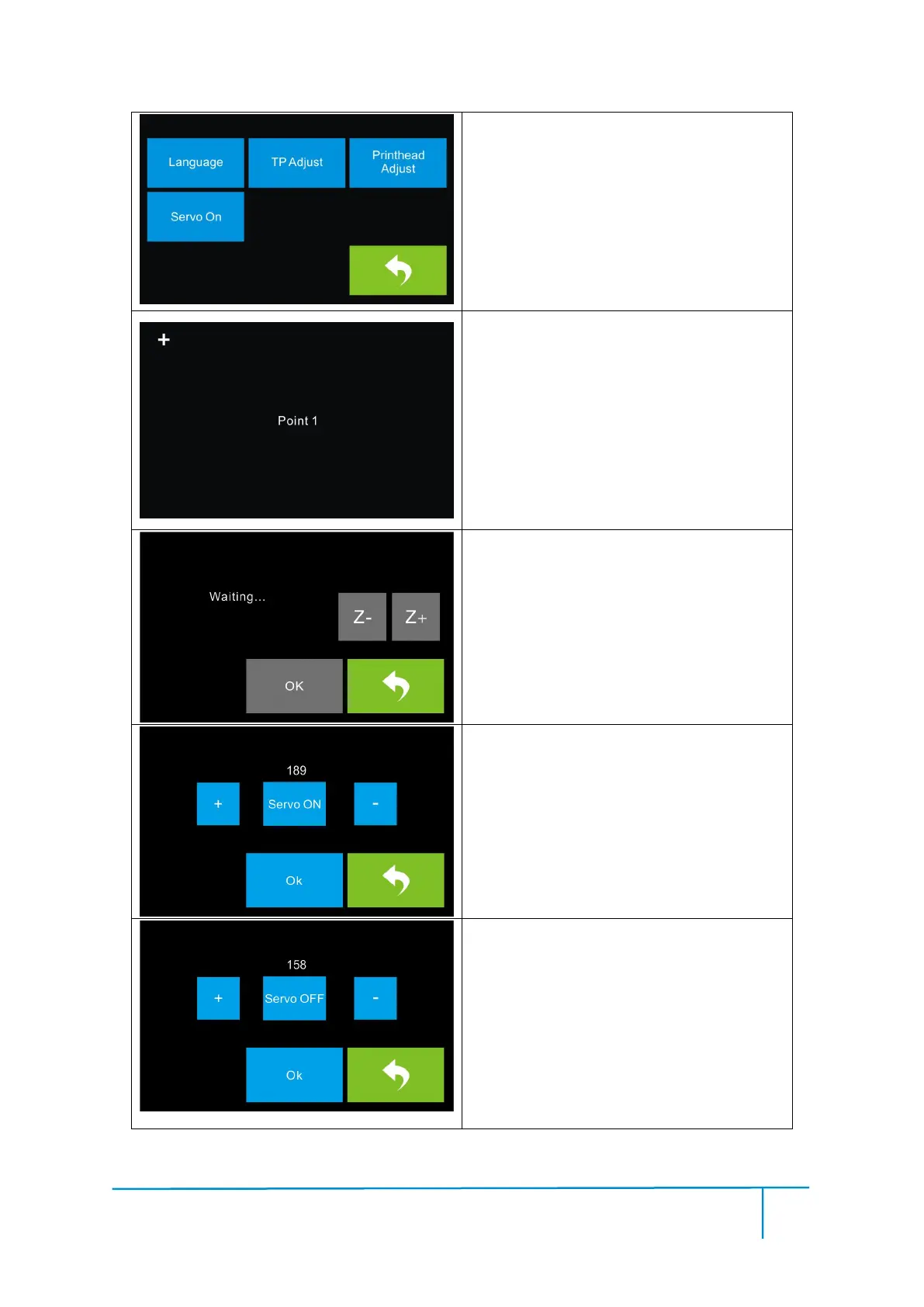
Tap [Setting] to enter the setting interface
◆Language: To set the display language
◆TP Adjust: Adjust interface
◆Servo on: To turn on/down servo
◆Printhead Adjust: To adjust the initial
distance between the extruder and the
build plate
TP adjust:
Tap all the ‘+’ on the touch screen in
sequence to finish touch-screen-LCD
calibration.
Printhead Adjust:
After the build plate and extruder finish
the initial movement, you can tap ‘+’or
‘-’ to adjust the distance between the
build plate and nozzle. Z:0. 00 stands for
the position where the servo is precisely
triggered.
Servo On:
Actually, the present servo status is off.
And the servo’s swing arm withdraws.
Tap ‘+’ or ‘-’ to adjust the status of swing
arm. Tap ‘+’, the arm swings down while
tap ‘-’ , the arm swings up.
Servo OFF:
Actually, the present servo status is on.
And the servo’s swing arm withdraws.
Tap ‘+’ or ‘-’ to adjust the status of swing
arm. Tap ‘+’, the arm swings down while
tap ‘-’ , the arm swings up.















 To Next Page