Changing Filament
Do not pull out the filament with force as it will damage the gears. If the melted
filament has cooled down in the extruder, repeat the following steps below.
08
Loading / Changing Filament
61℃ / 220℃
100%
HOME
27%
PreheatBuild Tools
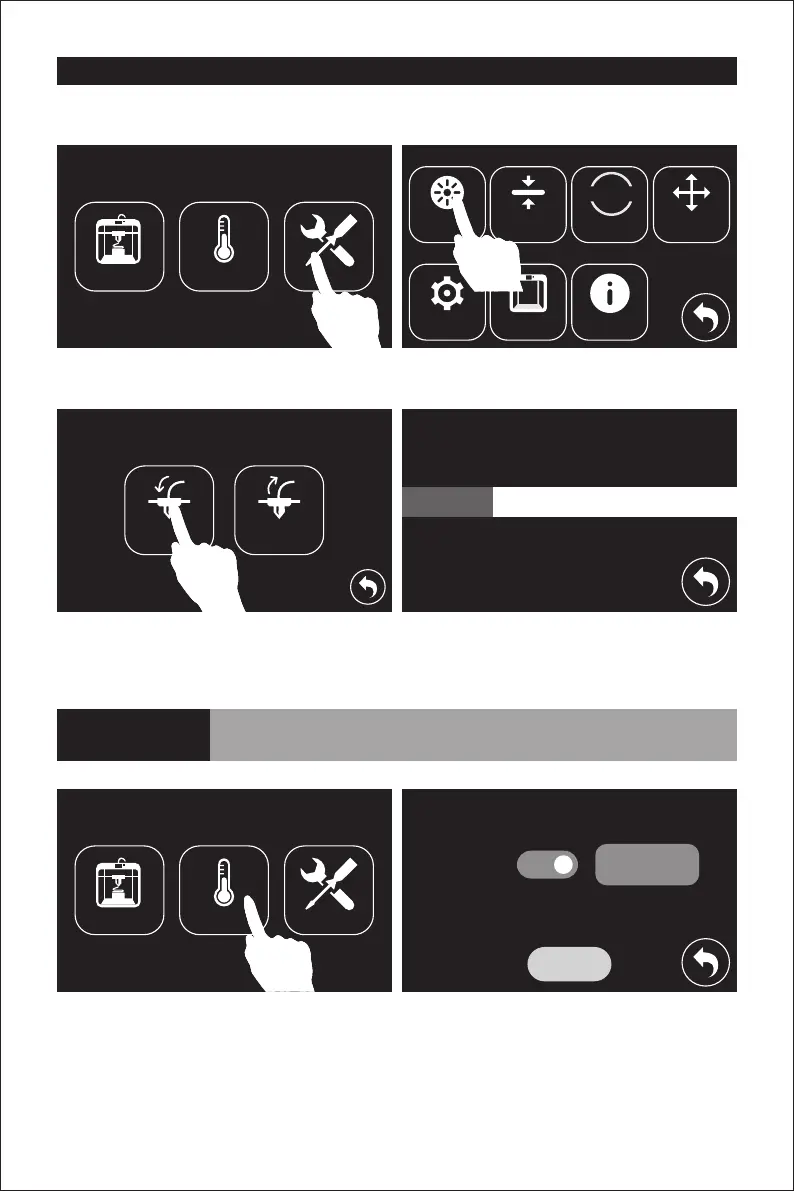
1. Tap [Preheat]--[Start] to the heat up the extruder.
2. Once preheated, hold down the spring presser and pull out the filament.
3. Tap the return button, insert the new filament into the filament intake, tap [Tools]-[Filament]-
[Load]. The filament will be drawn through the extruder once heated. Wait for the extruder to
provide a steady flow of filament.
Build Preheat Tools
Load Unload
Filament Level Home Manual
I’m heating up...
Setting Status About
1. Tap [Tools] and then tap [Filament].
2. Tap [Load]. The extruder will automatically heat up. Once heated, filament will be drawn
through the extruder. Continue extruding until the extruder provides a steady flow of filament.
Extruder
220℃
Extruder
Start















 To Next Page