15
Note: When attaching to the camera, the auto focus assist
beam of the Zoom Mini can only be triggered by setting
its focus mode (M/C/S) to S mode. The other two modes
cannot light up the auto focus assist beam.
Center eective range is 2-13ft / 0.6-4m, and the periphery
range is 2-8.2ft / 0.6-2.5m.
Custom
Function Signs
Function Setting No. Settings &
Description
ST Auto sleep
(standby)
ON ON
OF OFF
AF AF-assist beam ON ON
OF OFF
BL Backlighting
control
10 Sec. O in 10 sec.
OF Always o
ON Always lighting
AP ZOOM display
format
ON APS
OFF 135
1. Press the < ZOOM > Button for 2 seconds until C.Fn menu is displayed.
2. Turn the Select Dial to select the Custom Functions.
3. Press the <SET> Button and the Setting No. blinks.
4. Turn the Select Dial to set the desired number. Pressing the <SET> Button
will conrm the settings.
5. Press the <ZOOM> Button to exit.
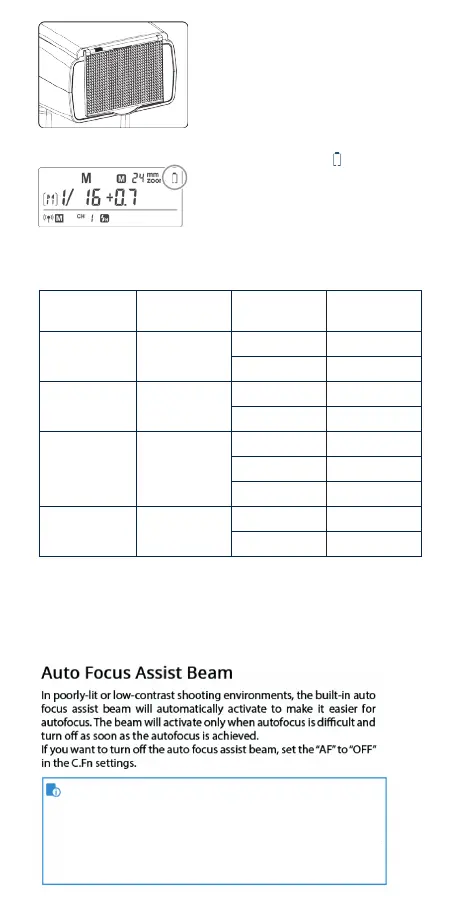
Low Battery Warning
If the battery power is low, < > will appear
and blink on the LCD panel. Please replace the
battery immediately. When the low battery
indicator is displayed, the ZOOM can not be
adjusted, it will constantly be 24mm.
Using the Wide Panel
Pull out the wide panel and place it over the
ash head as shown. The ash coverage will
then be extended to 14 mm.
• The catchlight panel will come out at the
same time. Push the catchlight panel back in.
The <ZOOM> button will not work
C.Fn: Setting Custom Functions
The following table lists the available and unavailable custom functions of this ash.


 To Next Page