EasyManua.ls Logo

FlashPoint ZOOM TTL FLASH R2 - Other Wireless Control Features; R1 Wireless Control Function; Sync Triggering; Bounce Flash

FlashPoint ZOOM TTL FLASH R2
24 pages
Print Icon
To Next Page IconTo Next Page
To Previous Page IconTo Previous Page
Loading...
16
Other Wireless Control Features
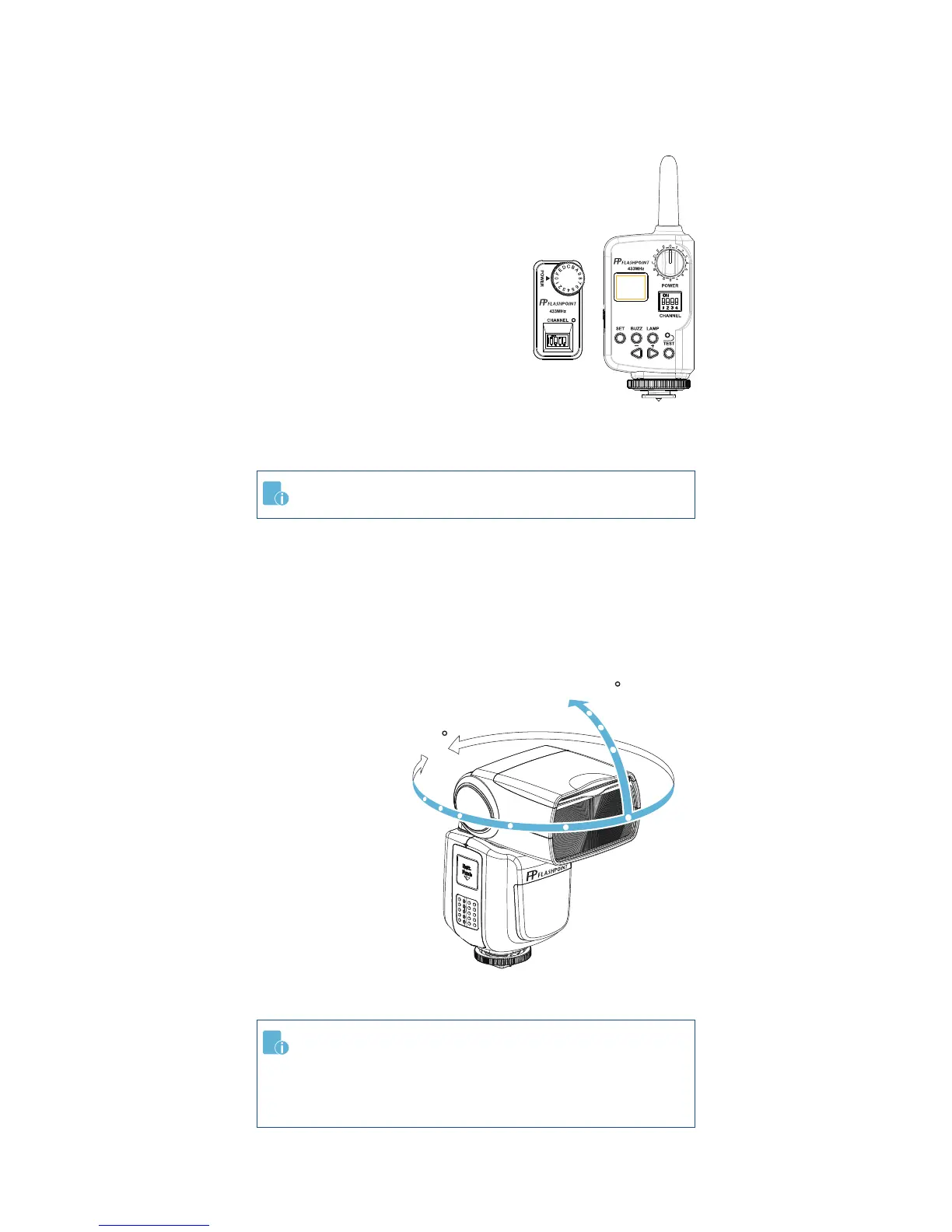
R1 Wireless Control Function

that you can 

transmitter.

need a Flashpoint R1 Transmitter and

FPLFSMZLRR.
Insert the receiver into the Wireless

transmitter into the camera hot shoe.
Settings made on the hotshoe-mounted
transmitter will be wirelessly communi-

the camera shutter release button to


Sync Triggering


camera’s PC socket.
Bounce Flash
By pointing the

a wall or ceiling, the

the surface before
illuminating the

soften shadows

for a more natural-
looking shot. This is

To set the bounce

For full instructions on the use of R1 series remote control,
see its user manual.

might be too weak and result in underexposure.
The wall or ceiling should be a plain, white color with good

may appear in the picture.
360
-7-90

Related product manuals