EasyManua.ls Logo

FlashPoint ZOOM TTL FLASH R2 - Flash Coverage and Special Effects; Creating a Catchlight; ZOOM: Setting Flash Coverage

FlashPoint ZOOM TTL FLASH R2
24 pages
Print Icon
To Next Page IconTo Next Page
To Previous Page IconTo Previous Page
Loading...
17
ZOOM: Setting the Flash Coverage and Using the Wide Panel

be set to match the lens focal length from 10 mm to 100mm


expanded for 7mm wide-angle lenses.
Choose 4/3 or 135 system in the Custom Function, C.Fn-ZOOM.
Creating a Catchlight
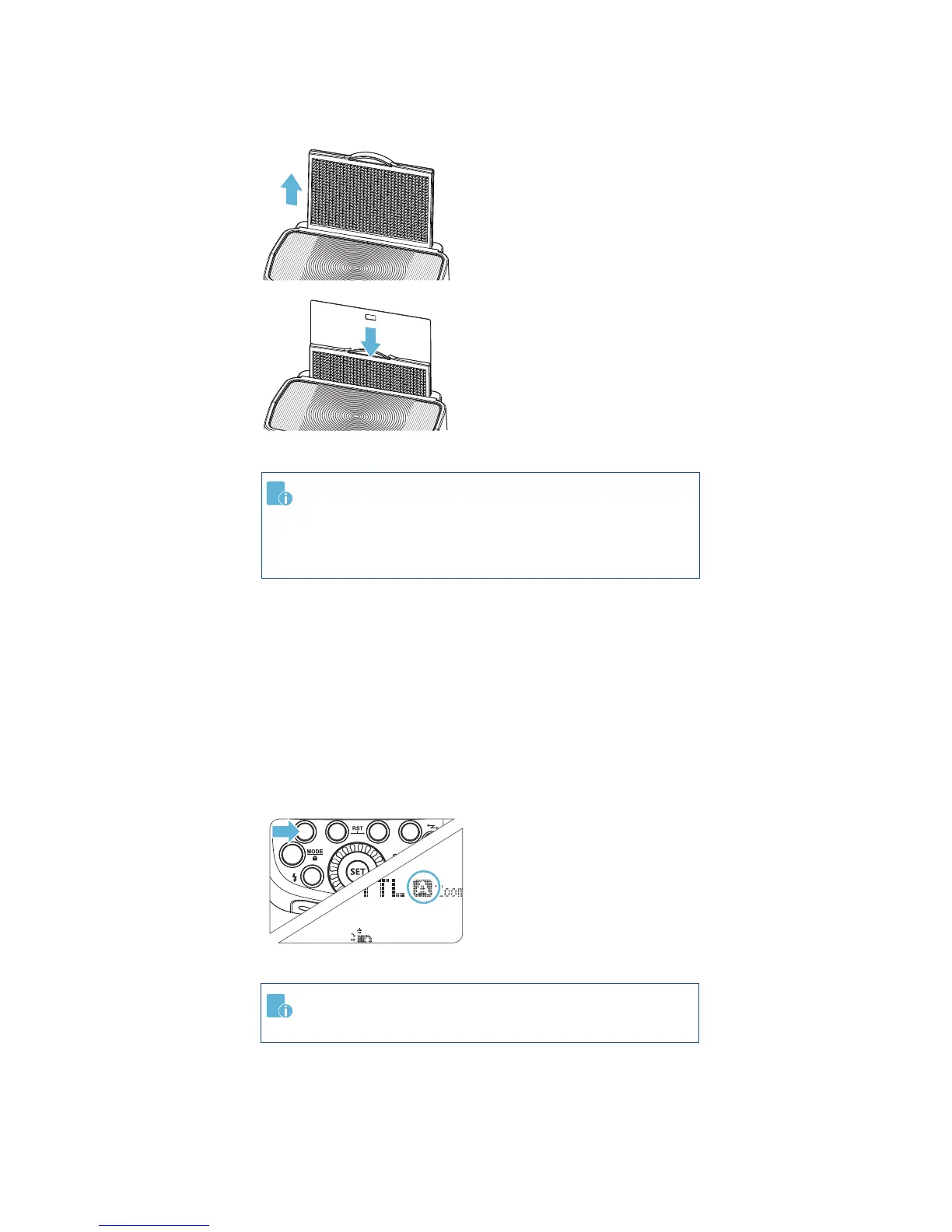
With the catch light panel, you can create a catchlight in the


the lens focal length so that the picture will not have a dark
periphery.


head left or right.


2
3
-
ward to 90°.
Pull out the wide angle

The catch light panel will
come out at the same time.
-
sion panel back in.
Push in only the wide

Follow the same proce-

In Manual Zoom mode,
press the <ZOOM/C.FN>
button.
Turn the Select Dial to

If <A> is displayed, the

automatically.

Related product manuals