5 –Camera Controller
A6700sc/A6750sc User’s Manual
18
5.2.4.2.1.1 Frame Sync Starts
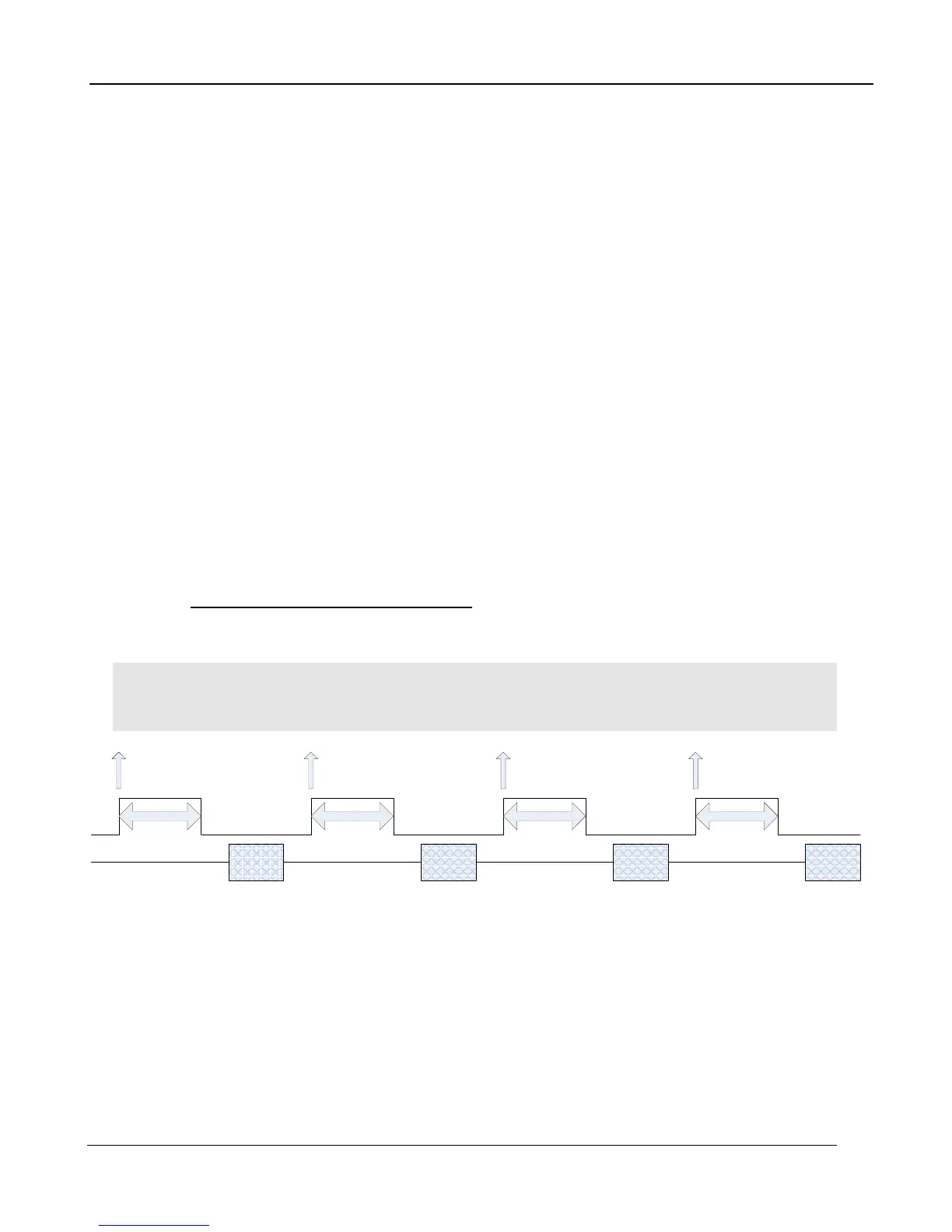
The A6750sc makes use of frame syncs and triggers to control the generation of image data. Frame
syncs control the start of individual frames whereas triggers start sequences of frames.
The generation of a frame consists of two phases: integration and data readout. Depending on the
timing between these two events, you can have two basic integration modes: Integrate Then Read
(ITR), and Integrate While Read (IWR). In ITR, integration and data readout occur sequentially. The
complete frame time is the combined total of the integration time plus readout time. In IWR, the
integration phase of the current frame occurs during the readout phase of the previous frame. In
other words, ITR and IWR terms refer to whether or not the camera will overlap the data readout and
integration periods. In ITR, the data is not overlapped which means lower frame rates but provides a
less noisy image. IWR can achieve much faster frame rates with a slight increase in noise. The
A6750sc does not require the user to explicitly choose whether to operate in ITR or IWR modes. The
camera will automatically select the integration mode based on the integration time, frame rate, and
frame sync mode.
The A6750sc supports two Frame Sync Modes: Frame Sync Starts Integration (FSSI), and Frame
Sync Starts Readout (FSSR). FSSI and FSSR determine which phase of the frame generation
process (integration or data readout) is synchronized to the frame sync. FSSI starts the integration
period when a frame sync occurs (i.e. “take a picture now”). The camera automatically calculates
when to start data readout. FSSR starts the data readout (for the previous frame) when a frame sync
occurs (i.e. “give me data now”). The camera automatically calculates when to start integration for the
current frame. In FSSI mode, the camera could be in either ITR or IWR mode. In FSSR mode, the
camera is always in IWR mode.
5.2.4.2.1.1.1 Frame Sync Starts Integration (FSSI)
Upon frame sync, the camera immediately integrates followed by data read out. Based on integration
time, frame size, and frame rate, the camera will automatically choose ITR or IWR mode.
NOTE: When using an external frame sync and superframing, the external frame sync should be set
to comply with ITR frame rate limits. If the external sync rate is too fast, the camera will ignore syncs
that come before the camera is ready
Preset 0
Data
Frame Sync
Preset 1
Data
Preset 2
Data
Preset 3
Data
Frame Sync Frame Sync Frame Sync
Preset 3
Integration
Preset 2
Integration
Preset 1
Integration
Preset 0
Integration
Figure 4-2: Frame Sync Starts Integration, ITR



 To Next Page