STRADA GENERATION3 – S5 - INSTALLATION MANUAL
46/66
7.5 Opening the upper door with an electronic lock
7.5.1 Preliminary operations
A. Take:
the upper door mechanical key,
the Flowbird door opening tool, to prevent damage to the housing or door paint,
a square key,
a maintenance card with adapted access rights.
7.5.2 Procedure
7.5.2.1 Opening the upper door
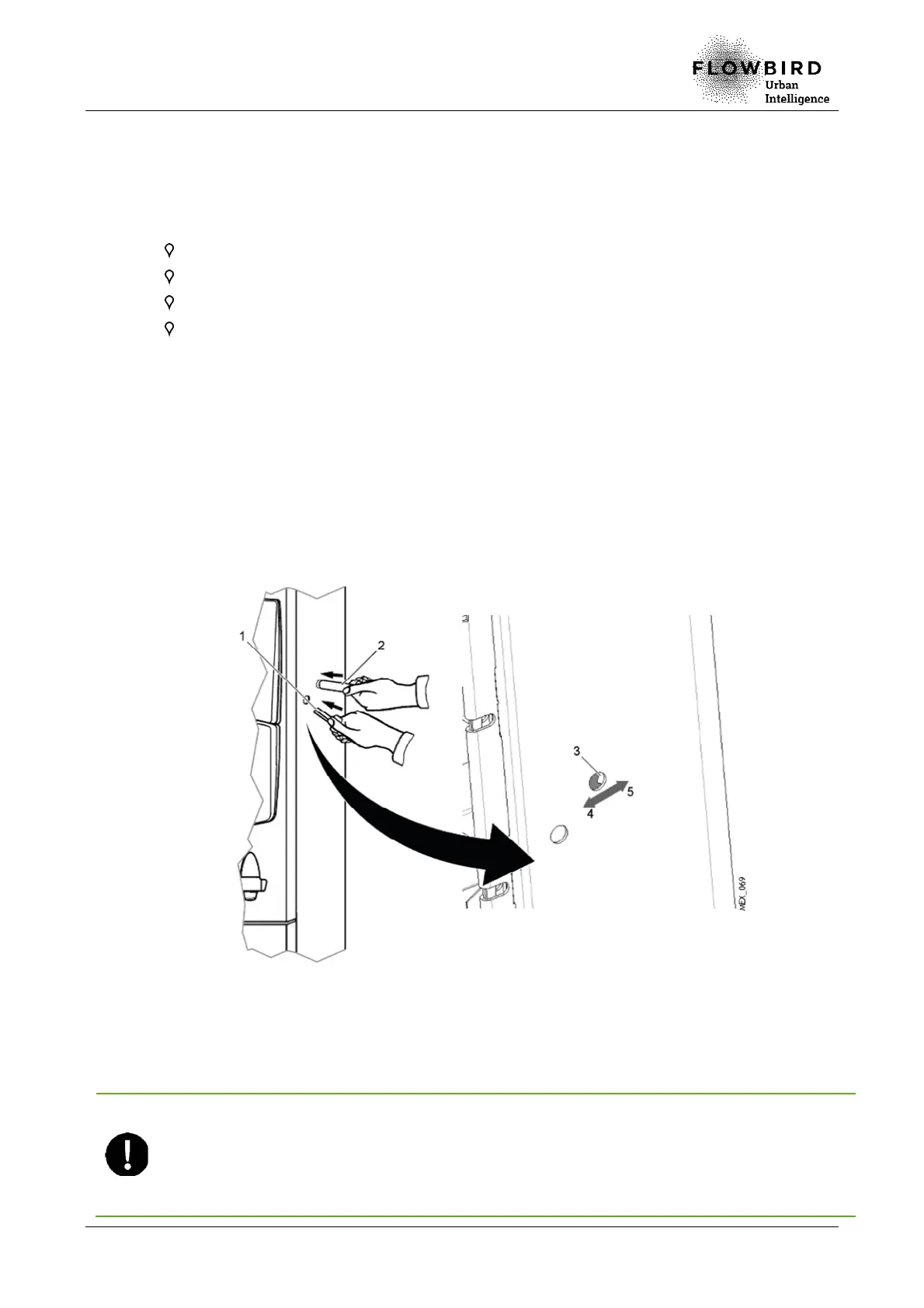
The electronic lock is equipped with protective flaps to reduce the risk of vandalism.
A. Insert the tip of the door opening tool (2) in the lock (3).
B. With the tip of the tool, push the first protective flap to the left (4) and the second flap
to the right (5).
C. When the keyholes are reachable, insert the square key (1) in its slot.
Opening the upper door
D. Put the maintenance card in the card slot.
E. Enter a PIN code at the keyboard.
You enter in the service mode.
After you have opened the upper door, the lock will be closed again after a 15
second time out to save power. Because the terminal now is in the service mode
you cannot prove your identity and get the necessary privilege to open the door
again. Instead you have to press an Open Upper Door key shown in the start
page of the service menu to open the lock mechanism again.



 To Next Page