ProSim™ 2/3
Users Manual
42
Battery Replacement
Warning
To prevent possible electrical shock, fire, or
personal injury:
• Remove batteries to prevent battery
leakage and damage to the Product if it is
not used for an extended period.
• Be sure that the battery polarity is correct
to prevent battery leakage.
• Batteries contain hazardous chemicals that
can cause burns or explode. If exposure to
chemicals occurs, clean with water and get
medical aid.
When the charge in the batteries becomes low, a warning
will show in the display. Replace the batteries immediately.
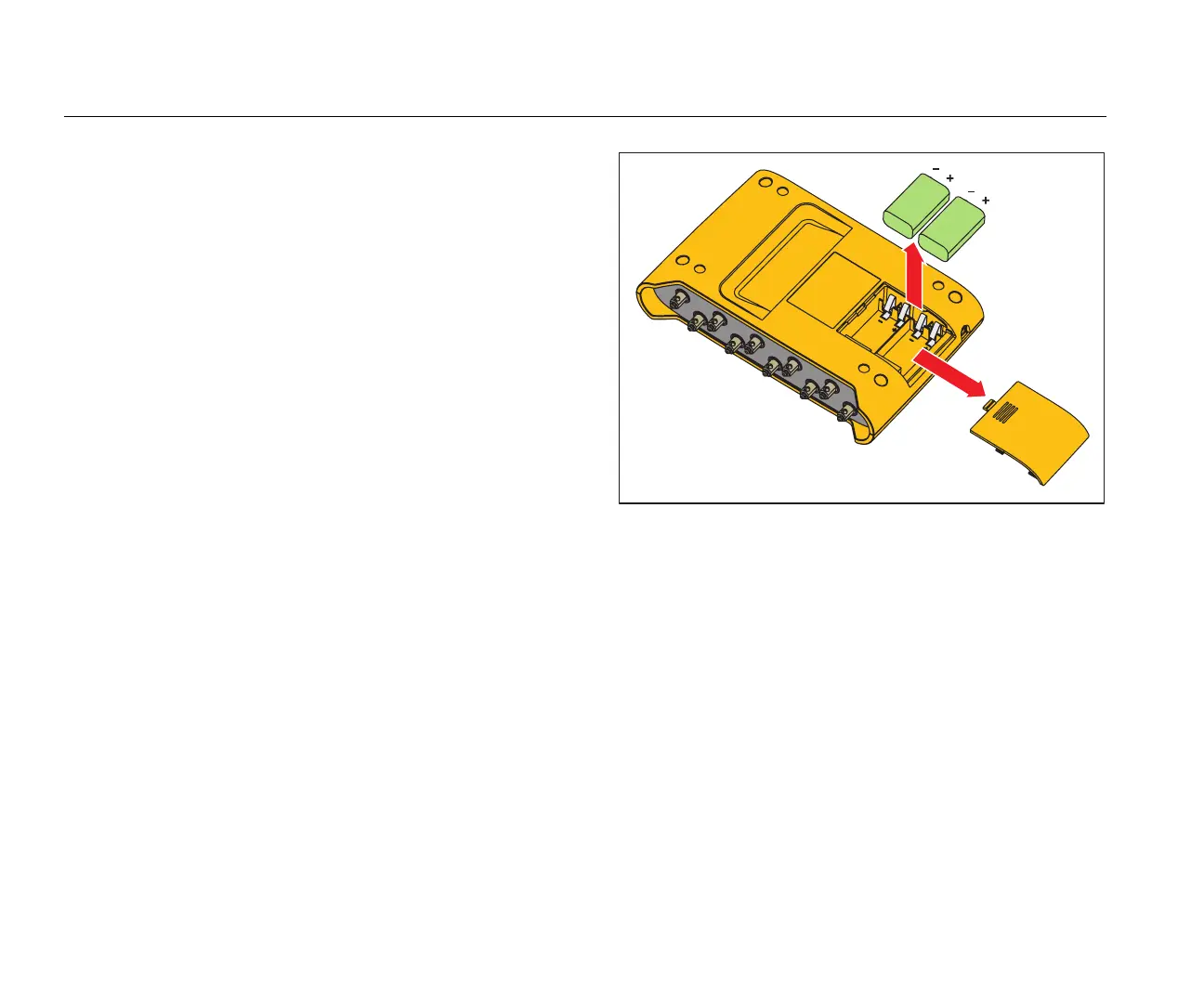
To replace the batteries:
1. Turn off the Product and remove all test leads.
2. Slide the battery door off on the rear of the Product.
See Figure 16.
3. Remove the two 9-volt batteries and replace them with
new ones. Use the correct battery orientation.
4. Install the battery door.
hal008.eps
Figure 16. Battery Replacement



 To Next Page