EasyManua.ls Logo

Fluke 540B - Calibrating an AC Voltage Source

Fluke 540B
76 pages
Print Icon
To Next Page IconTo Next Page
To Previous Page IconTo Previous Page
Loading...
540B
STEP
CONTROL
POSITION
OPERATION
a
POWER
ON
Set
the
RANGE
switch
in a
position
that
will
cause
GALV
OPEN
the
PERCENT
INPUT
meter
to
indicate
close
to,
SENSITIVITY LOW
but
not
exceed,
100%
for
the
level
to
be
calibrated.
RANGE
Adjust
the
de
source
voltage
to
the
exact
rms
value
MODE
DC SEARCH
of
the
ac
voltage
to
be
calibrated.
(Note
PERCENT
INPUT
meter
indication.
)
b MODE
DC
TRANSFER
Tap
the
GALV
switch
against
the
spring
tension
to
GALV
MOMENTARY
just
long enough
to
see
if
the
GAL-
REFERENCE
COARSE
VANOMETER
needle
will
stay
on
scale
.
Adjust
ADJUST
MEDIUM
the
COARSE
and
MEDIUM
controls
until
a
zero
reading
is
obtained.
c GALV
OPEN
Adjust
the
GALV
ZERO
control
for
zero
reading
SENSITIVITY MED
on
the
GALVANOMETER.
GALV
ZERO
d
GALV
LOCK
Adjust
the
MEDIUM
and
FINE
controls
for
zero
REFERENCE
MEDIUM
reading
on
the
GALVANOMETER.
ADJUST
FINE
e
GALV
OPEN
Adjust
the
GALV
ZERO
control
for
a
zero
reading
SENSITIVITY HIGH.
on
the
GALVANOMETER.
GALV
ZERO
--
f GALV
LOCK
Adjust
the
FINE
control
for
a
zero
reading
on
the
REFERENCE
GALVANOMETER.
ADJUST FINE
g GALV
OPEN
SENSITIVITY
LOW
h MODE
AC SEARCH
Adjust
the
ac
level
to
be
calibrated
until
a
reading
is
obtained
on
the
PERCENT
INPUT
meter
that
is
equal
to
the
reading
obtained
and
noted in
step
a.
i
MODE
AC
TRANSFER
NOTE: DO NOT ADJUST
THE
REFERENCE
ADJUST CONTROLS IN THIS MODE.
j
SENSITIVITY
LOW
Tap
the
GALV
switch
against
the
spring
tension
to
GALV
MOMENTARY
just
long enough
to
see
if
the
GAL-
VANOMETER
needle
will
stay
on
scale
while
adjust-
ing
the
level
of
the
ac
to
be
calibrated.
When
an
on
scale
reading
is
obtained
adjust
the
ac
level
for
a
zero
reading
on
the
GALVANOMETER.
k GALV
LOCK
Further
refine
the
adjustment
of
the
ac
voltage
until
SENSITIVITY
MED a GALVANOMETER
reading
of
zero
is
obtained
in
HIGH
the
MED
and
HIGH
SENSITIVITY
positions.
Record
the
ac
voltage
source
setting.
1
Repeat
steps
b
through
k
at
least
three
times
or
until
repeatibility
is
attained.
Make
note
of
the
ac
source
setting.
m
Reverse
the
input
polarity
to
the
thermocouple
by
depressing
the
POLARITY
switch.
Repeat
steps
b
through
k
at
l
east
three
times
or
until
repeatibility
is
attained.
Make
note
of
the
ac
source
setting.
n
Set
the
ac
source
voltage
adjustment
in
the
center
of
the
two
settings
recorded
in
steps
l
and
m.
The
rms
value
of
the
ac
voltage
now
equals
that
desired.
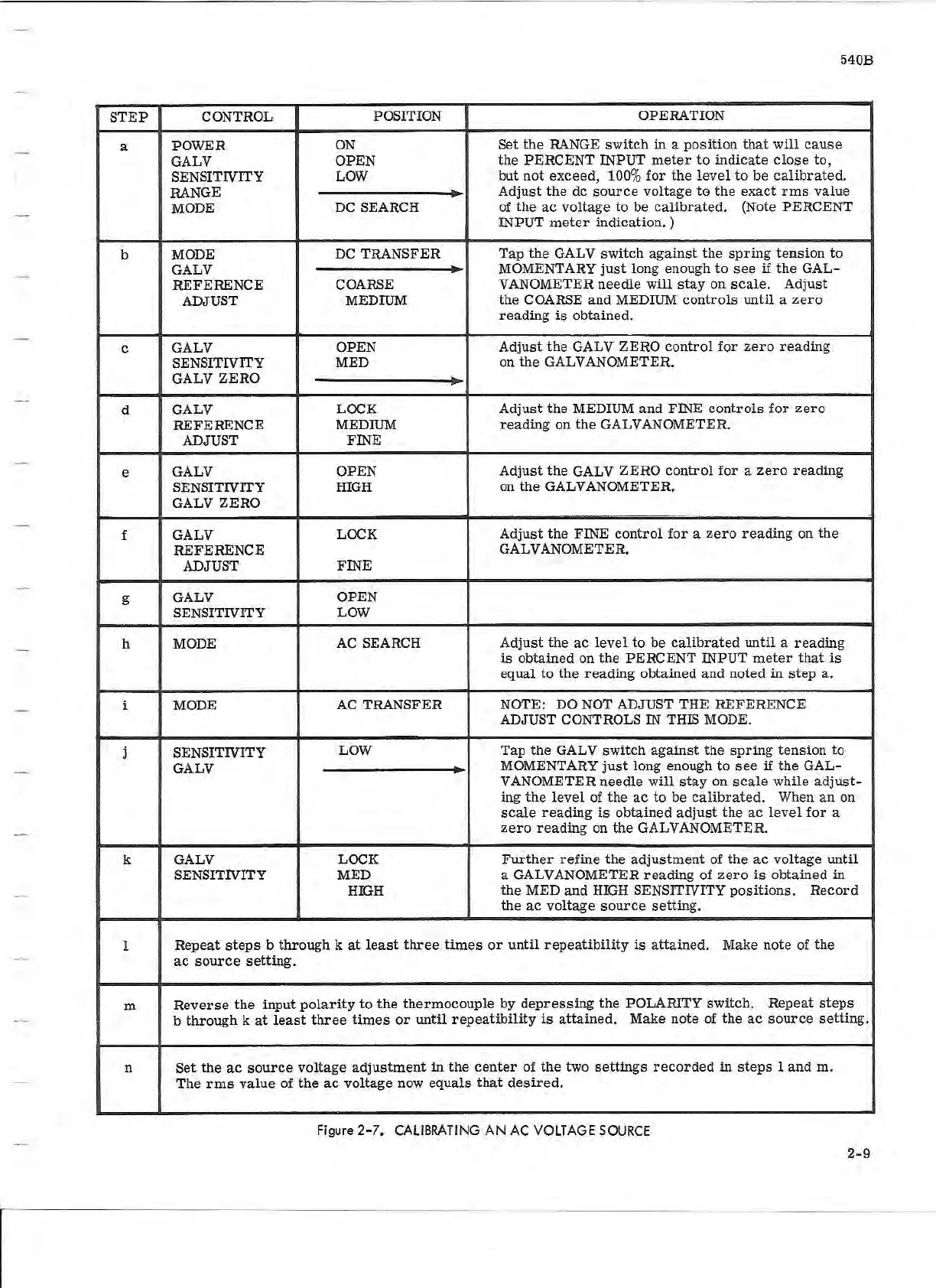
Figure 2- 7. CALIBRATING
AN
AC VOLTAGE
SOURCE
2-9