EasyManua.ls Logo

Fluke 540B - Electronic Galvanometer Calibration

Fluke 540B
76 pages
Print Icon
To Next Page IconTo Next Page
To Previous Page IconTo Previous Page
Loading...
540B
b.
GALV
switch
OPEN.
SENSITIVITY
switch
LOW.
POWER
switch
ON
.
c.
Adjust R6
for
a
1.
2
±0.1
vol
t
peak
- to-
peak
wave-
form
displayed
on
the
oscilloscope.
d. Remove
oscilloscope
connections.
e.
Connect
an
electronic
counter
between
the
lead
of
R5
nearest
Ql
and
the
negative end of
Cl.
f. Adjust
the
core
of
Tl
for
a 2500
±5
Hz indication on
the electronic counter. (The
core
of T1
is
adjust
-
able
from
the land
pattern
side
of the
circuit
board.
Access
to the adjustment
is
through the opening l
eft
from
removing
the
battery
pack. )
g.
Remove
all
test
connectio
ns
and
set
the
POWER
switch
to
OFF.
h. Re -
install
the
battery
pack
and
top
cover
on
the
Model
540B.
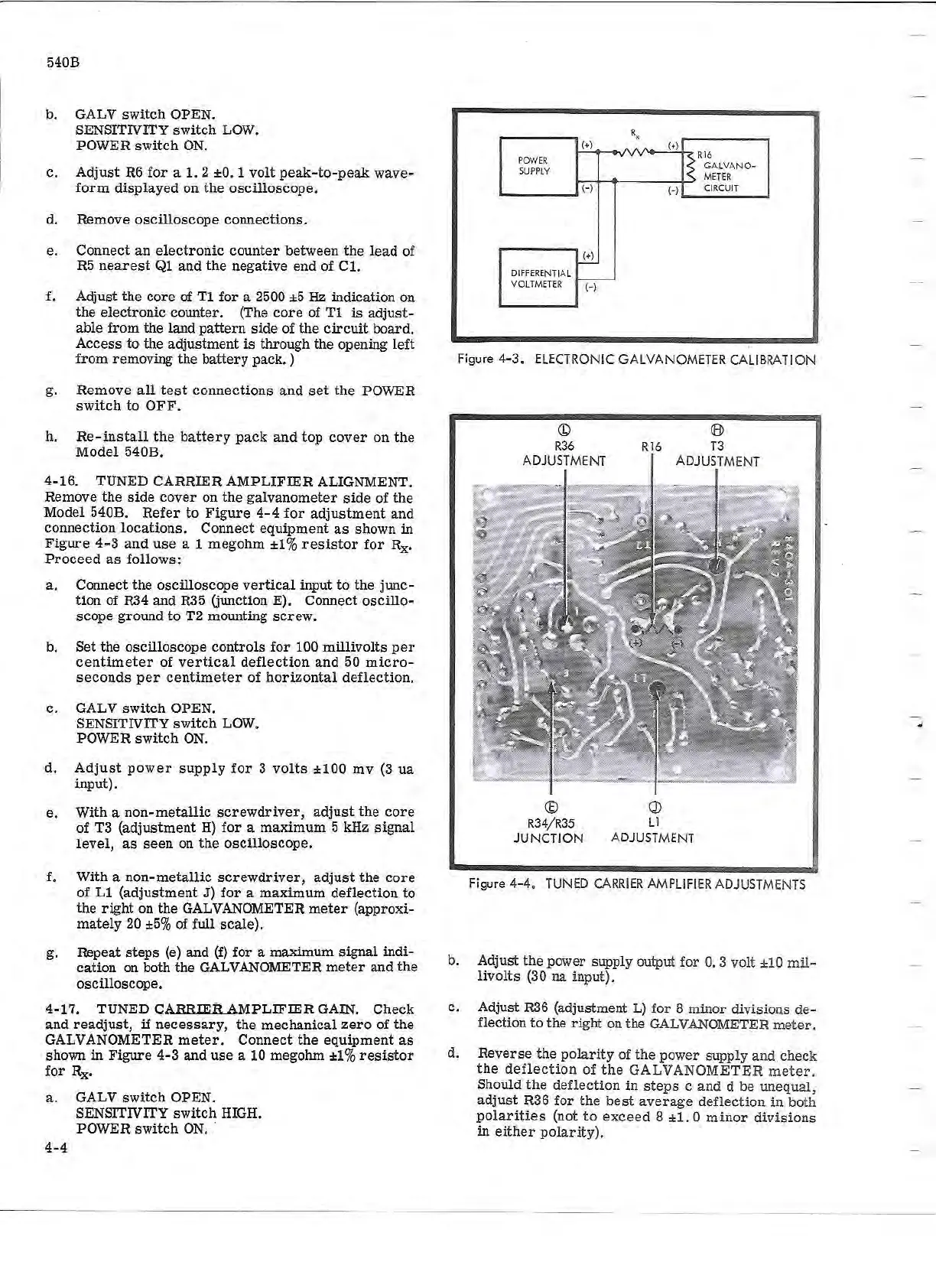
4-16.
TUNED CARRIER
AMPLIFIER
ALIGNMENT.
Remove
the
side
cover
on
the
galvanometer
side
of the
Model 540B.
Refer
to
Figure
4- 4
for
adjustment
and
connection
locations.
Connect
equipment
as
shown
in
Figure
4- 3
and
use
a 1
megohm
±1
%
resistor
for
Rx.
Proceed
as
follows:
a.
Connect the oscilloscope
vertical
input
to
the junc-
tion of R34
and
R35 (junction
E)
. Connect
oscillo
-
scope
ground
to
T2 mounting
screw.
b. Set
the
oscilloscope
controls
for
100 m
ill
ivolts
per
centimeter
of
vertical
deflection
and
50
micro-
seconds
per
centimeter
of
horizontal
deflection.
c.
GALV
switch
OPEN .
. SENSITIVITY
switch
LOW.
POWER
switch
ON.
d.
Adjust
power
supply
for
3
volts
±100
mv
(3
ua
input).
e.
With a non-
metallic
screwdriver,
adjust
the
core
of
T3 (adjustment
H)
for
a
maximum
5 kHz
signal
level,
as
seen
on
the
oscilloscope.
f. With a non-
metallic
screwdriver,
adjust
the
core
of
Ll
(adjustment
J)
for
a
maximum
deflection
to
the
right
on
the
GALVANOMETER
meter
(approxi-
mately
20
±5%
of
full
scale)
.
g.
Repeat
steps
(e) and
(f)
for
a maximum
signal
indi-
cation
on both the GALVANOMETER
meter
and
the
oscilloscope.
4- 17. TUNED CARRIER
AMPLIFIER
GAIN.
Check
and
readjust,
if
necessary,
the
mechanical
zero
of
the
GALVANOMETER
meter.
Connect
the
equipment
as
shown
in
Figure
4-3
and
use
a 10 megohm
±1
%
resistor
for
Rx•
a.
GALV
switch
OPEN.
4-4
SENSITIVITY
switch
HIGH.
POWER
switch
ON
x
(+)
(+)
POW
ER
Rl
6
S
UPPLY
G
ALVA
NO-
METE
R
(-)
(-)
CIRCU
IT
(+)
DI
FFERE
NT
I
AL
VOLT
METE
R
(-)
Figure
4-3
.
EL
ECT
RO
NI
C
GA
LV
ANO
METER
CA
LI
BRATION
E
R34
/
R35
JUNC
T
IO
N
J
L1
A
DJ
U
ST
MENT
Figure 4
-4
. TUNED
CAR
R
IER
AMPLI
FI
ER ADJUSTMENTS
b. Adjust the power s
up
pl
y output
for
0.
3 volt
±10
mil
-
livolts
(
30
na
inpu
t)
.
c.
Adjust
R36
(adjustment L) for 8 minor divisio
ns
de
-
flection
to
the
righ
t on
th
e
GALVAN
OMET
ER
met e
r.
d.
Reverse
th
e
po
la
rity
of the po
wer
su
pply
and check
the
deflec
t
io
n
of
the
GALVAN
OMET
ER
mete
r.
Should
the
de
fl
ection
in
st eps c a nd d be
un
e
qual,
adjust
R36 f
or
t
he
bes
t
average
de
fl
e
ction
in
both
po
l
arities
(not t o e
xceed
8
±1.
0
mi
nor
divi
s
ion
s
in
either
pola
r
ity
).