EasyManua.ls Logo

Fluke 540B - Voltage Source

Fluke 540B
76 pages
Print Icon
To Next Page IconTo Next Page
To Previous Page IconTo Previous Page
Loading...
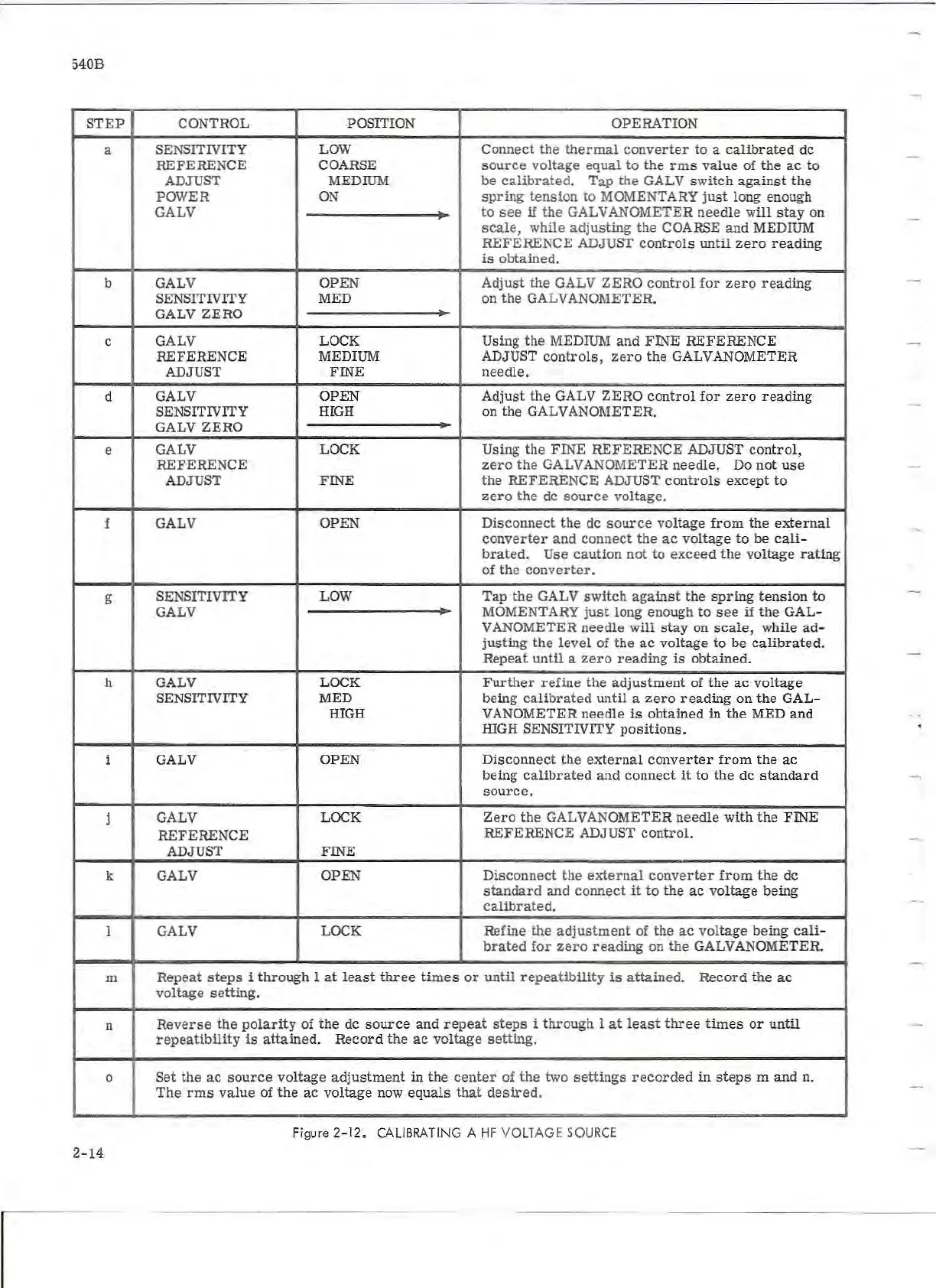
540B
ST
EP
CONTROL POSITION OPERATION
a
SENSITIVITY LOW Conn
ect
the
therma
l
converter
to
a
calibrated
de
REFERENCE
COARSE
sourc
e
voltage
equal
to
the
rms
va
lue
of
the
ac
to
ADJUST MEDIUM
be
calibrated.
Tap
the
GAL V
switch
against
the
POWER
ON
spring
tension
to
MOMENTARY
ju
st
long
enough
GALV
to
see
if
the
GALVANOMETER
needle
w
ill
stay
on
scal
e,
while
adjusting
the
COARSE
and
MEDIUM
REFERE
NCE ADJUST
controls
until
zero
re
ading
is
obtained.
b G
AL
V
OPE
N
Adjust
the
GALV
ZERO
control
for
zero
reading
SENSITIVITY MED on
the
GALVANOME
TER.
GALV
ZERO
c GALV LOCK
Using
the
MEDIUM
and
FINE
REFERENC
E
REFERENCE
MEDIUM ADJUST
controls,
zero
the
GALVANOMETER
ADJUST
FINE
needl
e.
d
GALV
OPE
N
Adjust
the
GALV
ZERO
control
for
zero
reading
SENSITIVITY HIGH
on
the
GALVANOMETER.
GALV
ZERO
e
GALV
LOCK Using
the
FINE
REFERE
NCE ADJU
ST
control,
REFERENCE
z
ero
the
GALVANOMET
ER
needle.
Do
not
use
ADJUST FINE
the
REFERENCE
ADJUST
control
s
except
to
zero
the
de
source
voltage.
f
GALV
OPEN
Di
sconnect
the
de
source
vo
ltage
from
the
external
converter
and
connect
the
ac
vol
tage
to
be
call
-
brated.
Use
caution
not
to
exceed
the
voltage
rating
of
th
e
converter
.
g SENSITIVITY LOW
Tap
the
GALV
switch
aga
ins
t
the
spring
tension
to
GALV MOMENTARY
just
long
enough
to
see
if
the
GAL-
V ANOMETER
needle
will
s t
ay
on
sca
l
e,
while
ad
-
justing
the
level
of
the
ac
voltage
to
be
calibrated.
Repeat
until
a
zero
reading
is
obtained
.
h GALV LOCK
Further
refine
the
adjustm
ent
of
the
ac
voltage
SENSITIVITY MED being
ca
li
brated
until
a
zero
read
ing
on
the
GAL
-
HIGH VANOMETER
needl
e
is
obtained
in
the
MED
and
IDGH SENSITIVITY p
ositions.
i GALV
OPEN
Disconn
ect
the
exter
nal
converter
from
th
e
ac
being
calibrated
and
connect
it
to
the
de s
tandard
sourc
e.
j GALV LOCK
Zero
the
GALVANOMETER
needle
with
the
FINE
REFERENCE
REFERENCE
ADJUST
control.
ADJUST FINE
k GALV
OPEN
Disconnect
the
external
converter
from
the
de
standard
and
connect
it
to
the
ac
voltag
e
being
calibrated.
1
GALV LOCK
Refine
the
adjustment
of
the
ac
vol
tage
being
cali
-
brated
for
zero
reading
on
the
GALVANOME
TER.
m
Repeat
steps
i
through
1
at
lea
s t
thr
ee
times
or
until
repeatibility
is
attained.
Record
th
e
ac
voltage
setting
.
n
Reverse
the
polarity
of
the
de
source
and
re
pe
at
steps
i
through
1
at
least
three
times
or
until
repeatibility
is
attained.
Record
the
ac
voltage
setting
.
0
Set
the
ac
source
voltage
adjustment
in
the
center
of
the
two
settings
recorded
in
steps
m
and
n.
The
rms
va
lue
of
the
ac
voltage
now
equals
that
desired.
Figure 2-1 2. CALIBRATI
NG
A
HF
VOLTAGE
SOURCE
2-14