EasyManua.ls Logo

Fluke 540B - Battery Installation and Removal; Battery Check Calibration

Fluke 540B
76 pages
Print Icon
To Next Page IconTo Next Page
To Previous Page IconTo Previous Page
Loading...
r
540B
4- 3. The
calibration
procedures
outlined
under
Peri-
odic
Maintenance
should
be
performed
annually
or
oftener
to
provide
the
most
satisfactory
service
from
your Model 540B. The
recommended
test
equipment
is
listed
in
Figure
4-1.
4-4.
BATTERY INSTALLATION
AND
RE·
MOVAL
4- 5.
Other
tha
.n
the
battery
condition
checks
(para
-
graph
2- 11) and
recharging,
routine
power
pack
main
-
tenance
is
limited
to
battery
replacement
. Due
to
the
advantage of being
able
to
recharge
the
major
battery
sections
,
routine
maintenance
is
further
limited
to
re-
placement
of
the
me
rcury
reference
battery,
as
re-
quired.
Should it become
necessa
ry
to
replace
any of
the
recharg
eable
batteries,
the
following
instructions
shoul
d be
used
.
a.
Remove
the
six
screws
indicated on
the
front
panel
of the
battery
pack
in
Figure
3-4.
b.
Sli
de
the
angle
bracket
assembly
to
one
side.
c.
Carefully
lift off one of
the
formed
plastic
battery
holders
to
allow
access
to
the
batter
ies.
d.
Re-assemble
after
battery
replacement.
CAUTION!
Non-rechargeable
batteries
should
always
be
removed
from
the
540B
if
they
fail
the
battery
check,
if
the
instrument
is
to
be
shipped,
or
if
the
instrument
is
to be
stored
for
extended
periods
of time.
4-6.
BATTERY CH ECK
CALIBRATION
4-7.
Each battery section of the Model 540B (REFER-
ENCE, GALV, and SEARCH)
has
a
correspo
nding
cir-
cuit
t
hat
allows
th
e
PERCE
NT INPUT
METER
to
indi-
cate
the
condition of
each
battery
section.
Calibra
tion
of
these
circuits
constitutes
the
setting
of
th
ei
r
adjust-
ments,
such
that
a low
battery
condition
indication
is
esta
blished on
the
PERCENT INPUT m
eter
scale,
at
the
lower
end of
the
green
BAT
OK
band.
These
adjust
-
ments
are
set
at
the
factory
and should
normally
never
have
to
be
adjusted.
Should a
situation
arise
in which
you feel
that
these
circuits
should
be
re
-c
alibrated,
use
the
following
procedure
for
Model 540B ' s
containing
mercury
battery
packs. Should your Model 540B contain
the
Model 540B-110 Rechargeable
Battery
Pack,
refer
to
paragraph
4-8.
a.
Model 540B POWER
switch
to
OFF.
b. Remove the
battery
pack
from
the
rear
of
the
Model
540B.
c.
Remove
the
battery
hold down
clamps
and
take
out
all
of
the
batteries
.
d. Conn
ect
1. 0
volt
(±10 mv)
de
between
pin
s
7(-
) and
5(+) on
the
battery
pack
printed
circ
uit
board.
4-2
e. POWER
switch
to REFERENCE.
f.
Adjust
R462
(see
Figure
4-
2)
for
a
PERCENT
IN-
PUT
meter
indication
at
the
lower
limit
of the BAT
OK
band.
g. POWER
switch
to
OFF.
Remove connections.
h. Connect
11.5
volts
(±100
mv)
de
between
pins
2(-)
and
1(+).
i.
POWER
switch
to GALV.
j . Adjust R461
(see
Figure
4-2)
for
a
PERCE
NT IN-
PUT
meter
indication
at
the lower
limit
of
the
BAT
OK
band.
k.
POWER
switch
to O
FF
.
Remove
connections.
l.
Connect
11.5
volts
(±100
mv) de between
pins
3(-)
and 4(+).
m . POWER
switch
to
SEARCH.
n. Adjust R460
(see
Figure
4-
2)
for
a
PERCE
NT
IN-
PUT
meter
indication
at
the
lower
limit
of
the
BAT
OK
band.
o.
POW
ER
switch
to
OFF.
Remove connections.
p.
Install
batter
ies
and
remount
the
battery
pack
in
the
Model
540B.
(For
the
rechargeable
battery
pack,
re-solder
the
corresponding
wires
to
pins
1
and
4,
install
the
1.
35
volt
battery,
and
remount
the
battery
pack.
)
4-8.
If
your
Model 540B
contains
the
recharg
eable
battery
pack,
use
the
procedure
of
paragraph
4-7,
sub-
stituting
the
following
steps
for
step
c of
the
calibration
procedure.
a.
Remove
the
1.
35
volt
battery.
b. Unsolder
the
wire
from
the
Model 540B
wire
har-
ness
at
p in 1 of
the
rechargeable
battery
pa
ck's
printed
circuit
board
.
Trea
t
thi
s
wir
e
as
pin
1 in
th
e following
calibra
tion
proce
dure.
c. Unsolder
the
wire
from
the
Model 540B
wire
har
-
ness
at
pin
4
of
the
rechargeable
battery
pack's
printed
circu
it
board.
Treat
this
wir
e
as
pin 4
in
the
following
calibratio
n
procedur
e.
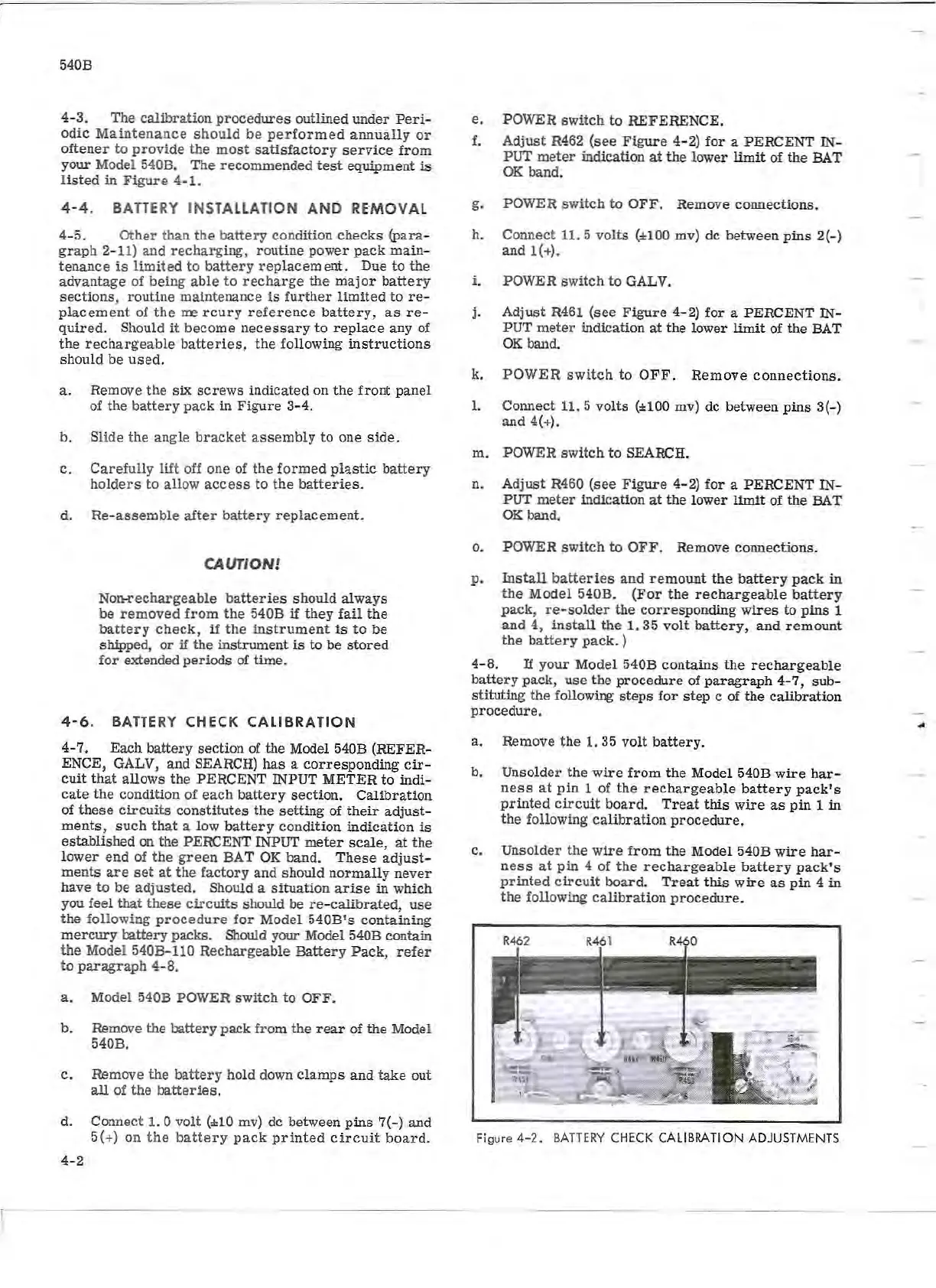
Figure
4-2.
BATTERY
CHECK
CALIBRATION
ADJUSTMENTS
...