6109A/7109A
Operators Manual
42
(Setup > Probe > DUT) Default Scale
Change Span, Offset, and Unit back to the factory default values, which
are 16, 4, and “mA” respectively.
Remote Operation
A computer can control the Product with either the USB or RS-232 remote
interface.
Setup
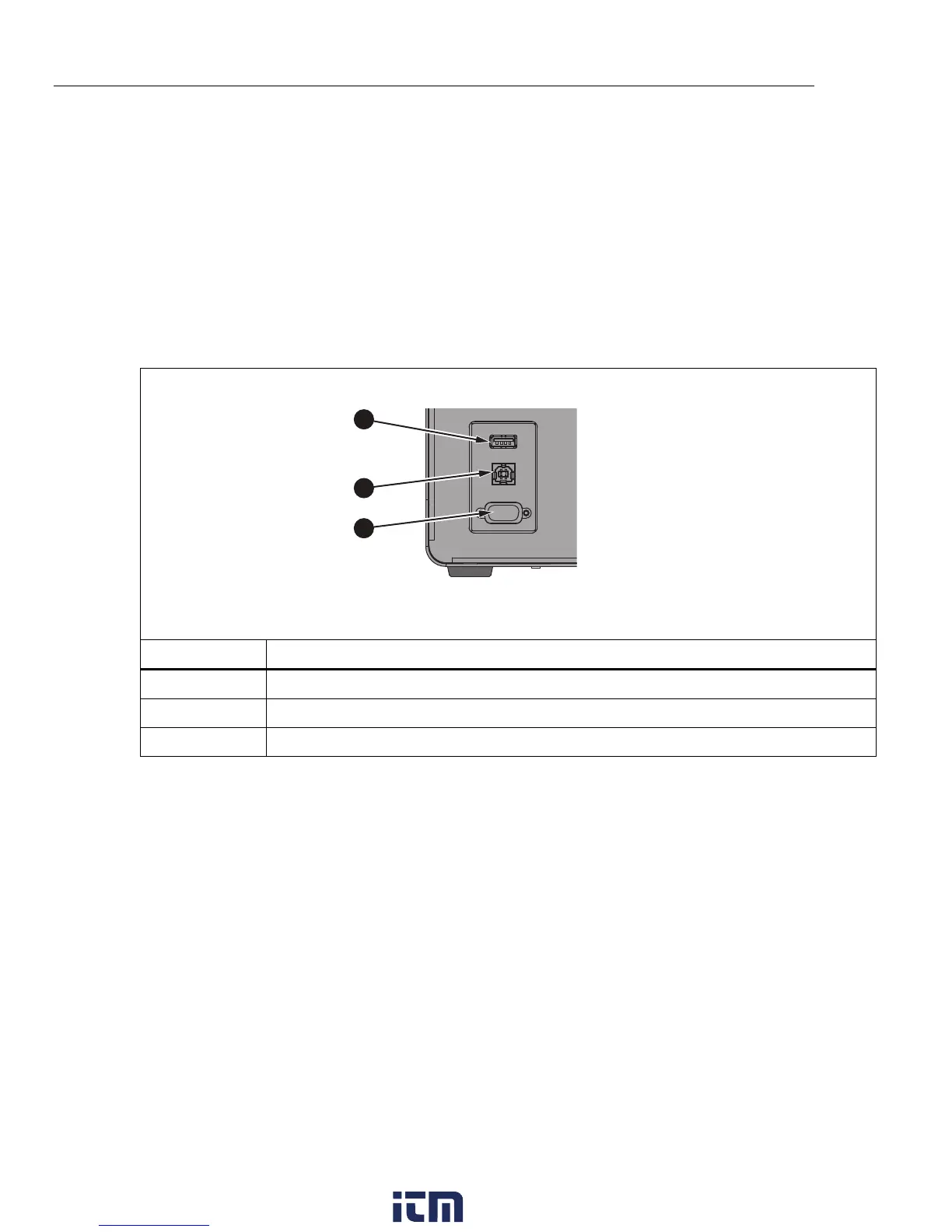
Ports for the USB device and RS-232 interface are located in the lower-left area
of the front panel of the Product as shown in Figure 14. Some setup may be
required to get the remote interface to function properly with the computer.
1
2
3
icu04.eps
Number Description
USB Host Port
USB Device Port
RS-232 Port
Figure 14. Remote Interface Ports
USB Device
The USB remote interface requires a special driver to be installed on the
computer. The driver can be found on the Product CD.
Connect the Product to the computer with the provided USB cable. Wait a few
seconds for the Product to be recognized as a USB device. The USB interface
shows as a virtual com port on the computer.
w ww . . co m
information@itm.com1.800.561.8187



 To Next Page