Quick Start
Power 4
4-5
An overflow drain is provided for excess bath fluid due to expansion. This drains the
fluid into the fluid expansion reservoir for reuse. See Fluid Expansion Reservoir in
Chapter 7, for details in using the reservoir.
Note
As the temperature of the bath increases the fluid level will increase, see
Chapter 6.
Power
Plug the bath power cord into a mains outlet of the proper voltage, frequency, and current
capability. Refer to Specifications in Chapter 3, for power details. Refer to and read the
CAUTION at the front of the manual concerning brownout and over voltage protection.
Check the back panel label for the correct voltage and frequency prior to energizing
the bath. Turn the bath on using the front panel “POWER” switch. The bath will turn on
and begin to heat or cool to reach the previously programmed temperature set-point. The
front panel LED display will indicate the actual bath temperature. Set the cooling switch
to “ON” for below or near ambient temperatures.
Note
The actual temperature where cooling is required depends on the bath fluid
and whether a cover is used over the access well.
Setting the Temperature
In the following discussion and throughout this manual a solid box around the word SET,
UP, DOWN or EXIT indicates the panel button to press while the dotted box indicates
the display reading on the front panel. Explanation of the button function or display
reading is written at the right.
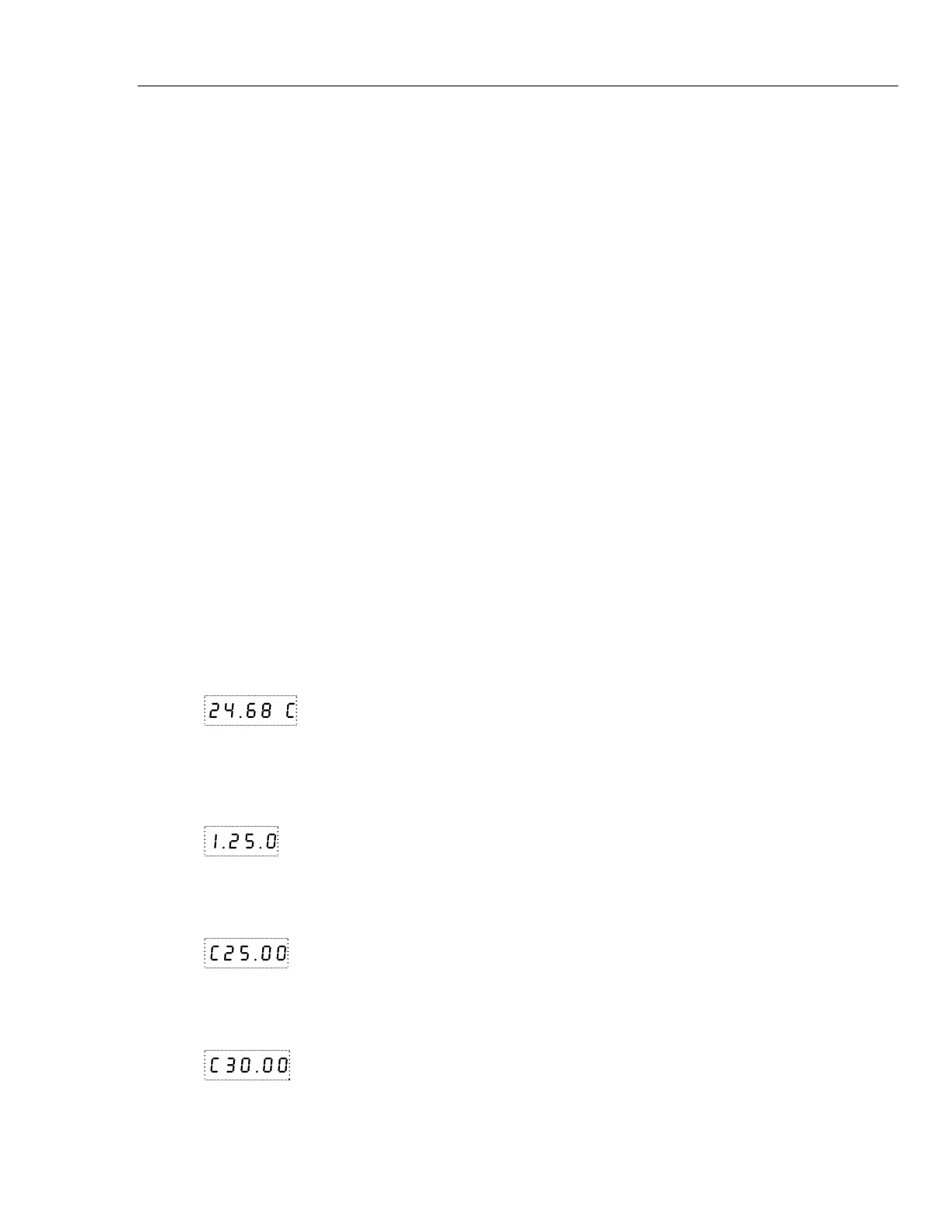
To view or set the bath temperature set-point proceed as follows. The front panel LED
display normally shows the actual bath temperature.
24.68 C
Bath temperature display
When “SET” is pressed the display shows the set-point memory that is currently being
used and its value. Eight set-point memories are available.
S
Access set-point selection
1.25.0
Set-point 1, 25.0°C currently used
Press “SET” to select this memory and access the set-point value.
S
Access set-point value
C25.00
Current value of set-point 1, 25.00°C
Press “UP” or “DOWN” to change the set-point value.
U
Increment display
C30.00
New set-point value
Press SET to accept the new value and display the vernier value. The bath begins heating
or cooling to the new set-point.


 To Next Page