EasyManua.ls Logo

Focal Dimension - Audio and Video Connections

Focal Dimension
39 pages
Print Icon
To Next Page IconTo Next Page
To Previous Page IconTo Previous Page
Loading...
DIMENSION
User
ma
n
ual
4.3. Connecti
ons
panel
0
e
8
G
e
0
8
0
0
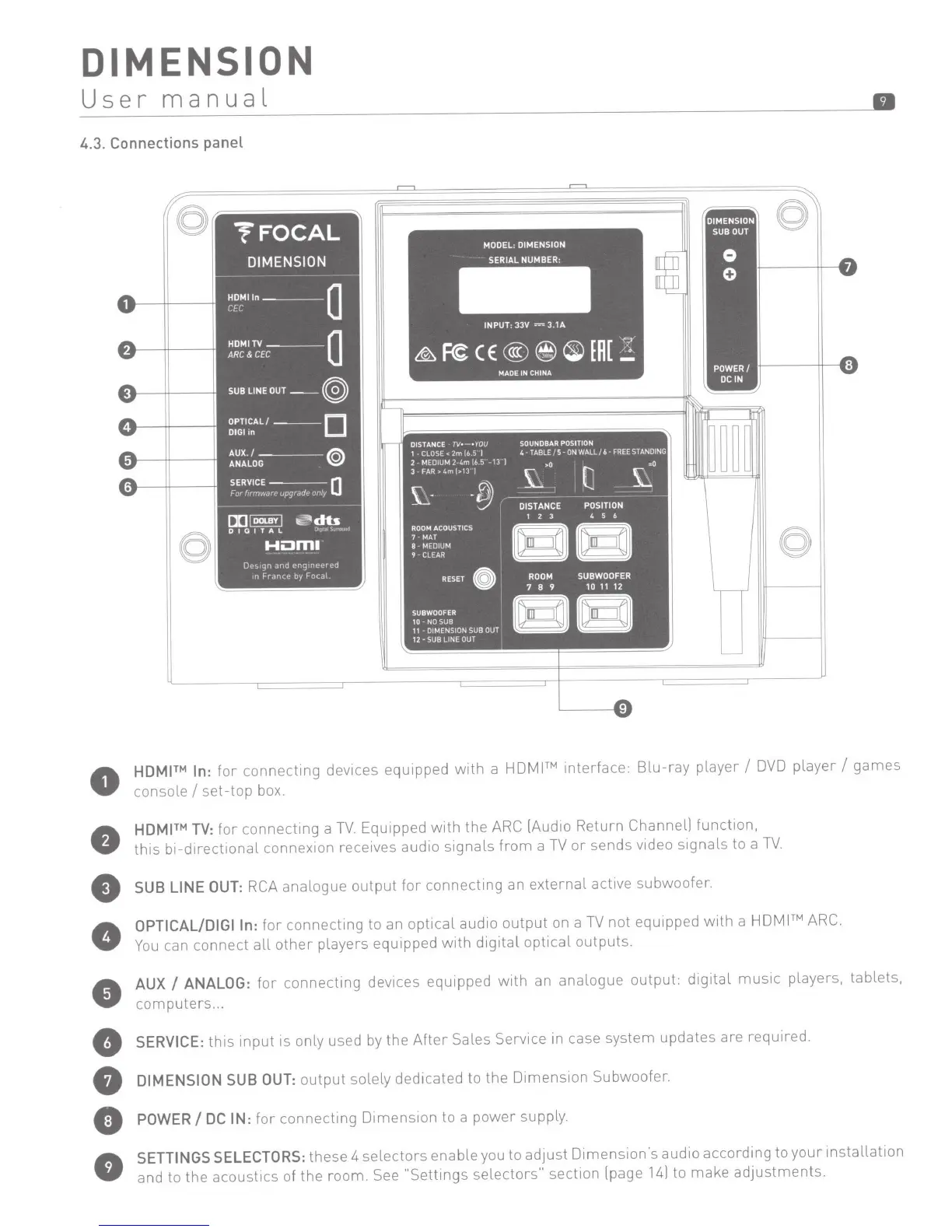
HDMI
In
:
for
connect1ng
devices equ1pped
with
a
HDMI™
interface:
Blu-ray
player
I
DVD
player
I
games
console
I
set-top
box.
HDMI
TV
:
for
connecting
a
TV.
Equipped
with
the
ARC [Audio Return Channell
function,
th1s
b1-direct1onal connex1on
receives
aud1o
s1gnals
from
a
TV
or
sends
video
s1gnals
to
a
TV.
SUB
LINE
OUT:
RCA
analogue
output
for
connectmg
an
external
active subwoofer.
OPTICALIDIGIIn:
for
connecting
to an
opt1cal
audio
output
on a
TV
not
equipped
with
a
HDMITM
ARC.
You
can
connect
all
other
players equipped
with
digital
optical
outputs.
AUX
I
ANALOG:
for
connectmg
dev1ces
equipped
with
an analogue
output:
digital
music
players, tablets,
computers
...
SERVICE:
this
input
is only used by the
After
Sales Service in case system updates are required.
DIMENSION
SUB
OUT:
output
solely dedicated to the
Dimension
Subwoofer.
POWER
I
DC
IN:
for
connecting
Dimension
to a
power
supply.
SETTINGS
SELECTORS:
these 4
selectors
enable you to adjust
Dimension's
audio
according
to
your
installation
and to the
acoust1cs
of
the
room.
See
"Settings
selectors"
section [page
14)
to
make
adjustments.

Other manuals for Focal Dimension

Related product manuals