10
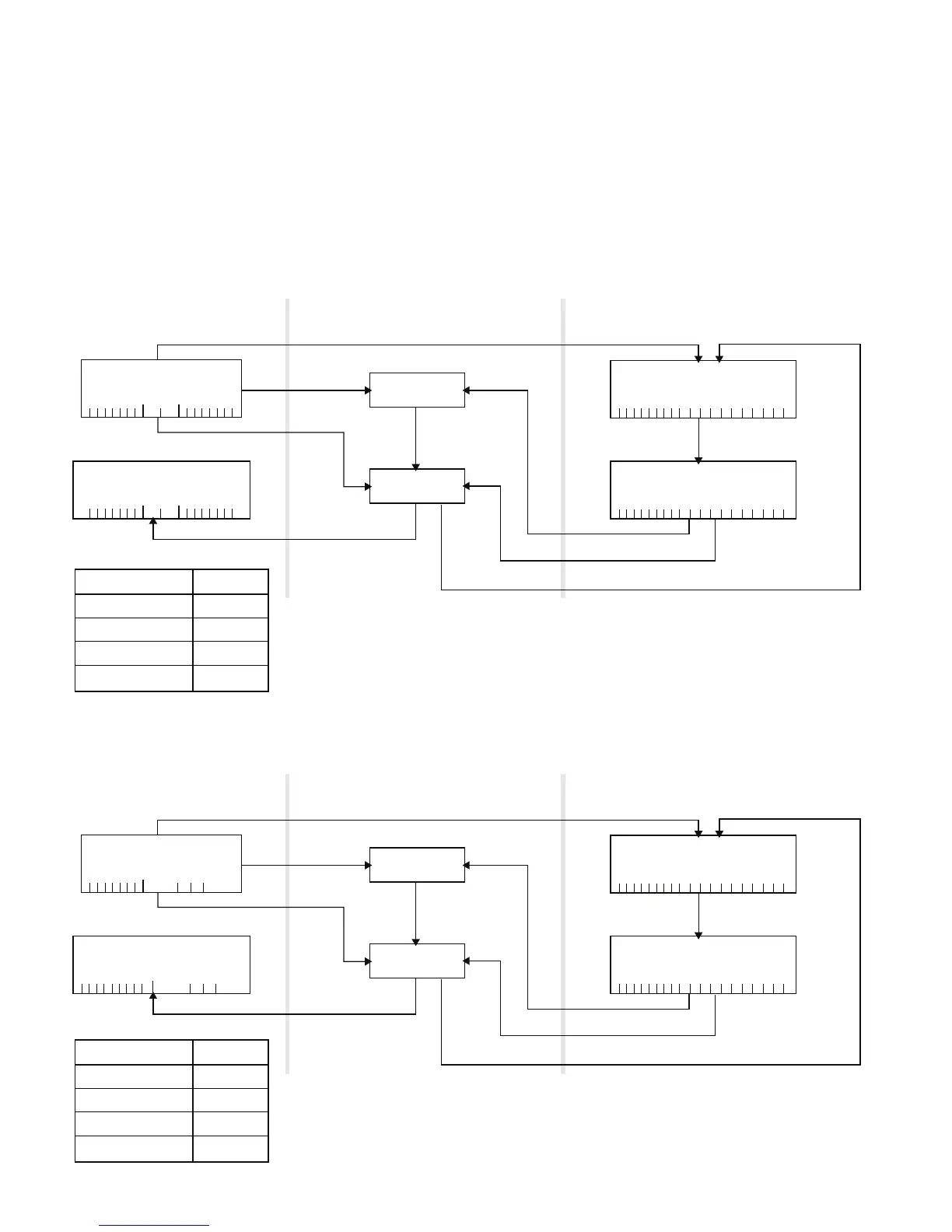
Saffire PRO 40 Architecture
Saffire PRO 40 offers more than just simple input and output routing to and from your computer. Saffire MixControl software
also allows you to re-route audio signals to any output, and to create custom mixes to be sent to your recording artists, outboard
processing equipment, or mixing console.
The following diagrams give an overview of the Saffire PRO 40 audio paths when set at different sample rates and
S/PDIF configurations.
The Hardware Inputs are routed directly to the DAW Inputs. The table below each diagram shows the routing configuration.
44.1kHz / 48kHz Optical as ADAT
HARDWARE IN DAW IN
Analogue 1-8 1-8
S/PDIF 1-2 9-10
ADAT 1-8 11-20
Loop back 1-2 19-20
44.1kHz / 48kHz Optical as S/PDIF
HARDWARE IN DAW IN
Analogue 1-8 1-8
S/PDIF 1-2 9-10
S/PDIF 1-2 11-12 *DAW IN 13-18 are redundant
Loop back 1-2 19-20
Saffire PRO 40
HARDWARE IN
12345678
Analog
ADAT
12345678
S/PDIF
1 2
12345678
Analog
ADAT
12345678
S/PDIF
1 2
HARDWARE OUT
12345678910 11 12 13 14 15 16 17 18 19 20
20 IN
Loop back
20 OUT
12345678910 11 12 13 14 15 16 17 18 19 20
Saffire MixControl Music Software
ROUTER
DAW OUT
DAW IN
MIXER
Saffire PRO 40
HARDWARE IN
12345678
Analog
S/PDIF
1 2 3 4
HARDWARE OUT
12345678910
Analog S/PDIF
1 2 1 2
12345678910 11 12 13 14 15 16 17 18 19 20
20 IN
Loop back
20 OUT
12345678910 11 12 13 14 15 16 17 18 19 20
Saffire MixControl Music Software
ROUTER
DAW OUT
DAW IN
MIXER




 To Next Page