2
Introduction
RTAS MixControl is a utility plug-in that enables Pro Tools users to blend monitor mixes between audio inputs and DAW output
signals during tracking, enabling performers to benefit from true zero-latency monitoring.
Requirements
Pro Tools version 9 is required to use Focusrite Interfaces and RTAS MixControl with Pro Tools.
Ensure your computer adheres to Avid’s system requirements as well as the Focusrite system requirements.
Avid Requiments
www.avid.com/products/pro-tools-software and select ‘Compatilblity & Upgrade Information’
Focsurite Requirements
www.focusrite.com/support and select “OS checker”
Installation
Download the latest Saffire MixControl installer AND the RTAS MixControl installer from www.focusrite.com/support
Run the Saffire MixControl installer 1.
You will be asked to restart your computer to complete the installation process2.
Run the RTAS MixControl installer3.
Using RTAS MixContol
Open Pro Tools 9, then open a new or saved project.
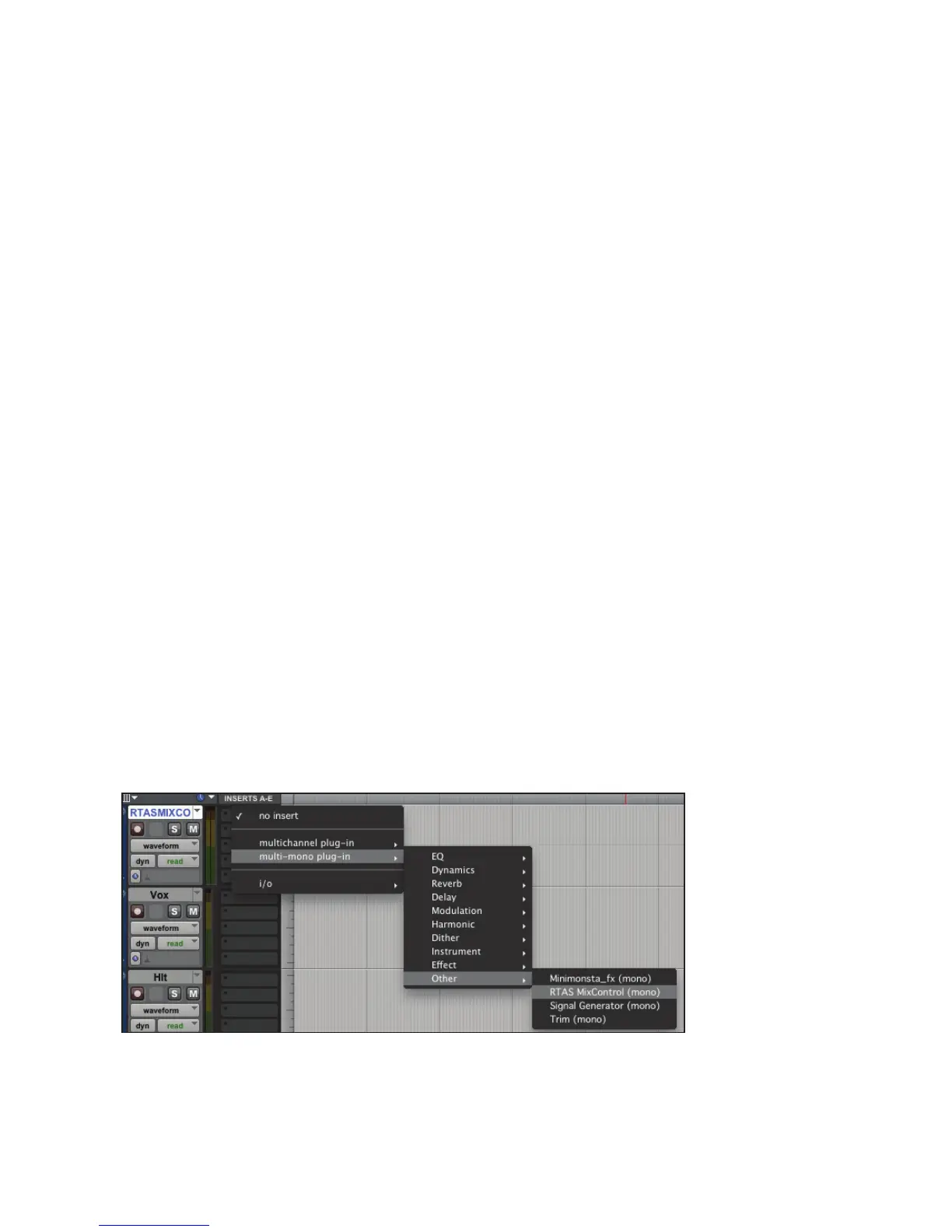
The RTAS MixControl Plug-in can be loaded on any track in your project. It will simply pass audio through unaffected.
You can place it on an existing audio track but it may be more convenient to add a separate audio track, name it “RTAS MixControl”
and add the RTAS Mix Control plug-in on that track.




 To Next Page