6
6
.
.
6
6
S
S
t
t
e
e
p
p
s
s
t
t
o
o
C
C
h
h
a
a
n
n
g
g
e
e
t
t
h
h
e
e
F
F
r
r
e
e
q
q
u
u
e
e
n
n
c
c
y
y
B
B
a
a
n
n
d
d
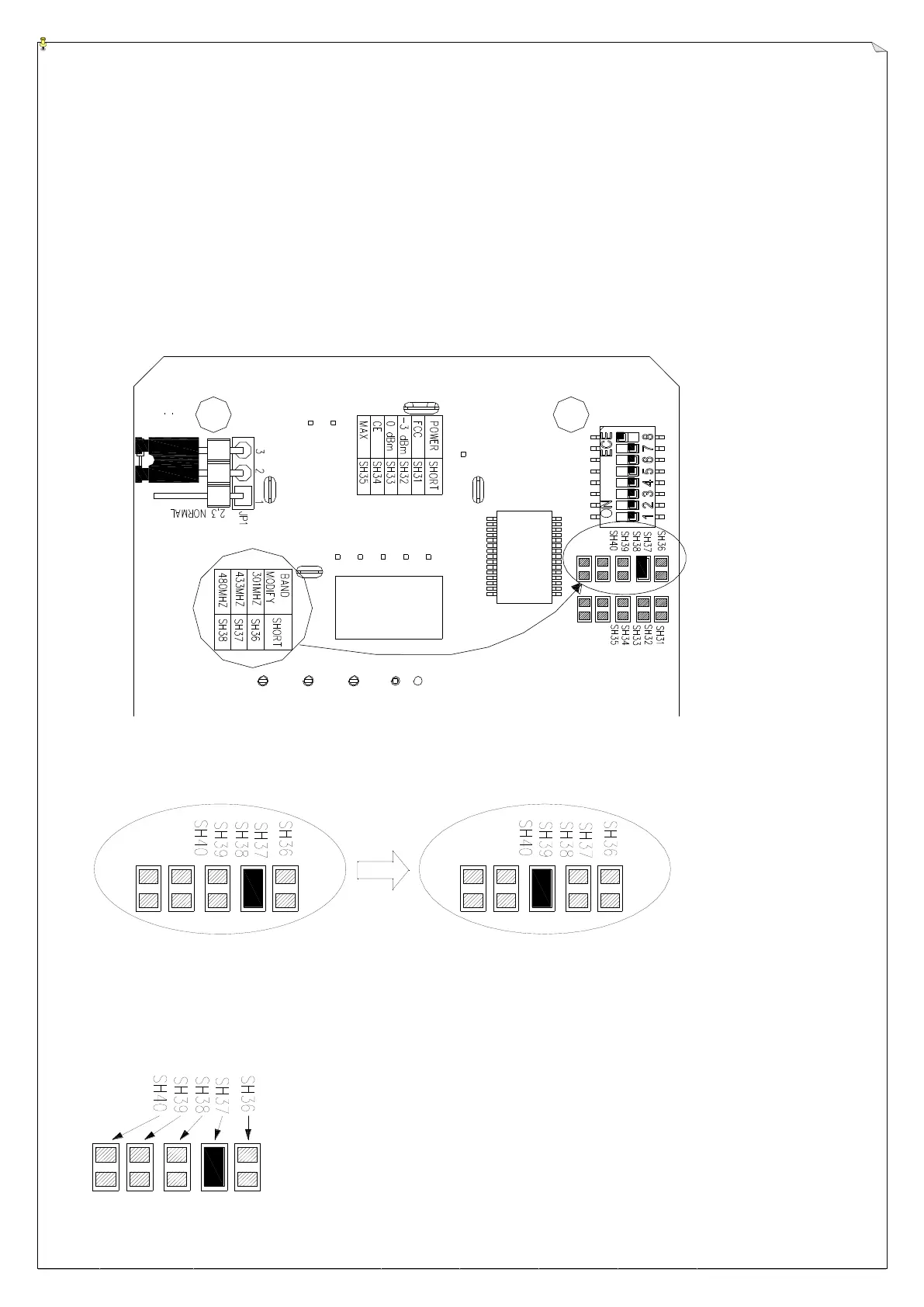
For example: Change the frequency band from 433MHz to 480MHz.
1. Pull out the power key.
2. Unscrew and disassemble the transmitter bottom casing from the transmitter and you will see
the encoder board.
3. Take out the batteries.
4. The below Fig.5 shows the SH number of each frequency band needs to be shorted.
(Fig.5)
5. Unsolder the SH37 to make it open and then short the SH38 for band 480MHz.
(see below Fig.6)
(Fig.6)
6. Assemble the transmitter upper and bottom casings then operate the transmitter by following
the regular startup steps.
Remark:Please refer to below Fig.7 for the position of each SH number.
(Fig.7)



 To Next Page