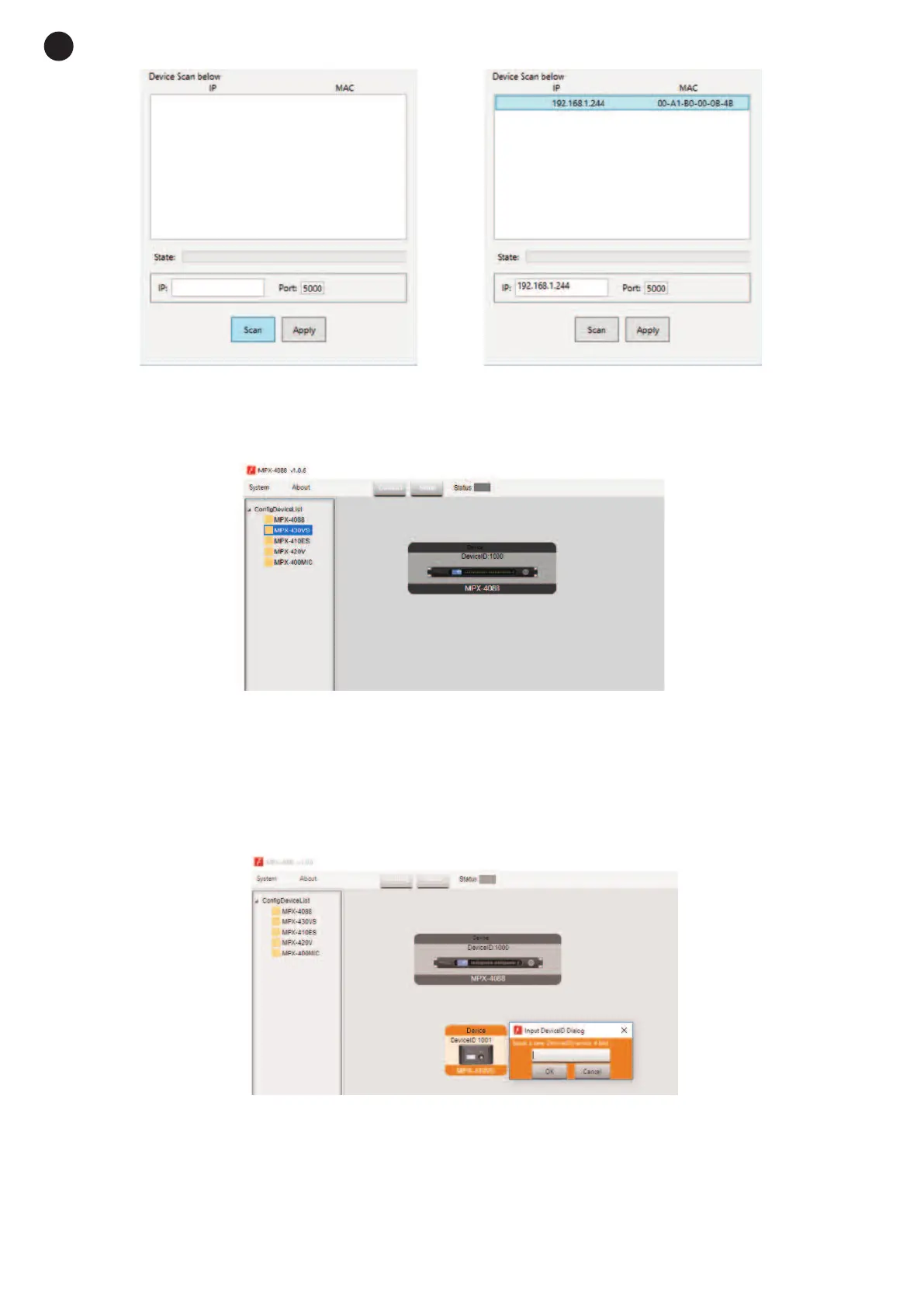
Select the line with the IP and MAC address of the MPX-4088 matrix and click on APPLY. Then, click on
CONNECT and the STATUS indicator should turn green. Add the devices located in the sidebar by
dragging them into the grey area.
Double click on the required device module to access the edition mode.
Note: when several matrices are connected in cascade, the LAN/RC-Net connector must be in the LAN
position on the matrix that is directly connected to the PC, and in the RC-Net position on the rest of the
matrices that are connected to each other. To access the configuration of each device, it is necessary to
establish the device’s ID manually by right-clicking on the device to be configured and accessing “Change
Device ID”.
2.- Star network mode: allows the configuration and individual control of several MPX-4088 matrices
connected to the same router. In this edition mode, the PC and the MPX-4088 matrix must be connected
to the router with RJ-45 cable and the LAN/RC-Net selector located on the rear panel of the matrix must
be in the LAN position.
In this edition mode, the system automatically detects the MPX-4088 matrices connected to the network
for their configuration and control.
- 10 -
E
N


 To Next Page