MPX-400MIC
I
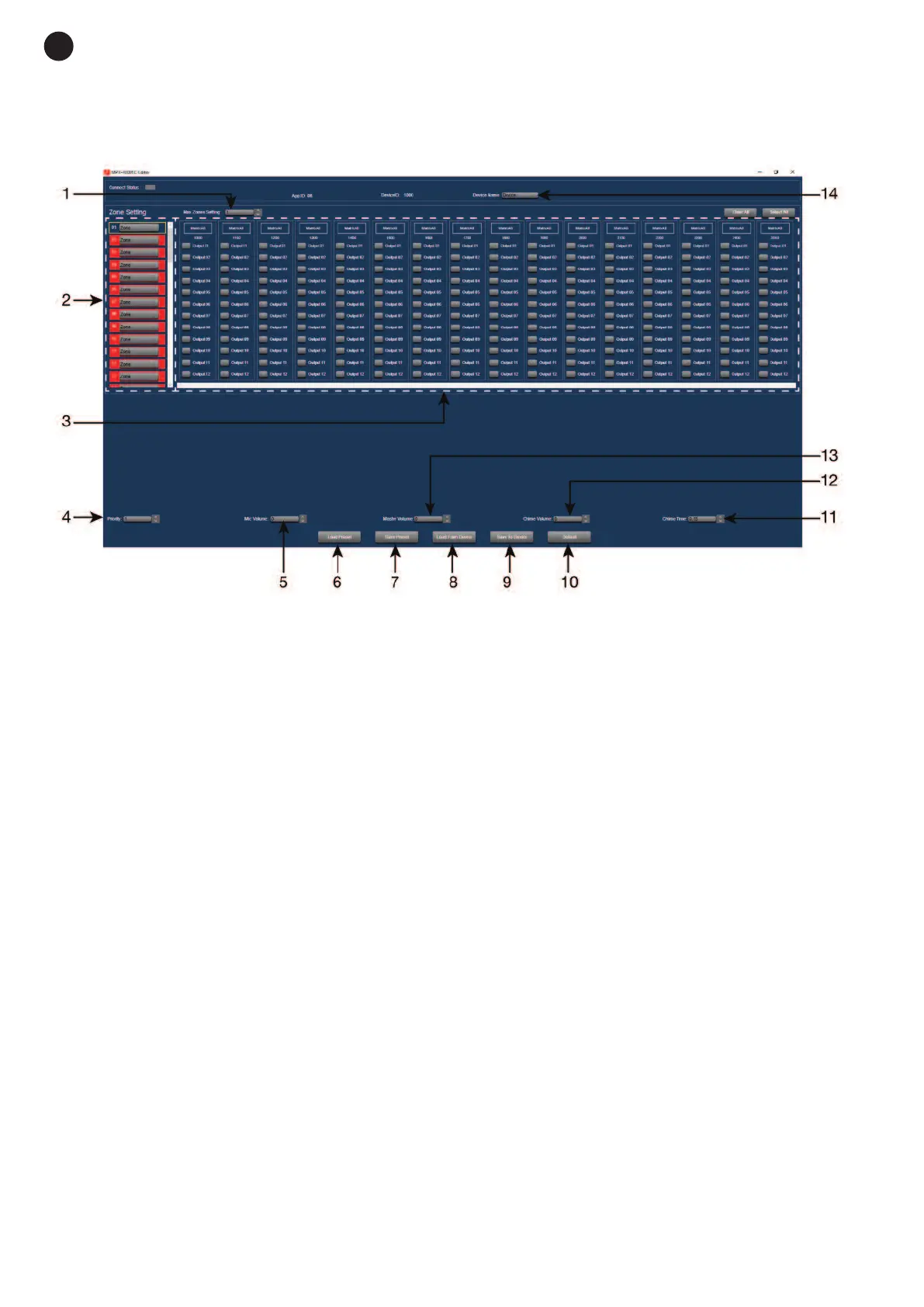
n Daisy Chain connection mode, the edition mode for the MPX-400MIC microphone with zone selector,
has the following functions:
1.- Max. Zone Setting: maximum number of paging zones, from 12 to 192.
2.- Zone Setting: possibility of establishing names for each zone.
3.- Selection of zone number assigned to the output of each zone.
4.- Priority: selects the priority of this microphone within the system, 1 to 8.
5.- Mic. Volume: allows microphone volume to be adjusted.
6.- Load Preset: allows the saved configuration to be loaded.
7.- Save preset: saves the current configuration.
8.- Load from Device: loads the configuration of MPX-400MIC.
9.- Save to Device: saves the current configuration in the MPX-400MIC.
10.- Default: sets the default configuration.
11.- Chime time: sets the duration of the chime, from 0.5 to 12 seconds maximum.
12.- Chime volume: allows the chime volume to be adjusted.
13.- Master volume: allows the general volume of the MPX-400MIC to be adjusted.
14.- Device name: allows the device name to be changed to one that is easily identified.
MPX-410ES
In Daisy Chain connection mode, the edition mode for the audio input/output control MPX-410ES, allows the
device name to be changed within the system.
MPX-420V
In Daisy Chain connection mode, the edition mode for the remote zone control MPX-420V, allows the device
name to be changed within the system.
MPX-430VS
In Daisy Chain connection mode, the edition mode for the remote zone control MPX-430VS, allows the
device name to be changed within the system.
- 18 -
E
N


 To Next Page