EN-4
Getting Started
Initial Setup
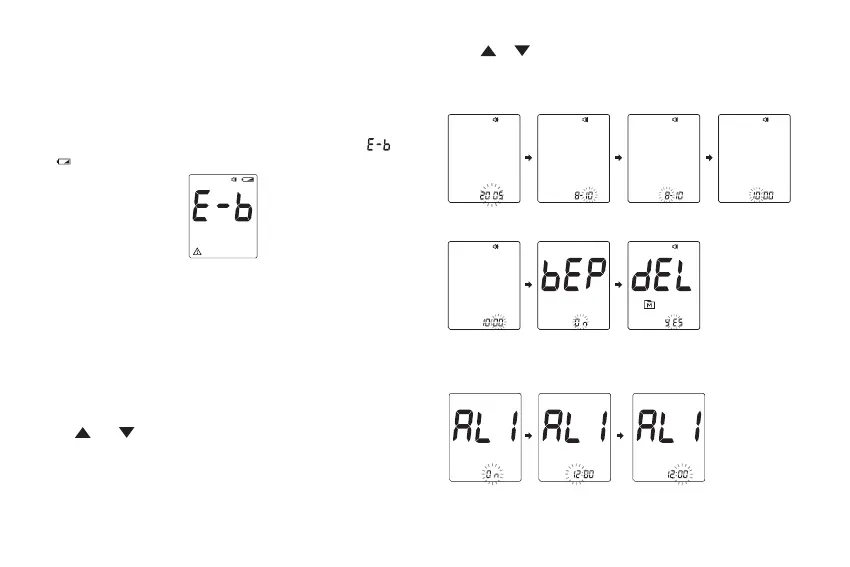
Please follow the initial setup procedure before using the
device for the rst time or after you have replaced the
battery. When the battery power is extremely low and “
& ” appears on the screen, the meter cannot be turned on.
Step 1: Enter the Setting Mode
1. The meter turns on automatically once a new battery is
inserted.
Note:
When you turn on the meter by pressing MAIN button for
the rst time, the meter will turn o automatically due to no
data.
2. Start with the meter o (no test strip inserted). Press and
hold and at the same time.
Step 2: Conguring the Settings (Date, Time, Universal
Tone, Memory Deletion and Reminder Alarm)
Set [Reminder
Alarm]
Set [Minute]
Set [Year] Set [Month] Set [Day] Set [Hour]
Set [Beep On,
Universal Tone,
Beep O]
Delete Memory
Records
Set [Alarm Time
(Hour)]
Set [Alarm Time
(Minute)]
Press or to adjust the value or enable/disable the
setting. Then press MAIN button to conrm the setting and
switch to another eld.



 To Next Page