A1-14
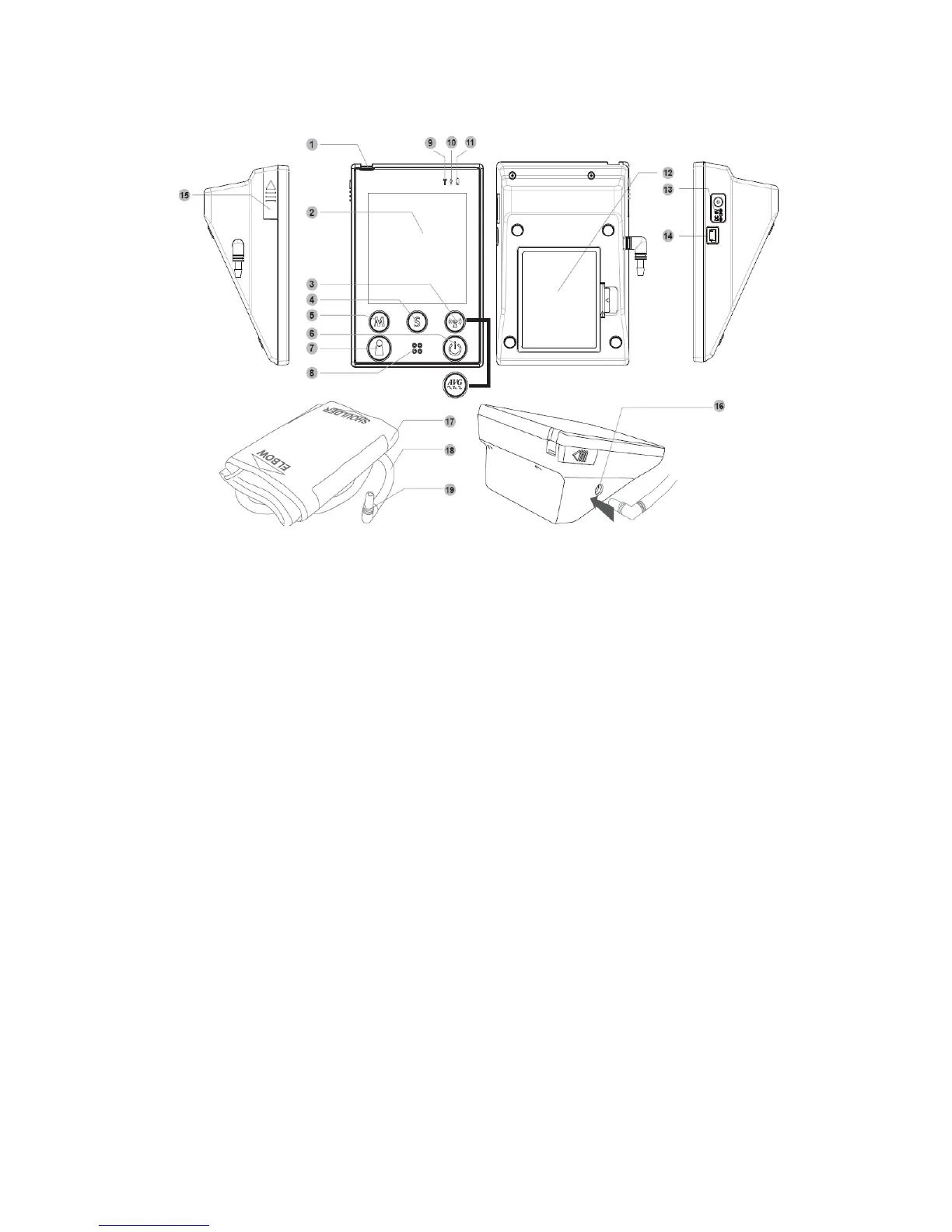
Appearance and Key Functions of the Monitor
1. TEST SLOT- is where you insert the test strip.
2. LCD SCREEN- guides you through the test using symbols and simple
messages.
3. RF BUTTON- assists you with wireless data transmission.
AVERAGE BUTTON- assists you with blood pressure average mode.
4. S BUTTON- is used to set up the monitor.
5. M BUTTON- is used to turn on the monitor and enter the memory.
6. ON/OFF BUTTON
7. USER SELECTION BUTTON- assists you with user number selection.
8. SPEAKER
9. RF INDICATOR- lights up for data transmission.
10. USB INDICATOR- lights up for data transmission.
11. POWER INDICATOR
12. BATTERY COMPARTMENT
13. AC ADAPTER PORT- is for power supply.
14. USB LINK PORT- For data transmission.
15. STRIP-EJECTION BUTTON- is where the used strip will be automatically
ejected after you push up the button.
16. Air jack
17. Arm Cuff
18. Air Tube
19. Air Plug- connects to air jack.
14



 To Next Page