A1-23
Setting the Monitor
Time, date, units of measurement, memory deletion, volume and language can
be set in the monitor. Two keys are involved: S button and M button.
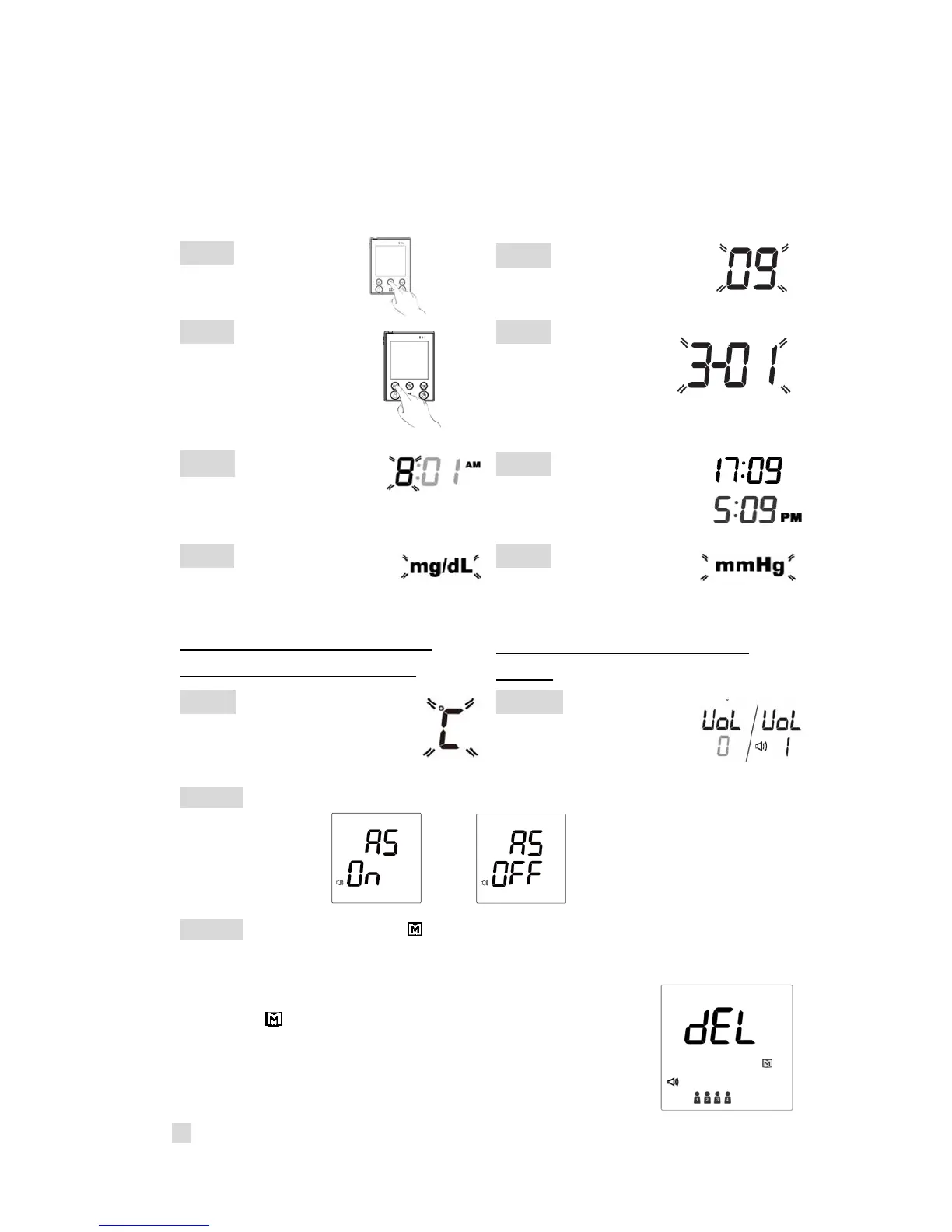
Step 1 Press the S
button to start setting.
Step 2 Year will flash first.
Step 3 Press M button
to make changes.
Press S button to
advance to next setting.
Step 4 Date will
flash. Follow Step 3
for changes.
Step 5 Time will flash.
Follow Step 3 for changes.
Step 6 12H/24H mode
selection. Follow Step 3
for changes.
Step 7 Unit of glucose
concentration
will flash.
Follow Step 3 for changes.
*Please note: The default unit is
milligram per deciliter (mg/dL).
Step 8 Unit of blood
pressure will flash.
Follow Step 3 for changes.
*Please note: The default unit is
mmHg.
Step 9 Unit of temperature
will flash. Follow Step 3 for
changes.
Step 10 Voice volume
will flash. Follow Step 3
for changes.
Step 11 Auto send will flash. Follow Step 3 for changes.
Step 12 “dEL” and flashing “ “ will display on the screen for memory deletion.
If you do not want to delete memory, press S button to skip this step.
If you’d like to delete memory, press M button again
so that “ ” will start flashing. Press M button again
to delete ALL memory. The monitor will repeat all
the settings you just finished and then the monitor
will turn off.
23



 To Next Page