Introduction | 13
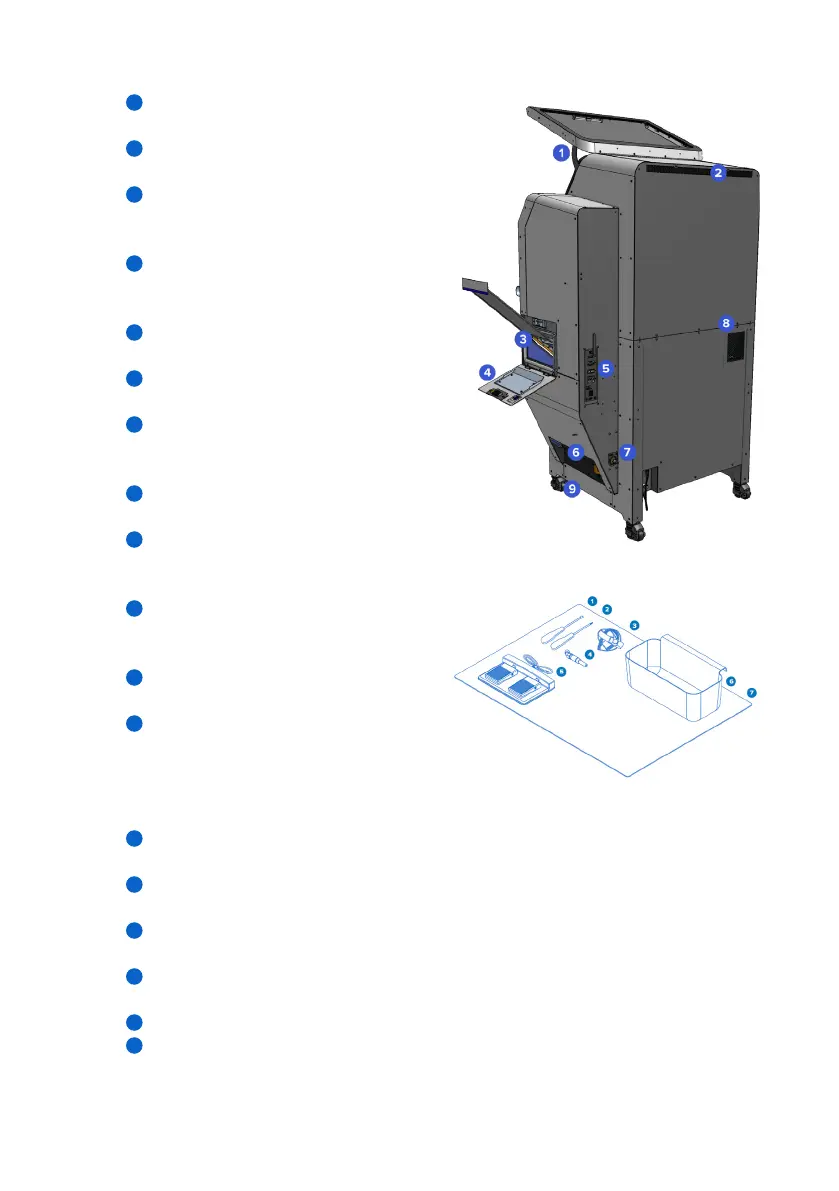
2.3.2 Fuse Blast – Side and rear
Door spring: Holds the blasting chamber
door open.
Air inlet: Provides ventilation to
the workspace.
Media filter mesh: Separates powder and
degraded blasting media and recycles
good media into the media hopper.
Waste hopper door: Sealed and
interlocked door for accessing the
waste hopper.
I/O panel: Panel for power supply, Wi-Fi
antenna, and Ethernet connection.
Waste hopper valve: A knife valve used
to close o and open the waste hopper.
Compressed air inlet: A 1/4" quick
disconnect hose coupling for the
air compressor.
Air exhaust: Blows circulated air out of the
Fuse Blast.
Caster wheels: Allows users to move the
Fuse Blast and lock it into position.
2.3.3 Fuse Blast accessories
7 mm socket wrench: Use the 7 mm
socket wrench for maintaining and
replacing parts.
T20 Torx driver: Use the T20 Torx driver
for maintaining and replacing parts.
Grounding wrist strap: Attach to
the grounding wrist plug to protect
users and electronics from static
electricity build up. Recommended for
manual mode.
3 mm blast nozzle orifice: Interchangeable blast nozzle orifice for lower flow compressed
air supply
Foot pedals: Connect the pedals to the Fuse Blast to manually control the air rinse and
media blast.
Parts transfer bin: Storage container for transferring printed parts from the Fuse Sift to
the Fuse Blast.
Floor mat: Place the floor mat underneath the Fuse Blast to prevent the pedals from sliding.
2.3.4 Additional Fuse Blast package components
Power cable: Compatible with the Fuse Blast, Fuse Sift, and Fuse 1 generation printers.
Wi-Fi antenna: Establish an internet connection on the Fuse Blast.
1
2
3
4
5
6
7
8
9
1
2
3
4
5
6
7
1
2



 To Next Page