Usage | 27
5 Usage
Always consult the safety data sheet (SDS) as the primary source of information to understand
safety and handling of Formlabs materials.
5.1 Operational environment
The operating temperature for the Fuse Blast is 10–36 °C (50–96.8 °F), with low ambient
humidity (30–80% RH). For optimal post-processing, do not exceed these limits. Operating
above recommended humidity levels can impact media transport and lead to clogging.
For detailed guidance and assistance, please contact Formlabs Support.
After printing, parts need to cool in the Fuse 1’s print enclosure and extracted from the build
chamber in the Fuse Sift before being moved into the Fuse Blast for cleaning and finishing.
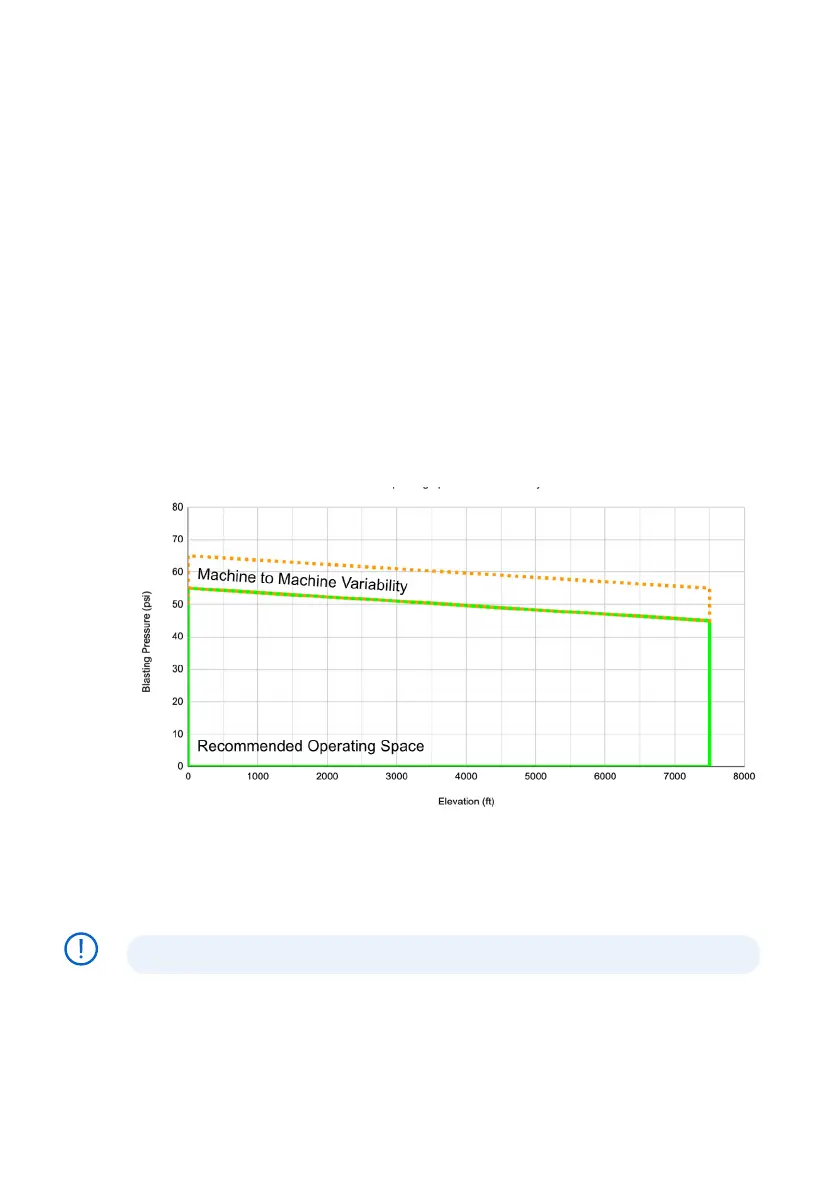
5.1.1 Altitude & Blasting Pressure
The Fuse Blast is operational up to 2286 m (7500 ft) in altitude. For optimal post-processing,
do not exceed these limits.
Maximum blasting pressure is dependent on installation altitude. The altitude chart below
shows the recommended safe operating space; blasting at or above this recommended
pressure may cause the Fuse Blast to clog.
5.2 Filling the media hopper
The Fuse Blast media hopper holds 8.3 L (2.2 gal) of blasting media. The total weight of that
blasting media varies based on which media blasting material is used. For example, the Fuse
Blast media hopper can hold roughly 10 kg (22 lbs) of 200–300 µm glass media.
Do not overfill the media hopper or you may clog the air inlet.
To fill the media hopper:
1. Turn the media valve underneath the machine clockwise to ensure it is firmly closed.
2. On the touchscreen, tap the Fan button. Wait a few seconds for the fan to audibly start.
NOTICE



 To Next Page